
 資料結構
資料結構 網路
網路 RDBMS
RDBMS 作業系統
作業系統 Java
Java MS Excel
 iOS
iOS HTML
HTML CSS
CSS Android
 Python
 C 程式語言
 C++
C++ C#
C# MongoDB
 MySQL
MySQL Javascript
 PHP
PHP 物理
物理 化學
化學 生物
生物 數學
數學 英語
英語 經濟
經濟 心理學
心理學 社會科學
社會科學 時尚研究
時尚研究 法律研究
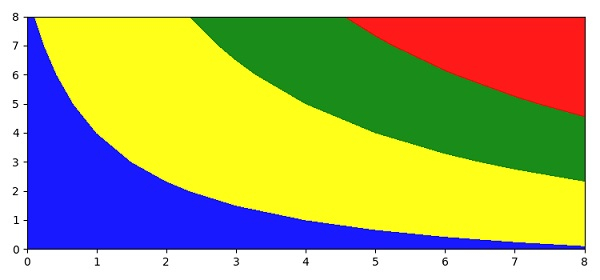
法律研究如何繪製 matplotlib 等高線?
要繪製 matplotlib 等高線,我們可以按以下步驟操作 -
使用 numpy 為 x、y 和 h 建立資料點。
使用 countourf() 方法建立著色的 3D(類似)繪圖。
使用 set_over() 方法,當 "norm.clip = False" 時設定超出範圍的高值的顏色。
使用 set_under() 方法,當 "norm.clip = False" 時設定超出範圍的低值的顏色。
使用 changed() 方法,只要可繪製的地圖發生變化,就呼叫此方法將 "changed" 訊號通知所有回撥偵聽器。
使用 show() 方法顯示圖形。
示例
import numpy as np
from matplotlib import pyplot as plt
plt.rcParams["figure.figsize"] = [7.50, 3.50]
plt.rcParams["figure.autolayout"] = True
x = np.arange(1, 10)
y = x.reshape(-1, 1)
h = x * y
cs = plt.contourf(h, levels=[10, 30, 50], colors=['yellow', 'green', 'purple'], extend='both', alpha=.90)
cs.cmap.set_over('red')
cs.cmap.set_under('blue')
cs.changed()
plt.show()
輸出

更新於:2021 年 4 月 10 日
298 次瀏覽

廣告