
 資料結構
資料結構 網路
網路 關係型資料庫管理系統 (RDBMS)
 作業系統
作業系統 Java
Java MS Excel
 iOS
iOS HTML
HTML CSS
CSS Android
 Python
 C語言程式設計
 C++
C++ C#
C# MongoDB
 MySQL
MySQL Javascript
 PHP
PHP 物理學
物理學 化學
化學 生物學
生物學 數學
數學 英語
英語 經濟學
經濟學 心理學
心理學 社會學
社會學 服裝學
服裝學 法學
法學如何在安卓手機靜音模式下播放聲音?
介紹
在安卓應用中,我們經常會遇到需要播放通知聲音的場景,即使裝置處於靜音模式也需要播放。本文將介紹如何在安卓手機靜音模式下播放聲音。
實現
我們將建立一個簡單的應用程式,其中包含一個用於顯示應用程式標題的文字檢視和一個按鈕,用於在裝置處於靜音模式時播放通知聲音。
步驟1 - 在Android Studio中建立一個新專案
開啟Android Studio,如下圖所示。點選“新建專案”建立一個新的Android Studio專案。
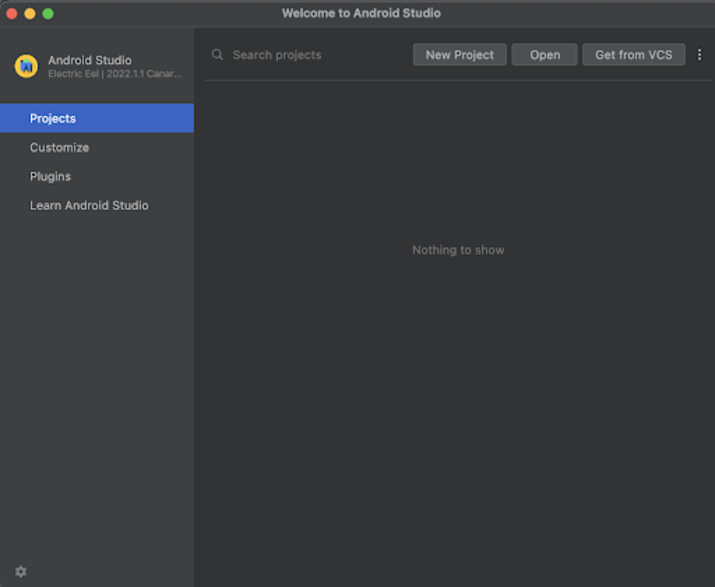
點選“新建專案”後,您將看到如下介面。
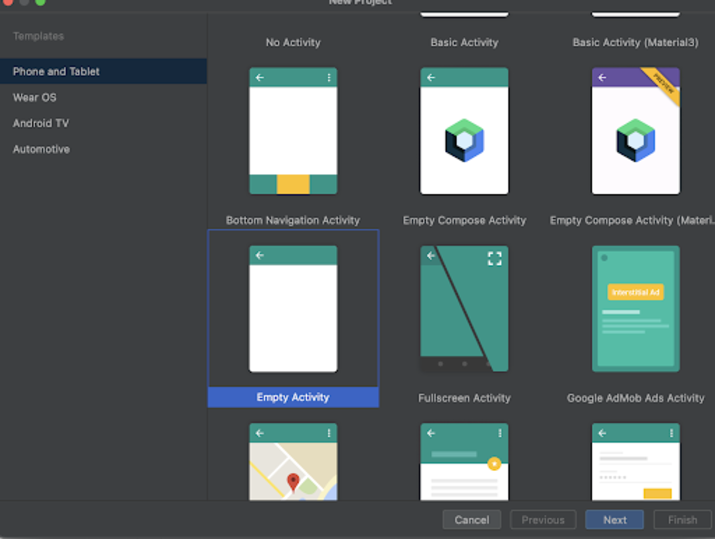
在此介面中,選擇“Empty Activity”,然後點選“Next”。點選“Next”後,您將看到如下介面。
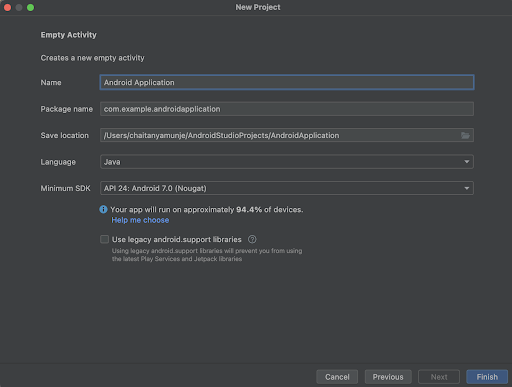
在此介面中,只需指定專案名稱即可。包名將自動生成。
注意 - 請確保選擇Kotlin作為程式語言。
指定所有詳細資訊後,點選“Finish”以建立一個新的Android Studio專案。
專案建立完成後,您將看到開啟的兩個檔案:activity_main.xml和MainActivity.java檔案。
步驟2:處理activity_main.xml
開啟activity_main.xml。如果此檔案不可見,請在左側面板中導航到app>res>layout>activity_main.xml開啟此檔案。開啟此檔案後,新增以下程式碼。程式碼中添加了註釋以便詳細瞭解。
<?xml version="1.0" encoding="utf-8"?>
<RelativeLayout xmlns:android="http://schemas.android.com/apk/res/android"
   xmlns:tools="http://schemas.android.com/tools"
   android:id="@+id/idRLLayout"
   android:layout_width="match_parent"
   android:layout_height="match_parent"
   android:orientation="vertical"
   tools:context=".MainActivity">

   <!-- text view for displaying  heading of the application -->
   <TextView
      android:layout_width="match_parent"
      android:layout_height="wrap_content"
      android:layout_above="@id/idBtnPlayNotification"
      android:layout_centerInParent="true"
      android:layout_margin="10dp"
      android:padding="5dp"
      android:text="Play Notification when Android Phone is in Silent Mode"
      android:textAlignment="center"
      android:textAllCaps="false"
      android:textColor="@color/black"
      android:textSize="18sp"
      android:textStyle="bold" />

   <!-- on below line we are creating a button to play audio notification -->
   <Button
      android:id="@+id/idBtnPlayNotification"
      android:layout_width="match_parent"
      android:layout_height="wrap_content"
      android:layout_centerInParent="true"
      android:layout_margin="20dp"
      android:text="Play Notification"
      android:textAllCaps="false" />
</RelativeLayout>
說明 - 在上面的程式碼中,根元素是Android中的相對佈局。此佈局是一個檢視組,用於相對於彼此對齊其中的所有元素。藉助ID或位置,我們可以相對地對齊相對佈局中的所有元素。
在這個相對佈局中,我們首先建立一個文字檢視,用於顯示應用程式的標題。然後,我們建立一個按鈕,用於在裝置處於靜音模式時播放通知聲音。
最後,我們為相對佈局新增一個閉合標籤,因為文字檢視和按鈕都包含在我們的相對佈局中。
步驟3:處理MainActivity.java
開啟MainActivity.java。如果此檔案不可見,請在左側面板中導航到app>java>您的應用包名>MainActivity.java開啟此檔案。開啟此檔案後,新增以下程式碼。程式碼中添加了註釋以便詳細瞭解。
package com.example.androidjavaapp;

import android.content.Context;
import android.media.AudioManager;
import android.media.Ringtone;
import android.media.RingtoneManager;
import android.net.Uri;
import android.os.Bundle;
import android.os.Handler;
import android.view.View;
import android.widget.Button;
import androidx.appcompat.app.AppCompatActivity;

public class MainActivity extends AppCompatActivity {

   // on below line creating a variable for button.
   private Button playNotificationBtn;

   @Override
   protected void onCreate(Bundle savedInstanceState) {
      super.onCreate(savedInstanceState);
      setContentView(R.layout.activity_main);
      // on below line we are initializing variables.
      playNotificationBtn = findViewById(R.id.idBtnPlayNotification);

      // on below line we are adding click listener for  button.
      playNotificationBtn.setOnClickListener(new View.OnClickListener() {
         @Override
         public void onClick(View v) {
            // on below line we are creating an intent for send action.
            playNotificationSoundInSilentMode();
         }
      });
   }

   // on below line creating a method to play notification.
   public void playNotificationSoundInSilentMode() {

      // on below line creating and initializing variable for audio manager.
      AudioManager am = (AudioManager) getSystemService(Context.AUDIO_SERVICE);

      // on below line getting original volume.
      int originalVolume = am.getStreamVolume(AudioManager.STREAM_NOTIFICATION);

      // on below line setting stream volume.
      am.setStreamVolume(AudioManager.STREAM_NOTIFICATION, am.getStreamMaxVolume(AudioManager.STREAM_NOTIFICATION), 0);

      // on below line getting notification uri.
      Uri notification = RingtoneManager.getDefaultUri(RingtoneManager.TYPE_NOTIFICATION);

      // on below line creating a variable for ringtone and playing it.
      Ringtone r = RingtoneManager.getRingtone(getApplicationContext(), notification);
      r.play();

      // on below line calling a handler function to again switch back to silent mode.
      Handler handler = new Handler();
      handler.postDelayed(new Runnable() {
         @Override
         public void run() {

            // on below line setting stream volumne.
            am.setStreamVolume(AudioManager.STREAM_NOTIFICATION, originalVolume, 0);
         }
      }, 500);
   }
}
說明 - 在上面的MainActivity.java檔案程式碼中,我們首先為按鈕建立一個變數。
現在,我們將看到onCreate方法。這是每個Android應用程式的預設方法。建立應用程式檢視時將呼叫此方法。在此方法中,我們設定內容檢視,即名為activity_main.xml的佈局檔案,以設定來自該檔案的UI。
指定檢視後,我們初始化按鈕的變數。之後,我們為按鈕添加了一個點選監聽器來播放通知聲音。
在onclick方法中,我們呼叫一個將播放通知聲音的方法。在此方法中,我們首先將裝置的靜音模式更改為常規模式,然後透過呼叫Uri來播放通知聲音。之後,我們再次將裝置配置檔案切換為靜音模式。
新增上述程式碼後,只需點選頂部的綠色圖示即可在移動裝置上執行我們的應用程式。
注意 - 請確保已連線到您的真實裝置或模擬器。
輸出
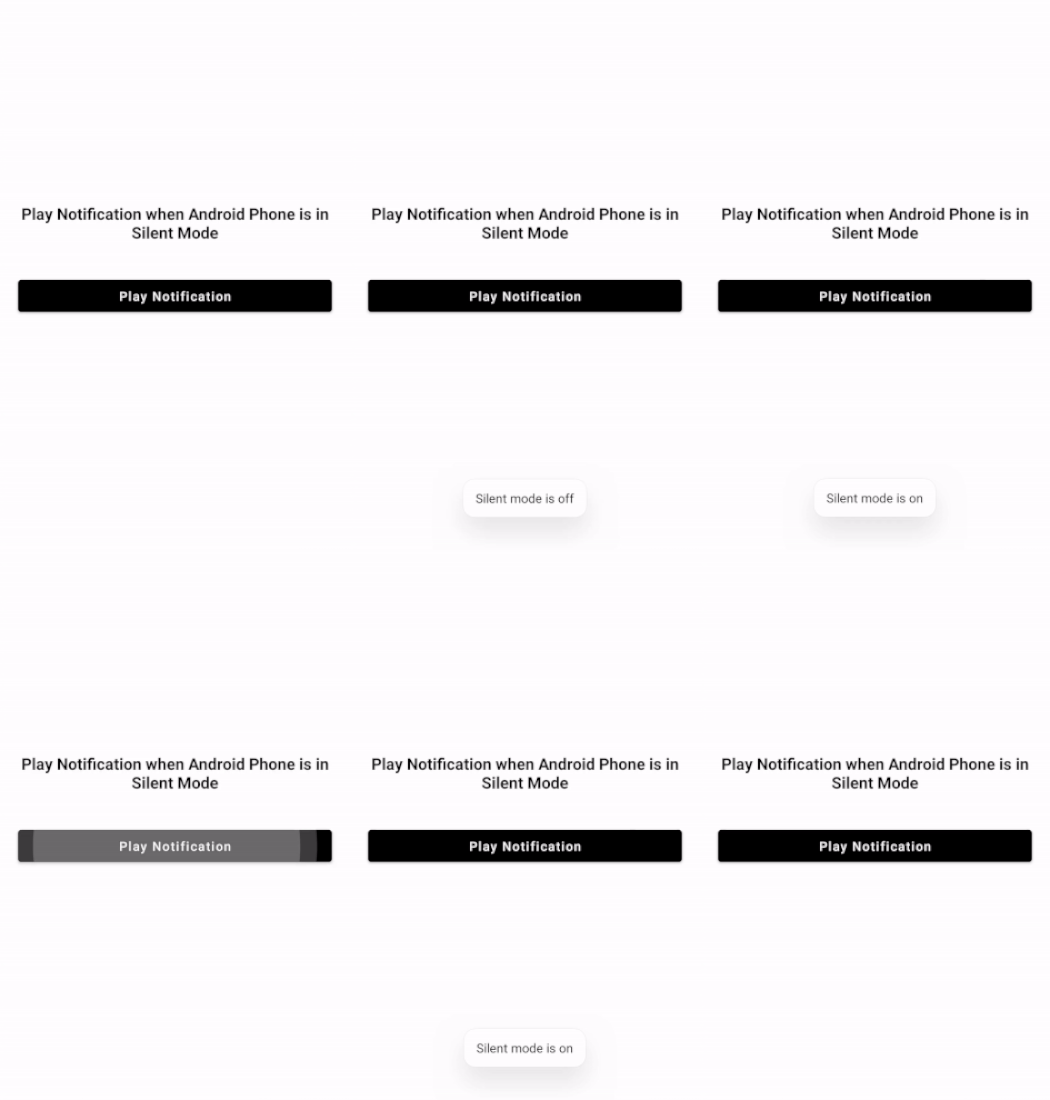
結論
在以上教程中,我們學習瞭如何在安卓手機靜音模式下播放通知聲音。

2K+ 次瀏覽
