
 資料結構
資料結構 網路
網路 關係型資料庫管理系統
 作業系統
作業系統 Java
Java MS Excel
 iOS
iOS HTML
HTML CSS
CSS Android
 Python
 C 語言程式設計
 C++
C++ C#
C# MongoDB
 MySQL
MySQL Javascript
 PHP
PHP 物理學
物理學 化學
化學 生物學
生物學 數學
數學 英語
英語 經濟學
經濟學 心理學
心理學 社會學
社會學 時尚研究
時尚研究 法律研究
法律研究如何在 MATLAB 中執行彩色影像的對比度增強?
眾所周知,MATLAB 是一款功能強大的影像處理和訊號處理工具。我們可以用它來改變影像的不同引數,例如亮度、對比度、飽和度等等。在這篇文章中,我將解釋如何使用 MATLAB 執行彩色影像的對比度增強。
什麼是對比度增強?
在數字影像處理中,提高影像顏色和視覺質量的過程稱為對比度增強。此技術透過改變影像不同區域的亮度和顏色濃度來提高影像質量。
對比度增強用於使影像更具視覺吸引力,以便人眼能夠輕鬆區分影像中的不同物體。
彩色影像通常在 RGB 色彩空間中呈現。因此,彩色影像的對比度增強是透過分別改變每個顏色通道(即 RGB(紅、綠和藍))的對比度來完成的。
在 MATLAB 中,我們可以使用多種技術來增強影像的對比度。其中一些技術包括直方圖均衡化、對比度受限自適應直方圖均衡化、直方圖拉伸、增強濾波器、伽馬校正等。
彩色影像的對比度增強廣泛應用於各種應用中,例如影像處理、攝影、遙感成像、醫學成像等。
現在讓我們學習如何使用 MATLAB 增強彩色影像的對比度。
MATLAB 中的彩色影像對比度增強
在 MATLAB 中,有多種可用的技術可以改善彩色影像的對比度。但在這裡,我們將介紹三種常用的對比度增強技術,即“樸素演算法”、“標準演算法”和“使用 HSV 色彩空間”。
在樸素演算法中,彩色影像的對比度增強是透過直接調整 RGB 顏色通道的畫素值來改變其強度來實現的。
在標準演算法中,對比度增強是透過使用直方圖均衡化技術來執行的。
在 HSV 色彩空間的情況下,彩色影像的對比度增強是透過調整強度值同時保持飽和度和色調分量不變來執行的。HSV 色彩空間方法增強了彩色影像的對比度,而不會改變其顏色。
現在讓我們藉助示例詳細瞭解所有這些對比度增強方法。
使用樸素演算法增強彩色影像的對比度
在樸素演算法中,影像的對比度增強是透過直接更改影像顏色通道的畫素值來執行的。
以下是使用 MATLAB 中的樸素演算法增強彩色影像對比度的分步過程。
步驟 (1) - 使用“imread”函式讀取輸入彩色影像。
步驟 (2) - 從影像中分離 RGB 顏色通道。
步驟 (3) - 指定一個因子來增強影像每個通道的對比度。
步驟 (4) - 使用增強因子執行影像的對比度增強。
步驟 (5) - 調整每個通道的畫素值,以確保它們必須在顏色的有效範圍內,即 [0, 255]。
步驟 (6) - 透過組合所有增強的顏色通道獲得增強的彩色影像。
步驟 (7) - 顯示結果。
我們可以按照這七個步驟使用 MATLAB 中的樸素演算法增強彩色影像的對比度。
示例
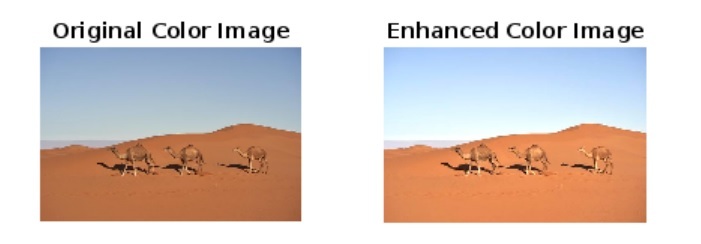
以下是一個示例,演示了在 MATLAB 中使用樸素演算法執行彩色影像對比度增強程式碼的實現。
% MATLAB code for contrast enhancement using Naïve algorithm
% Read the input color image
img = imread('https://tutorialspoint.tw/assets/questions/media/14304-1687425269.jpg');

% Separate the RGB color channels of the image
r_channel = img(:, :, 1);
g_channel = img(:, :, 2);
b_channel = img(:, :, 3);

% Specify the enhancement factors for each color channel
r_factor = 1.25;
g_factor = 1.25;
b_factor = 1.25;

% Multiply pixel values with enhancement factors to perform contrast enhancement
enhanced_r_channel = r_channel * r_factor;
enhanced_g_channel = g_channel * g_factor;
enhanced_b_channel = b_channel * b_factor;

% Adjust pixel values to make them within the valid range
enhanced_r_channel = min(max(enhanced_r_channel, 0), 255);
enhanced_g_channel = min(max(enhanced_g_channel, 0), 255);
enhanced_b_channel = min(max(enhanced_b_channel, 0), 255);

% Obtain enhanced color image by combining all the enhanced channels
enhanced_color_img = cat(3, uint8(enhanced_r_channel), uint8(enhanced_g_channel), uint8(enhanced_b_channel));

% Display the original and enhanced color images
subplot(1, 2, 1);
imshow(img);
title('Original Color Image');

subplot(1, 2, 2);
imshow(enhanced_color_img);
title('Enhanced Color Image');
輸出
執行此程式碼時,它將生成以下輸出 -
使用標準演算法增強彩色影像的對比度
我們還可以使用 MATLAB 中的標準演算法執行彩色影像的對比度增強。在 MATLAB 中,標準演算法使用直方圖均衡化方法來改善彩色影像中的對比度級別。
下面解釋了使用標準演算法執行對比度增強的分步過程。
步驟 (1) - 使用“imread”函式讀取輸入彩色影像。
步驟 (2) - 從影像中分離 RGB 顏色通道。
步驟 (3) - 使用直方圖均衡化技術獲得增強的顏色通道。
步驟 (4) - 透過組合所有增強的通道獲得增強的彩色影像。
步驟 (5) - 顯示結果。
示例
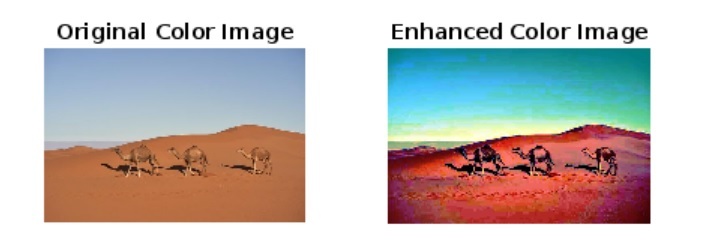
現在讓我們看一個示例,瞭解使用 MATLAB 中的標準演算法進行對比度增強程式碼的實現。
% MATLAB code to perform contrast enhancement using standard algorithm
% Read the input color image
img = imread('your_image.jpg');

% Separate RGB color channels from the image
r_channel = img(:, :, 1);
g_channel = img(:, :, 2);
b_channel = img(:, :, 3);

% Enhance each channel using the histogram equalization
enhanced_r_channel = histeq(r_channel);
enhanced_g_channel = histeq(g_channel);
enhanced_b_channel = histeq(b_channel);

% Obtain the enhanced color image by combining all the enhanced channels
enhanced_color_img = cat(3, enhanced_r_channel, enhanced_g_channel, enhanced_b_channel);

% Display the original and enhanced color images
subplot(1, 2, 1);
imshow(img);
title('Original Color Image');

subplot(1, 2, 2);
imshow(enhanced_color_img);
title('Enhanced Color Image');
輸出
執行此程式碼時,它將生成以下輸出 -
使用 HSV 色彩空間方法增強彩色影像的對比度
在 MATLAB 中,我們還可以使用 HSV 色彩空間增強彩色影像的對比度。在這種方法中,影像的對比度得到增強,而不會改變影像的色調和飽和度分量。
下面解釋了使用 HSV 色彩空間方法執行對比度增強所涉及的步驟。
步驟 (1) - 使用“imread”函式讀取輸入影像。
步驟 (2) - 將影像從 RGB 色彩空間轉換為 HSV 色彩空間。
步驟 (3) - 從影像中分離 V(值)分量以執行對比度增強。
步驟 (4) - 對 V 分量應用直方圖均衡化以改善影像的對比度。
步驟 (5) - 用增強的 V 分量替換原始 V 分量。
步驟 (6) - 將影像從 HSV 色彩空間轉換為 RGB 色彩空間。
步驟 (7) - 顯示增強的彩色影像。
示例
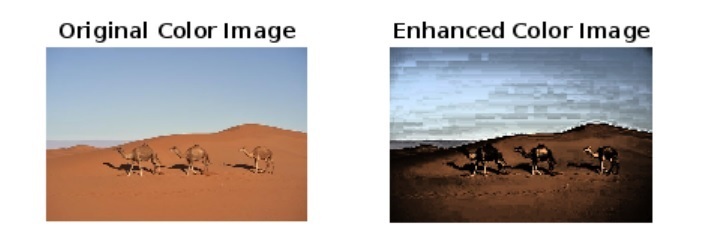
以下示例演示瞭如何使用 HSV 色彩空間方法在彩色影像中執行對比度增強。
% MATLAB code to perform contrast enhancement using HSV color space
% Read the input color image
img = imread('https://tutorialspoint.tw/assets/questions/media/14304-1687425269.jpg');

% Convert the RGB image to HSV image
hsv_img = rgb2hsv(img);

% Separate the V component from the image
V = hsv_img(:, :, 3);

% Use histogram equalization to perform contrast enhancement
enhanced_V = histeq(V);

% Replace the original V component with the enhanced V component in the image
hsv_img(:, :, 3) = enhanced_V;

% Convert the enhanced image from HSV to RGB color space
enhanced_color_img = hsv2rgb(hsv_img);

% Display the original and enhanced color images
subplot(1, 2, 1);
imshow(img);
title('Original Color Image');

subplot(1, 2, 2);
imshow(enhanced_color_img);
title('Enhanced Color Image');
輸出
執行此程式碼時,它將生成以下輸出 -
結論
總之,我們可以使用 MATLAB 執行彩色影像的對比度增強。MATLAB 提供了多種方法來增強影像的對比度級別。在本教程中,我藉助示例程式解釋了對比度增強的分步過程。在所有這些示例中,我都使用了不需要對比度增強的示例影像。為了獲得更好的結果,請將此影像替換為您自己的影像。

251 次檢視
