
 資料結構
資料結構 網路
網路 RDBMS
RDBMS 作業系統
作業系統 Java
Java MS Excel
 iOS
iOS HTML
HTML CSS
CSS Android
 Python
 C 程式設計
 C++
C++ C#
C# MongoDB
 MySQL
MySQL Javascript
 PHP
PHP 物理
物理 化學
化學 生物
生物 數學
數學 英語
英語 經濟學
經濟學 心理學
心理學 社會研究
社會研究 時尚研究
時尚研究 法律研究
法律研究如何在 Rest Assured 中傳遞多個請求標頭?
我們可以使用 Rest Assured 在請求中傳遞多個標頭。Web 服務可以在執行服務呼叫時接受標頭作為引數。標頭以鍵值對的形式表示。
在 Rest Assured 中傳遞多個標頭的方法不止一種——
使用 header 方法以鍵值格式傳遞。
語法
Response r = given()
.baseUri("https://tutorialspoint.tw/")
.header("header1", "value1")
.header("header2", "value2")
.get("/about/about_careers.htm");
使用 headers 方法以 Map 的形式傳遞。
語法
Map<String,Object> m = new HashMap<String,Object>();
m.put("header1", "value1");
m.put("header2, "value2");
Response r = given()
.baseUri("https://tutorialspoint.tw/")
.headers(m)
.get("/about/about_careers.htm");
使用 headers 方法以 List 的形式傳遞。
語法
List<Header> h = new ArrayList<Header>();
h.add(new Header("header1", "value1"));
h.add(new Header("header2", "value2"));
Response r = given()
.baseUri("https://tutorialspoint.tw/")
.headers(h)
.get("/about/about_careers.htm");
示例
程式碼實現
import org.testng.annotations.Test;
import static io.restassured.RestAssured.given;
import io.restassured.RestAssured;
import io.restassured.response.Response;
import io.restassured.specification.RequestSpecification;
public class NewTest {
   @Test
   public void addMultipleHeader() {
      String baseUrl =
      "https://api.reverb.com/api/articles?page=1&per_page=24";

      //input details with multiple headers
      RequestSpecification r = RestAssured.given()
      .header("Accept", "application/hal+json")
      .header("Content-Type", "application/json")
      .header("Accept-Version", "3.0");

      //obtain get Response
      Response res = r.get(baseUrl);

      //get status code
      int c = res.getStatusCode();
      System.out.println(c);
   }
}
輸出
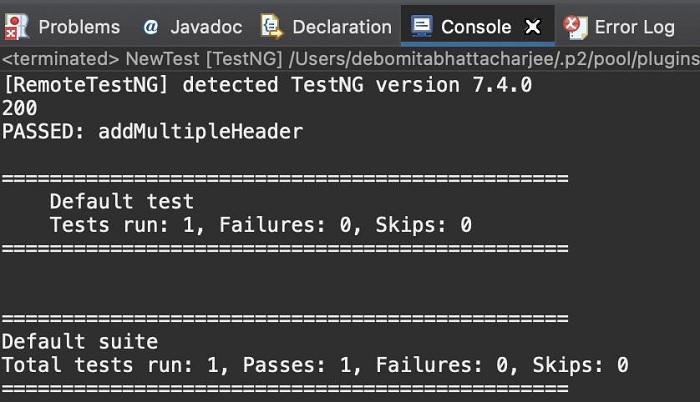

更新日期: 19-Nov-2021
8 千+ 瀏覽

廣告