
 資料結構
資料結構 聯網
聯網 RDBMS
RDBMS 作業系統
作業系統 Java
Java MS Excel
 iOS
iOS HTML
HTML CSS
CSS Android
 Python
 C 程式設計
 C++
C++ C#
C# MongoDB
 MySQL
MySQL Javascript
 PHP
PHP 物理學
物理學 化學
化學 生物學
生物學 數學
數學 英語
英語 經濟學
經濟學 心理學
心理學 社會學
社會學 時裝研究
時裝研究 法律研究
法律研究如何從 Rest Assured 中的巢狀列表中獲取值?
我們可以在 Rest Assured 中從巢狀列表中獲取值。透過使用 extract 方法來完成。要獲取該項,我們必須使用 path 方法(在 extract 方法後)並在響應中傳遞我們希望獲得的項。
我們首先將透過 Postman 在一個模擬的 API URL 上傳送一個 GET 請求,並遍歷其具有巢狀列表的響應。
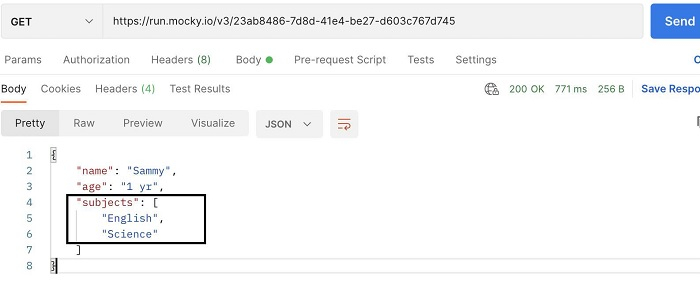
範例
程式碼實現
import org.testng.annotations.Test;
import static io.restassured.RestAssured.given;
import java.util.ArrayList;
import io.restassured.RestAssured;
import io.restassured.http.ContentType;
public class NewTest {
   @Test
   public void getRequest() {

      //base URL
      RestAssured.baseURI = "https://run.mocky.io/v3";
      RestAssured.basePath =
      "/23ab8486-7d8d-41e4-be27-d603c767d745";

      //response from GET request
      given()
      .when().get().prettyPrint();

      //extract values from Response
      String name = given().contentType(ContentType.JSON).get()
      .then().extract().path("name");
      System.out.println(name);
      String age = given().contentType(ContentType.JSON).get()
      .then().extract().path("age");
      System.out.println(age);

      //extract values from a nested list in Response
      ArrayList<String> s = given().contentType(ContentType.JSON).get()
      .then().extract().path("subjects");
      for(String subject: s) {
         System.out.println(subject);
      }
   }
}
輸出


更新日期: 2021 年 11 月 22 日
2 千次觀看

廣告