
 資料結構
資料結構 網路
網路 RDBMS
RDBMS 作業系統
作業系統 Java
Java MS Excel
 iOS
iOS HTML
HTML CSS
CSS Android
 Python
 C 程式設計
 C++
C++ C#
C# MongoDB
 MySQL
MySQL Javascript
 PHP
PHP 物理
物理 化學
化學 生物
生物 數學
數學 英語
英語 經濟學
經濟學 心理學
心理學 社會學
社會學 時尚學
時尚學 法律學
法律學如何在 Rest Assured 中處理靜態 JSON?
我們可以在 Rest Assured 中處理靜態 JSON。這可以透過將整個 JSON 請求儲存於外部檔案中來完成。首先,該檔案的全部內容應當轉換為 String。
然後,我們應當讀取檔案內容,並將其轉換為 Byte 資料型別。一旦全部資料轉換為 Byte,我們最終應當將其轉換為字串。我們將使用一個外部 JSON 檔案作為執行 POST 請求的有效負載。
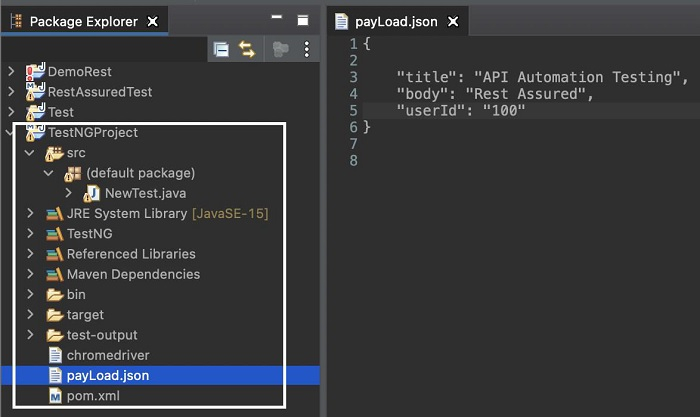
讓我們建立一個 JSON 檔案,叫作 payLoad.json,並在下方 JSON 格式中新增一個請求主體。這是在專案內建立的。
{
   "title": "API Automation Testing",
   "body": "Rest Assured",
   "userId": "100"
}
示例
程式碼實現
import org.testng.annotations.Test;
import static io.restassured.RestAssured.*;
import java.io.File;
import java.io.IOException;
import java.nio.file.Files;
import java.nio.file.Paths;
import io.restassured.RestAssured;
public class NewTest {
   @Test
   void readJSONfile() throws IOException {

      //read data from local JSON file then store in byte array
      byte[] b = Files.readAllBytes(Paths.get("payLoad.json"));

      //convert byte array to string
      String bdy = new String(b);

      //base URL
      RestAssured.baseURI = "https://jsonplaceholder.typicode.com";

      //input details with header and body
      given().header("Content-type", "application/json").body(bdy)

      //adding post method
      .when().post("/posts").then().log().all()

      //verify status code as 201
      .assertThat().statusCode(201);
   }
}
輸出
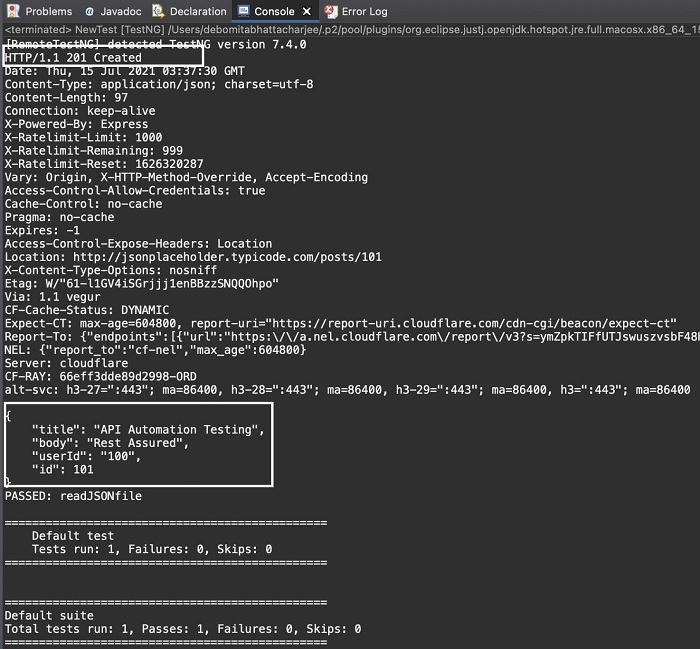

更新日期:2021 年 11 月 17 日
5 千+ 次閱讀

廣告