
 資料結構
資料結構 網路
網路 關係資料庫管理系統 (RDBMS)
 作業系統
作業系統 Java
Java MS Excel
 iOS
iOS HTML
HTML CSS
CSS Android
 Python
 C語言程式設計
 C++
C++ C#
C# MongoDB
 MySQL
MySQL Javascript
 PHP
PHP 物理學
物理學 化學
化學 生物學
生物學 數學
數學 英語
英語 經濟學
經濟學 心理學
心理學 社會學
社會學 服裝學
服裝學 法學
法學如何在Selenium中透過部分ID匹配定位元素?
我們可以使用Selenium webdriver透過部分ID匹配來定位元素。在使用xpath或css定位器識別元素時,可以實現這一點。在css和xpath表示式中,我們使用正則表示式來部分匹配ID。
讓我們看一下HTML程式碼中元素的ID。id屬性值為**gsc-i-id1**。
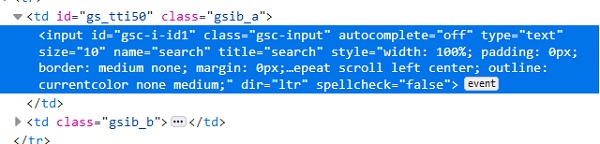
使用css表示式,我們可以使用*並對ID進行部分匹配。css值為**input[id*='id']**。這意味著子文字**id**存在於實際文字**gsc-i-id1**中。我們也可以使用**^**並對ID進行匹配。css值為**input[id^='gsc']**。這意味著實際文字**gsc-i-id1**以子文字**gsc**開頭。我們也可以使用**$**並對ID進行匹配。css值為**input[id$='id1']**。這意味著實際文字**gsc-i-id1**以子文字**id1**結尾。
使用xpath表示式,我們可以使用**contains()**方法並對ID進行部分匹配。xpath值為**//*[contains(@id, 'id')]**。這意味著子文字id存在於實際文字**gsc-i-id1**中。我們也可以使用**starts-with()**並對ID進行匹配。css值為**//*[starts-with(@id, 'gsc')]**。這意味著實際文字**gsc-i-id1**以子文字gsc開頭。我們也可以使用**ends-with()**並對ID進行匹配。css值為**//*[endswith(@id, 'id1')]**。這意味著實際文字**gsc-i-id1**以子文字**id1**結尾。
示例
程式碼實現。
import org.openqa.selenium.WebDriver;
import org.openqa.selenium.chrome.ChromeDriver;
import org.openqa.selenium.WebElement;
import org.openqa.selenium.By;
public class PartialMatchId{
   public static void main(String[] args) {
      System.setProperty("webdriver.chrome.driver", "C:\Users\ghs6kor\Desktop\Java\chromedriver.exe");
      WebDriver driver = new ChromeDriver();
      driver.get("https://tutorialspoint.tw/about/about_careers.htm");
      // identify element with partial id match with * in css
      WebElement l=driver.findElement(By.cssSelector("input[id*='id']"));
      l.sendKeys("Selenium");
      // obtain the value entered with getAttribute method
      System.out.println("Using * expression: " +l.getAttribute("value"));
      l.clear();
      // identify element with partial id match with ^ in css
      WebElement m=driver.findElement(By.cssSelector("input[id^='gsc']"));
      m.sendKeys("Java");
      // obtain the value entered with getAttribute method
      System.out.println("Using ^ expression: " +m.getAttribute("value"));
      m.clear();
      // identify element with partial id match with $ in css
      WebElement n = driver.findElement(By.cssSelector("input[id$='id1']"));
      n.sendKeys("Python");
      // obtain the value entered with getAttribute method
      System.out.println("Using $ expression: " +n.getAttribute("value"));
      n.clear();
      // identify element with partial id match with contains in xpath
      WebElement o=driver.findElement(By.xpath("//input[contains(@id,'id')]"));
      o.sendKeys("Selenium");
      // obtain the value entered with getAttribute method
      System.out.println("Using contains: " +o.getAttribute("value"));
      o.clear();
      // identify element with partial id match with starts-with in xpath
      WebElement p=driver.findElement(By.xpath("//input[starts-with(@id,'gsc')]"));
      p.sendKeys("Java");
      // obtain the value entered with getAttribute method
      System.out.println("Using starts-with: " +p.getAttribute("value"));
      p.clear();
      driver.close();
   }
}
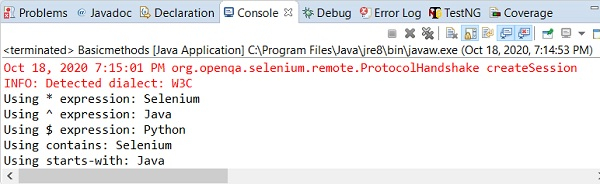
輸出

更新於:2020年10月26日
9K+ 次瀏覽

廣告