
 資料結構
資料結構 網路
網路 關係型資料庫管理系統
 作業系統
作業系統 Java
Java MS Excel
 iOS
iOS HTML
HTML CSS
CSS Android
 Python
 C 語言程式設計
 C++
C++ C#
C# MongoDB
 MySQL
MySQL Javascript
 PHP
PHP 物理學
物理學 化學
化學 生物學
生物學 數學
數學 英語
英語 經濟學
經濟學 心理學
心理學 社會學
社會學 服裝設計
服裝設計 法律研究
法律研究如何在 Laravel Blade 中插入值到隱藏輸入框?
Blade 是一個模板引擎,可以幫助你在 Laravel 中構建檢視顯示。它還可以幫助你在模板中使用 PHP 程式碼。
Blade 模板以 filename.blade.php 的形式儲存,並存儲在 **resources/views/ 資料夾**中。
為了理解上述問題,讓我們建立一個呼叫 Blade 模板的檢視。
在 routes/web.php 中,我建立了以下路由,它呼叫帶有資料 ['mymsg' => 'Welcome to Tutorialspoint'] 的 hello 檢視。
示例 1
讓我們來看一個例子:
Route::get('hello', function () {
   return view('hello', ['mymsg' => 'Welcome to Tutorialspoint']);
});
hello.blade.php 位於 resources/views 資料夾中:
{{$mymsg}}
輸出
當你測試時,輸出將是:
Welcome to Tutorialspoint
示例 2
使用 input type="hidden"
現在讓我們在上面建立的檢視中新增一個隱藏欄位。我們可以透過使用隱藏輸入欄位來實現,如下所示。在你的 **hello.blade.php** 中新增以下內容
<input type="hidden" value="{{$secretKey}}" name="key">
在你的路由中,傳遞 secretKey 變數,如下所示:
Route::get('hello', function () {
   return view('hello', ['mymsg' => 'Welcome to Tutorialspoint', 'secretKey'=>'123456']);
});
在 hello.blade.php 中,你需要新增如下所示的輸入欄位:
{{$mymsg}}
<input type="hidden" value="{{$secretKey}}" name="key">
輸出
以上程式碼的輸出如下:
Welcome to Tutorialspoint
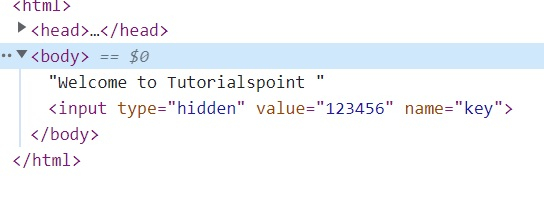
當你檢查元素時,你會看到如下所示的輸入欄位:
示例 3
讓我們利用 Form 在 Blade 模板中將輸入欄位顯示為隱藏。Form 可以幫助你在 Laravel 中構建 HTML 表單。
這是一個如何使用它的例子。隱藏輸入欄位新增如下:
<?php echo Form::hidden('secretkey', '878$54509'); ?>
以上程式碼等價於:
<input name="secretkey" type="hidden" value="878$54509">
hello.blade.php
{{$mymsg}}

<?php echo Form::open(array('url'=>'/hello'));?>
<?php echo Form::hidden('secretkey', '878$54509'); ?>

<?php echo Form::close(); ?>
輸出
以上程式碼的輸出如下:
Welcome to Tutorialspoint
當你檢查頁面時,你會看到如下所示:

示例 4
向輸入欄位新增更多屬性
要向 input type="hidden" 傳遞更多屬性,我們可以這樣做:
{{$mymsg}}

<?php echo Form::open(array('url'=>'/hello'));?>
<?php echo Form::hidden('secretkey', '878$54509'); ?>
<?php echo Form::hidden('secretkey', '878$54509', array('id' => 'key')) ?>

<?php echo Form::close(); ?>
輸出
以上程式碼的輸出為:
Welcome to Tutorialspoint
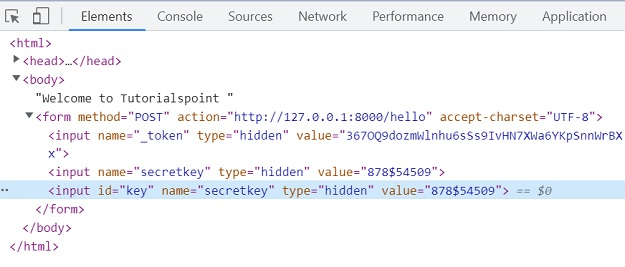
當你檢查頁面時,你會看到如下所示:

更新於: 2022-08-30
4K+ 閱讀量

廣告