
 資料結構
資料結構 網路
網路 RDBMS
RDBMS 作業系統
作業系統 Java
Java MS Excel
 iOS
iOS HTML
HTML CSS
CSS Android
 Python
 C 程式設計
 C++
C++ C#
C# MongoDB
 MySQL
MySQL Javascript
 PHP
PHP 物理
物理 化學
化學 生物
生物 數學
數學 英語
英語 經濟學
經濟學 心理學
心理學 社會研究
社會研究 時裝研究
時裝研究 法律研究
法律研究如何使用 PowerShell 獲取 IIS 應用程式池回收設定?
若要透過 GUI 獲取 IIS 應用程式池回收設定,您需要檢查應用程式池高階設定。
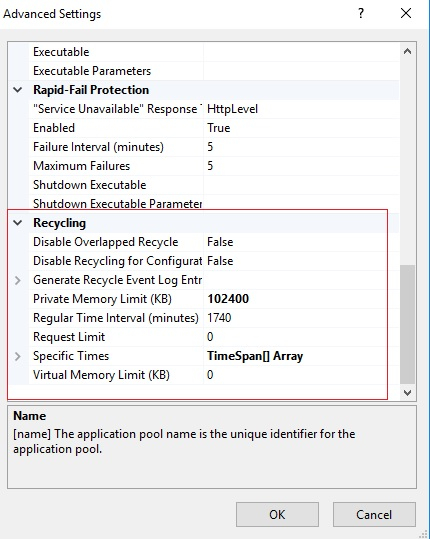
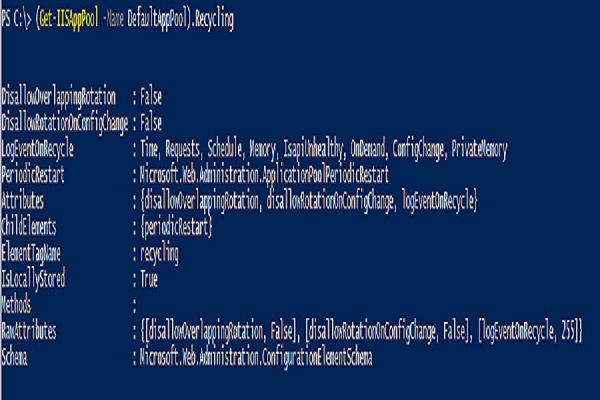
要使用 PowerShell 檢索上述設定,我們可以將 Get-IISAppPool 命令與特定的應用程式池名稱一起使用。我們有應用程式池 DefaultAppPool,我們需要檢索其 Recycling 設定。
PS C:\> (Get-IISAppPool -Name DefaultAppPool).Recycling
輸出
以下設定將針對定期重啟。
PS C:\> (Get-IISAppPool -Name DefaultAppPool).Recycling.PeriodicRestart
輸出
Memory          : 0
PrivateMemory   : 102400
Requests        : 0
Schedule        : {add}
Time            : 1.05:00:00
Attributes      : {memory, privateMemory, requests, time}
ChildElements   : {schedule}
ElementTagName  : periodicRestart
IsLocallyStored : True
Methods         :
RawAttributes   : {[memory, 0], [privateMemory, 102400], [requests, 0], [time, 1.05:00:00]}
Schema          : Microsoft.Web.Administration.ConfigurationElementSchema
在進一步展開時,您可以新增 Privatememory、Time 等屬性。

更新於: 28-4 月-2021
2K+ 瀏覽

廣告