
 資料結構
資料結構 網路
網路 關係型資料庫管理系統
 作業系統
作業系統 Java
Java MS Excel
 iOS
iOS HTML
HTML CSS
CSS Android
 Python
 C 程式設計
 C++
C++ C#
C# MongoDB
 MySQL
MySQL Javascript
 PHP
PHP 物理學
物理學 化學
化學 生物學
生物學 數學
數學 英語
英語 經濟學
經濟學 心理學
心理學 社會學
社會學 時裝學
時裝學 法學
法學如何使用 PowerShell 獲取資料夾大小?
我們將使用Get-ChildItem命令首先檢索資料夾的內容,然後按照如下所示管道Measure-Object命令。
Get-ChildItem C:\Temp\ -Recurse | Measure-Object -Property Length -Sum
輸出
Count : 1514
Average :
Sum : 372060503
Maximum :
Minimum :
Property : Length
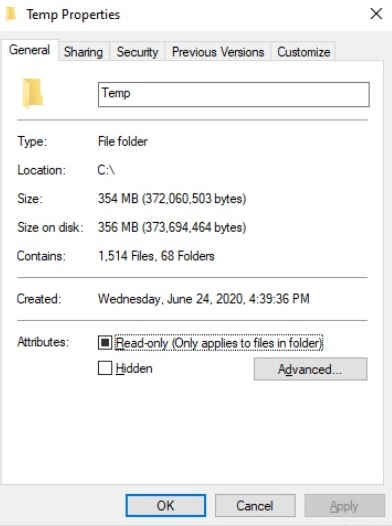
上方的輸出顯示,總共有 1514 個檔案和資料夾,而總和顯示了所有檔案和資料夾的合併後 KB 大小。我們可以按照如下所示將其轉換為 MB。
(Get-ChildItem C:\Temp\ -Recurse | Measure-Object -Property Length -Sum).Sum / 1MB
354.824545860291
我們可以獲得四舍五入的結果,
[Math]::Round(
   ((Get-ChildItem C:\Temp\ -Recurse | Measure-Object -Property Length -Sum).Sum / 1MB),2
)
354.82
你可以在資料夾路徑中檢視相同的內容。

更新時間:2021-03-30
4000+ 瀏覽量

廣告