
 資料結構
資料結構 網路
網路 RDBMS
RDBMS 作業系統
作業系統 Java
Java MS Excel
 iOS
iOS HTML
HTML CSS
CSS Android
 Python
 C 程式設計
 C++
C++ C#
C# MongoDB
 MySQL
MySQL Javascript
 PHP
PHP 物理
物理 化學
化學 生物
生物 數學
數學 英語
英語 經濟學
經濟學 心理學
心理學 社會研究
社會研究 時尚研究
時尚研究 法律研究
法律研究如何在 phantomjsdriver selenium c# 中啟用 cookie?
我們可以在 C# 中啟用 Selenium Webdriver 中的 cookie。cookie 是由瀏覽器儲存的資料。鍵值對用於在 cookie 中儲存資訊以儲存相關資訊。
要新增 cookie,可以使用 AddCookie 方法。cookie 的鍵和值作為引數傳遞給該方法。此外,要獲取 cookie 資訊,可以使用 GetCookieNamed 方法。
語法
driver.Manage().Cookies.AddCookie(new Cookie("Automation", "QA"));
driver.Manage().Cookies.GetCookieNamed("Automation");
對於實現,我們將使用 NUnit 框架。
示例
using NUnit.Framework;
using OpenQA.Selenium;
using OpenQA.Selenium.Firefox;
using System;
namespace NUnitTestProject1{
   public class Tests{
      String u = "https://tutorialspoint.tw/index.htm";
      IWebDriver d;
      [SetUp]
      public void Setup(){
         //creating object of FirefoxDriver
         d = new FirefoxDriver();
      }
      [Test]
      public void Test1(){
         //launching URL
         d.Navigate().GoToUrl(u);
         //adding cookie
         d.Manage().Cookies.AddCookie(new Cookie("Automation", "QA"));
         //obtain cookie
         var c = d.Manage().Cookies.GetCookieNamed("Automation");
         Console.WriteLine(c);
      }
      [TearDown]
      public void close_Browser(){
         d.Quit();
      }
   }
}
輸出
單擊執行所有測試按鈕−

單擊開啟此結果的其他輸出連結−
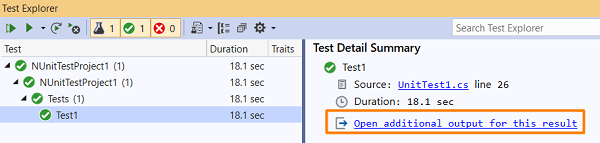
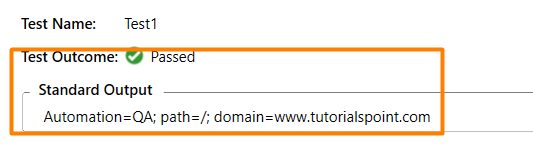
我們應該得到測試結果和標準輸出。

更新於: 30-1 月-2021
192 次訪問

廣告