
 資料結構
資料結構 網路
網路 RDBMS
RDBMS 作業系統
作業系統 Java
Java MS Excel
 iOS
iOS HTML
HTML CSS
CSS Android
 Python
 C 程式設計
 C++
C++ C#
C# MongoDB
 MySQL
MySQL Javascript
 PHP
PHP 物理
物理 化學
化學 生物
生物 數學
數學 英語
英語 經濟
經濟 心理學
心理學 社會科學
社會科學 時尚文化
時尚文化 法律教程
法律教程如何在 JavaFX 中建立上下文選單?
選單是向用戶顯示的一組選項或命令,通常選單包括執行某種操作的專案。選單的內容稱為選單項。
上下文選單
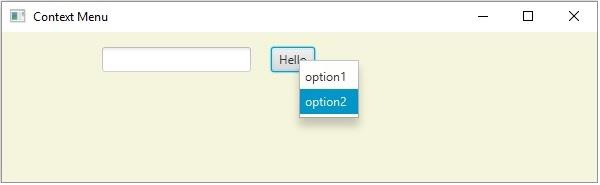
上下文選單是一個彈出的,在與應用程式中的 UI 元素進行互動時出現的選單。最好的例子是當您用滑鼠單擊滑鼠右鍵時系統中出現的選單。您可以透過例項化**javafx.scene.control.ContextMenu**類來建立一個上下文選單。
就像選單一樣,建立上下文選單後,需要向其中新增 MenuItem。您可以使用**setContextMenu()**方法將 ContextMenu 設定到 javafx.scene.control 類中的任何物件。
這些內容選單通常會在您“單擊滑鼠右鍵”附加的控制元件時顯示。
示例
import java.io.FileNotFoundException;
import javafx.application.Application;
import javafx.geometry.Insets;
import javafx.scene.Group;
import javafx.scene.Scene;
import javafx.scene.control.Button;
import javafx.scene.control.ContextMenu;
import javafx.scene.control.MenuItem;
import javafx.scene.control.TextField;
import javafx.scene.layout.HBox;
import javafx.scene.paint.Color;
import javafx.stage.Stage;
public class ContextMenuExample extends Application {
   public void start(Stage stage) throws FileNotFoundException {
      //Creating the image view
      Button button = new Button("Hello");
      TextField textField = new TextField();
      //Creating a context menu
      ContextMenu contextMenu = new ContextMenu();
      //Creating the menu Items for the context menu
      MenuItem item1 = new MenuItem("option1");
      MenuItem item2 = new MenuItem("option2");
      contextMenu.getItems().addAll(item1, item2);
      //Adding the context menu to the button and the text field
      textField.setContextMenu(contextMenu);
      button.setContextMenu(contextMenu);
      HBox layout = new HBox(20);
      layout.setPadding(new Insets(15, 15, 15, 100));
      layout.getChildren().addAll(textField, button);
      //Setting the stage
      Scene scene = new Scene(new Group(layout), 595, 150, Color.BEIGE);
      stage.setTitle("CustomMenuItem");
      stage.setScene(scene);
      stage.show();
   }
   public static void main(String args[]){
      launch(args);
   }
}
輸出

更新於:2020 年 5 月 20 日
1000+ 檢視次數

廣告