
 資料結構
資料結構 網路
網路 關係型資料庫管理系統
 作業系統
作業系統 Java
Java MS Excel
 iOS
iOS HTML
HTML CSS
CSS Android
 Python
 C 程式設計
 C++
C++ C#
C# MongoDB
 MySQL
MySQL Javascript
 PHP
PHP 物理學
物理學 化學
化學 生物學
生物學 數學
數學 英語
英語 經濟學
經濟學 心理學
心理學 社會科學
社會科學 時尚研究
時尚研究 法律研究
法律研究如何在 JavaFX 中建立警報?
警報是一個對話方塊,它顯示預構建的對話方塊型別。你可以透過例項化 javafx.scene.control.Alert 類來建立一個 警報。此類是 Dialog 類的子類。你可以在例項化時透過傳遞相應引數來建立必需型別的對話方塊,如下所示 -
Alert alert = new Alert(Alert.AlertType.CONFIRMATION);
示例
下面的示例演示瞭如何建立 Alert。
import javafx.application.Application;
import javafx.geometry.Insets;
import javafx.scene.Group;
import javafx.scene.Scene;
import javafx.scene.control.Alert;
import javafx.scene.control.Alert.AlertType;
import javafx.scene.control.Button;
import javafx.scene.control.ButtonBar.ButtonData;
import javafx.scene.control.ButtonType;
import javafx.scene.control.Dialog;
import javafx.scene.layout.HBox;
import javafx.stage.Stage;
import javafx.scene.paint.Color;
import javafx.scene.text.Font;
import javafx.scene.text.FontPosture;
import javafx.scene.text.FontWeight;
import javafx.scene.text.Text;
public class AlertExample extends Application {
   public void start(Stage stage) {
      //Creating a dialog
      Alert alert = new Alert(Alert.AlertType.CONFIRMATION);
      //Setting the title
      alert.setTitle("Alert");
      ButtonType type = new ButtonType("Ok", ButtonData.OK_DONE);
      //Setting the content of the dialog
      alert.setContentText("This is a confirmmation alert");
      //Adding buttons to the dialog pane
      alert.getDialogPane().getButtonTypes().add(type);
      //Setting the label
      Text txt = new Text("Click the button to show the dialog");
      Font font = Font.font("verdana", FontWeight.BOLD, FontPosture.REGULAR, 12);
      txt.setFont(font);
      //Creating a button
      Button button = new Button("Show Dialog");
      //Showing the dialog on clicking the button
      button.setOnAction(e -> {
         alert.showAndWait();
      });
      //Creating a vbox to hold the button and the label
      HBox pane = new HBox(15);
      //Setting the space between the nodes of a HBox pane
      pane.setPadding(new Insets(50, 150, 50, 60));
      pane.getChildren().addAll(txt, button);
      //Creating a scene object
      Scene scene = new Scene(new Group(pane), 595, 300, Color.BEIGE);
      stage.setTitle("Alert");
      stage.setScene(scene);
      stage.show();
   }
   public static void main(String args[]){
      launch(args);
   }
}
輸出
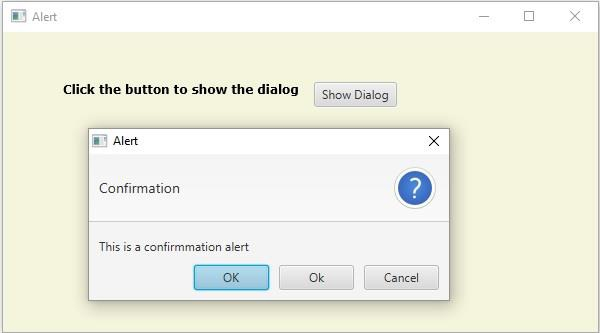

更新於: 19-May-2020
2K+ 瀏覽量

廣告