
 資料結構
資料結構 網路
網路 關係型資料庫管理系統
 作業系統
作業系統 Java
Java MS Excel
 iOS
iOS HTML
HTML CSS
CSS Android
 Python
 C 語言
C 語言 C++
C++ C#
C# MongoDB
 MySQL
MySQL Javascript
 PHP
PHP 物理
物理 化學
化學 生物
生物 數學
數學 英語
英語 經濟
經濟 心理學
心理學 社會研究
社會研究 時尚研究
時尚研究 法律研究
法律研究如何用 tkinter 建立一個計時器?
在本示例中,我們將使用 Python Tkinter 建立一個計時器。為了顯示時間,我們將使用 Python 中的 time 模組。
最初,我們將按照以下步驟建立計時器:
- 為小時、分鐘和秒設定三個輸入控制元件,並預設設定值為“00”。
- 建立一個按鈕用於設定計時器。它將呼叫函式 **countdowntimer()**。
- 定義一個函式 **countdowntimer()**,當我們單擊按鈕傳播時間時,該函式會進行更新。
示例
#Import the required library
from tkinter import *
import time
#Create an instance of tkinter frame
win = Tk()
win.geometry('750x300')
win.resizable(False,False)
#Configure the background
win.config(bg='burlywood1')
#Create Entry Widgets for HH MM SS
sec = StringVar()
Entry(win, textvariable=sec, width = 2, font = 'Helvetica 14').place(x=220, y=120)
sec.set('00')
mins= StringVar()
Entry(win, textvariable = mins, width =2, font = 'Helvetica
14').place(x=180, y=120)
mins.set('00')
hrs= StringVar()
Entry(win, textvariable = hrs, width =2, font = 'Helvetica 14').place(x=142, y=120)
hrs.set('00')
#Define the function for the timer
def countdowntimer():
   times = int(hrs.get())*3600+ int(mins.get())*60 + int(sec.get())
   while times > -1:
      minute,second = (times // 60 , times % 60)
      hour =0
      if minute > 60:
         hour , minute = (minute // 60 , minute % 60)
      sec.set(second)
      mins.set(minute)
      hrs.set(hour)
      #Update the time
      win.update()
      time.sleep(1)
      if(times == 0):
         sec.set('00')
         mins.set('00')
         hrs.set('00')
      times -= 1
Label(win, font =('Helvetica bold',22), text = 'Set the Timer',bg
='burlywood1').place(x=105,y=70)
Button(win, text='START', bd ='2', bg = 'IndianRed1',font =('Helvetica
bold',10), command = countdowntimer).place(x=167, y=165)
win.mainloop()
輸出
上面的程式碼會顯示一個時鐘計時器。
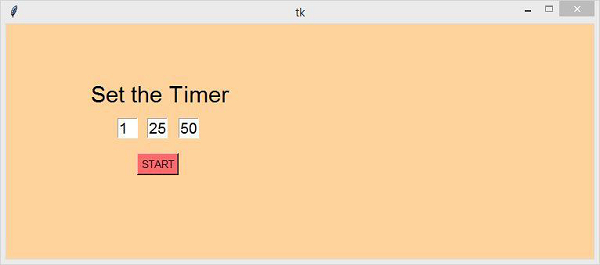
現在,透過在框中插入一個值,並單擊“開始”按鈕,來設定計時器,以便開始計時。

最後更新時間: 15-04-2021
9K+ 瀏覽量

廣告