
 資料結構
資料結構 網路
網路 RDBMS
RDBMS 作業系統
作業系統 Java
Java MS Excel
 iOS
iOS HTML
HTML CSS
CSS Android
 Python
 C 程式設計
 C++
C++ C#
C# MongoDB
 MySQL
MySQL Javascript
 PHP
PHP 物理
物理 化學
化學 生物
生物 數學
數學 英語
英語 經濟學
經濟學 心理學
心理學 社會學
社會學 時裝設計學
時裝設計學 法律學
法律學如何在 JavaFX 中建立文字流佈局?
為了在應用程式中建立豐富的文字內容,JavaFX 提供稱為文字流的特殊佈局,該佈局由**javafx.scene.layout.TextFlow**類表示。使用此佈局,您可以在一個文字流中佈局多個文字節點。
由於它們是獨立的節點,因此您可以為它們設定不同的字型。如果您嘗試向此佈局新增非文字節點,則它們將被視為嵌入物件,並且只是簡單地插入到文字之間。
此類具有兩個屬性 −
lineSpacing − 該屬性(double)用於指定文字物件之間的間距。您可以使用setLineSpacing()方法為此屬性設定值。
textAlignment − 該屬性用於指定窗格中文字物件的對其方式。您可以使用**setTextAlignment()**方法為此屬性設定值。您可以向此方法傳遞四個值 − CENTER、JUSTIFY、LEFT、RIGHT。
示例
import java.io.FileNotFoundException;
import javafx.application.Application;
import javafx.scene.Group;
import javafx.scene.Scene;
import javafx.scene.paint.Color;
import javafx.stage.Stage;
import javafx.scene.text.Font;
import javafx.scene.text.FontWeight;
import javafx.scene.text.Text;
import javafx.scene.text.TextFlow;
public class TextFlowExample extends Application {
   public void start(Stage stage) throws FileNotFoundException {
      //Creating a text object
      Text text1 = new Text(30.0, 110.0, "Hi ");
      //Setting the font
      Font font1 = Font.font("Brush Script MT", FontWeight.BOLD, 75);
      text1.setFont(font1);
      //Setting the color of the text
      text1.setFill(Color.CORAL);
      text1.setStrokeWidth(1);
      text1.setStroke(Color.CHOCOLATE);
      Text text2 = new Text(40.0, 110.0, "Welcome To");
      Font font2 = Font.font("Verdana", FontWeight.LIGHT, 25);
      text2.setFont(font2);
      //Setting the color of the text
      text2.setFill(Color.YELLOWGREEN);
      text2.setStrokeWidth(1);
      text2.setStroke(Color.DARKRED);
      Text text3= new Text(50.0, 110.0, "Tutorialspoint");
      Font font3 = Font.font("Kunstler Script", FontWeight.BOLD, 80);
      text3.setFont(font3);
      //Setting the color of the text
      text3.setFill(Color.CORNFLOWERBLUE);
      text3.setStrokeWidth(1);
      text3.setStroke(Color.CRIMSON);
      Text text4 = new Text(" We provide free tutorials for readers in various technologies ");
      text4.setFont(new Font("Algerian", 30));
      text4.setFill(Color.DARKGOLDENROD);
      Text text5 = new Text("We believe in easy learning");
      //Setting font to the text
      text5.setFont(new Font("Ink Free",30));
      text5.setFill(Color.MEDIUMVIOLETRED);
      //Creating the text flow
      TextFlow textFlow = new TextFlow();
      textFlow.setPrefWidth(595);
      textFlow.getChildren().addAll(text1, text2, text3, text4, text5);
      //Setting the stage
      Group root = new Group(textFlow);
      Scene scene = new Scene(root, 595, 250, Color.BEIGE);
      stage.setTitle("Text Flow Example");
      stage.setScene(scene);
      stage.show();
   }
   public static void main(String args[]){
      launch(args);
   }
}
輸出
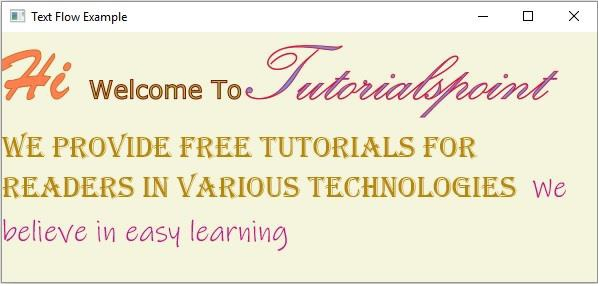

更新時間:2020 年 5 月 19 日
226 次觀看

廣告