
 資料結構
資料結構 網路
網路 關係資料庫管理系統 (RDBMS)
 作業系統
作業系統 Java
Java MS Excel
 iOS
iOS HTML
HTML CSS
CSS Android
 Python
 C語言程式設計
 C++
C++ C#
C# MongoDB
 MySQL
MySQL Javascript
 PHP
PHP 物理學
物理學 化學
化學 生物學
生物學 數學
數學 英語
英語 經濟學
經濟學 心理學
心理學 社會學
社會學 時尚研究
時尚研究 法學研究
法學研究如何使用Java OpenCV庫將彩色影像轉換為棕褐色影像?
將彩色影像轉換為棕褐色的演算法:
獲取每個畫素的紅、綠、藍值
計算這三種顏色的平均值。
定義深度和強度值(理想值為20和30)。
修改值如下:
red = red + (depth*2).
Green = green +depth.
blue = blue-intensity.
確保修改後的值在0到255之間。
根據修改後的顏色建立新的畫素值,並將新值設定為畫素。
Java實現
使用ImageIO.read()方法讀取所需的影像。
獲取影像的高度和寬度。
使用巢狀for迴圈遍歷影像中的每個畫素。
使用getRGB()方法獲取畫素值。
將上面獲取的畫素值作為引數建立一個Color物件。
分別使用getRed()、getGreen()和getBlue()方法從顏色物件中獲取紅色、綠色和藍色值。
根據演算法中指定的計算新的紅色、綠色和藍色值。
使用修改後的RGB值建立一個新的畫素。
使用setRGB()方法設定新的畫素值。
示例
import java.io.File;
import java.io.IOException;
import java.awt.Color;
import java.awt.image.BufferedImage;
import javax.imageio.ImageIO;
public class Color2Sepia {
   public static void main(String args[])throws IOException {
      //Reading the image
      File file= new File("D:\Images\cuba.jpg");
      BufferedImage img = ImageIO.read(file);
      for (int y = 0; y < img.getHeight(); y++) {
         for (int x = 0; x < img.getWidth(); x++) {
            //Retrieving the values of a pixel
            int pixel = img.getRGB(x,y);
            //Creating a Color object from pixel value
            Color color = new Color(pixel, true);
            //Retrieving the R G B values
            int red = color.getRed();
            int green = color.getGreen();
            int blue = color.getBlue();
            int avg = (red+green+blue)/3;
            int depth = 20;
            int intensity = 30;
            red= avg+(depth*2);
            green = avg+depth;
            blue = avg-intensity;
            //Making sure that RGB values lies between 0-255
            if (red > 255)red = 255;
            if (green > 255)green = 255;
            if (blue > 255)blue = 255;
            if (blue<0)blue=0;
            //Creating new Color object
            color = new Color(red, green, blue);
            //Setting new Color object to the image
            img.setRGB(x, y, color.getRGB());
         }
      }
      //Saving the modified image
      file = new File("D:\Images\sepia_image2.jpg");
      ImageIO.write(img, "jpg", file);
      System.out.println("Done...");
   }
}
輸入
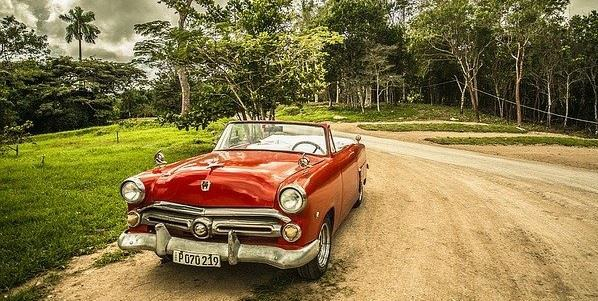
輸出
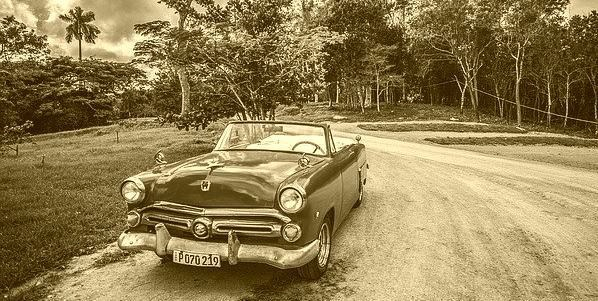

更新於:2020年4月9日
741 次瀏覽

廣告