
 資料結構
資料結構 網路
網路 關係資料庫管理系統
 作業系統
作業系統 Java
Java MS Excel
 iOS
iOS HTML
HTML CSS
CSS Android
 Python
 C語言程式設計
 C++
C++ C#
C# MongoDB
 MySQL
MySQL Javascript
 PHP
PHP 物理學
物理學 化學
化學 生物學
生物學 數學
數學 英語
英語 經濟學
經濟學 心理學
心理學 社會學
社會學 時尚研究
時尚研究 法律研究
法律研究如何使用Java OpenCV庫將負片轉換為正片?
要將負片轉換為正片 -
使用 ImageIO.read() 方法讀取所需的影像。
獲取影像的高度和寬度。
使用巢狀的 for 迴圈遍歷影像中的每個畫素。
使用 getRGB() 方法獲取畫素值。
要從畫素中檢索每個值,您需要將其右移到每種顏色的起始位置,即 alpha 為 24,紅色為 16 等,並執行與 0Xff 的按位與運算。這會掩蓋變數,保留最後 8 位並忽略所有其餘位。
透過從 255 中減去它們來計算新的紅色、綠色和藍色值。
透過將其各自位置向左移動 ARGB 來重建畫素,並使用按位或將它們連線起來。
使用 setRGB() 方法設定新的畫素值。
示例
import java.io.File;
import java.io.IOException;
import java.awt.image.BufferedImage;
import javax.imageio.ImageIO;
public class Negative2Color {
   public static void main(String args[])throws IOException {
      //Reading the image
      File file= new File("D:\Images\cat_neg.jpg");
      BufferedImage img = ImageIO.read(file);
      for (int y = 0; y < img.getHeight(); y++) {
         for (int x = 0; x < img.getWidth(); x++) {
            //Retrieving contents of a pixel
            int p = img.getRGB(x,y);
            //Getting the A R G B values from the pixel value
            int a = (p>>24)&0xff;
            int r = (p>>16)&0xff;
            int g = (p>>8)&0xff;
            int b = p&0xff;
            //Subtract RGB from 255
            r = 255 - r;
            g = 255 - g;
            b = 255 - b;
            //Set new RGB value
            p = (a<<24) | (r<<16) | (g<<8) | b;
            img.setRGB(x, y, p);
         }
      }
      //Saving the modified image
      file = new File("D:\Images\negative_positive.jpg");
      ImageIO.write(img, "jpg", file);
      System.out.println("Done...");
   }
}
輸入
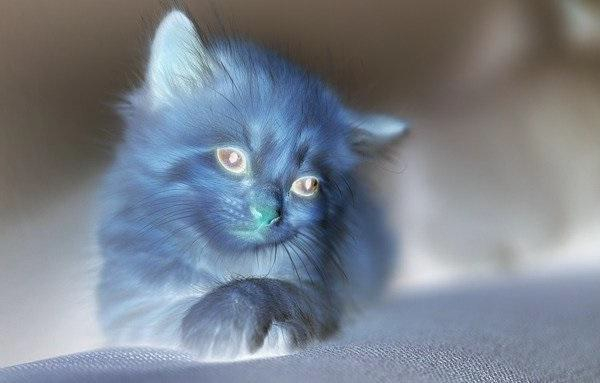
輸出


更新於: 2020年4月9日
458 次檢視

廣告