
 資料結構
資料結構 網路
網路 關係型資料庫管理系統
 作業系統
作業系統 Java
Java MS Excel
 iOS
iOS HTML
HTML CSS
CSS Android
 Python
 C 語言程式設計
 C++
C++ C#
C# MongoDB
 MySQL
MySQL Javascript
 PHP
PHP 物理學
物理學 化學
化學 生物學
生物學 數學
數學 英語
英語 經濟學
經濟學 心理學
心理學 社會學
社會學 服裝設計
服裝設計 法律研究
法律研究如何在 PyTorch 中計算一組邊界框的面積?
torchvision.io 包提供了執行不同 IO 操作的功能。為了計算邊界框或一組邊界框的面積,torchvision.io 包提供了 box_area() 函式。此函式將邊界框作為輸入引數,並返回每個框的面積。
邊界框應為大小為 [N,4] 的 torch 張量,其中 N 是要計算面積的邊界框的數量。每個邊界框由座標 (xmin, ymin, xmax, ymax) 指定。換句話說 - 0 ≤ xmin < xmax, 且 0 ≤ ymin < ymax. 計算出的面積是一個大小為 [N] 的 torch 張量。
要計算單個邊界框的面積,我們將邊界框張量進行 unsqueeze 操作,使其成為一個二維張量。
語法
torchvision.ops.box_area(boxes)
引數
boxes - 包含邊界框的 [N,4] torch 張量。每個邊界框都以 (xmin, ymin, xmax, ymax) 格式給出,其中 0 ≤ xmin < xmax, 且 0 ≤ ymin < ymax.
輸出
它返回一個大小為 [N] 的 torch 張量,其中包含邊界框的面積。
步驟
匯入所需的庫。在以下所有示例中,所需的 Python 庫為 torch 和 torchvision。確保您已安裝它們。
import torch
import torchvision
from torchvision.io import read_image
from torchvision.utils import draw_bounding_boxes
from torchvision.ops import box_area
使用 image_read() 函式讀取 JPEG 或 PNG 影像。使用影像型別(.jpg 或 .png)指定完整的影像路徑。此函式的輸出是一個大小為 [image_channels, image_height, image_width] 的 torch 張量。
img = read_image('dog.png')將邊界框定義為 torch 張量。邊界框張量的資料型別應為 torch.int。如果要計算單個邊界框的面積,則對張量進行 unsqueeze 操作。
bbox = (310, 200, 485, 430)
# convert the bbox to torch tensor
bbox = torch.tensor(bbox, dtype=torch.int)
使用 box_area() 計算邊界框的面積。可以選擇將帶有繪製邊界框的影像分配給一個新的變數。
area = box_area(bbox)
使用 draw_bounding_boxes() 函式在影像上繪製邊界框。我們將計算出的面積作為標籤放在邊界框內。
labels= [f"bbox area = {area.item()}"]
img=draw_bounding_boxes(img, bbox, labels= labels, width=3,colors=(255,255,0))
將影像張量轉換為 PIL 影像並顯示它。
img = torchvision.transforms.ToPILImage()(img)
img.show()
輸入影像
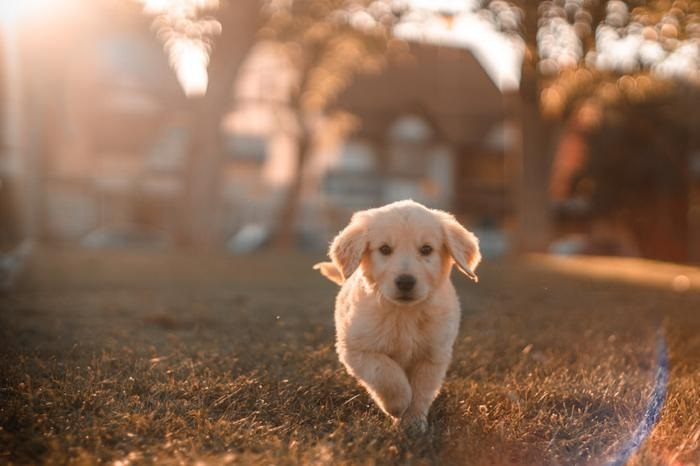
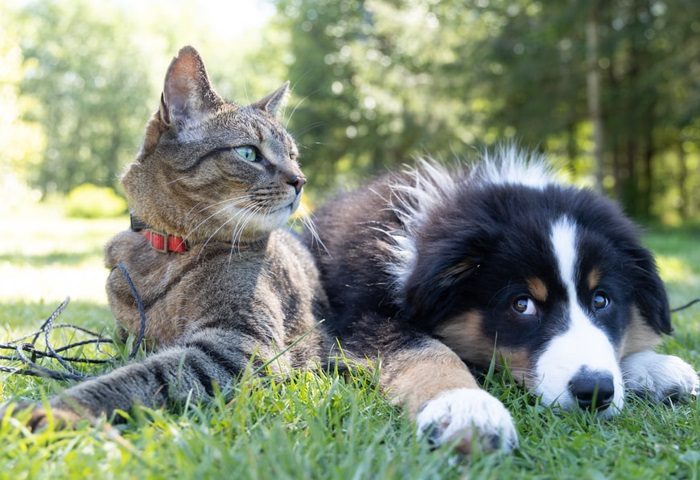
我們將在以下示例中使用這些影像作為輸入檔案。
示例 1
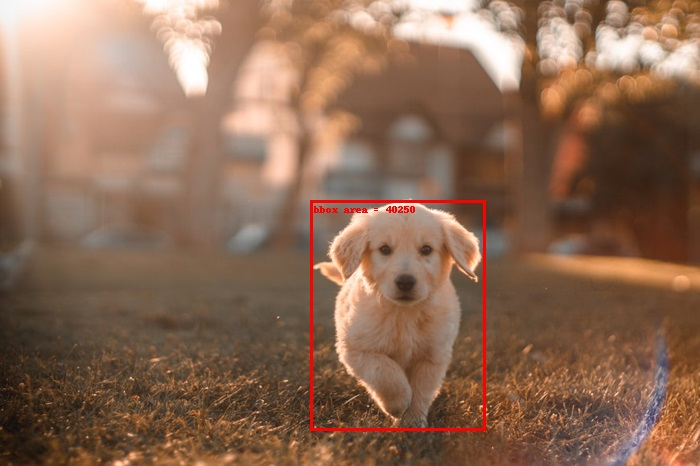
在以下 Python 程式中,我們計算單個邊界框的面積,並將此面積作為標籤放在影像上,並顯示影像。
# Import the required libraries
import torch
import torchvision
from torchvision.io import read_image
from torchvision.utils import draw_bounding_boxes
from torchvision.ops import box_area

# read the input image
img = read_image('dog.png')

# bounding box in (xmin, ymin, xmax, ymax) format
# top-left point=(xmin, ymin), bottom-right point = (xmax, ymax)bbox = (310, 200, 485, 430)

# convert the bbox to torch tensor
bbox = torch.tensor(bbox, dtype=torch.int)
print(bbox)
print(bbox.size())

# unsqueeze the bbox to make it 2D
bbox = bbox.unsqueeze(0)
print(bbox.size())

# Compute the bounding box area
area = box_area(bbox)
print("BBOX area:", area)
labels= [f"bbox area = {area.item()}"]
img=draw_bounding_boxes(img, bbox, labels= labels, width=3,colors=(255,255,0))

# b=a.permute(1,2,0)
# plt.imshow(b)
# plt.show()
img = torchvision.transforms.ToPILImage()(img)
img.show()
輸出
tensor([310, 200, 485, 430], dtype=torch.int32)
torch.Size([4])
torch.Size([1, 4])
BBOX area: tensor([40250], dtype=torch.int32)
示例 2
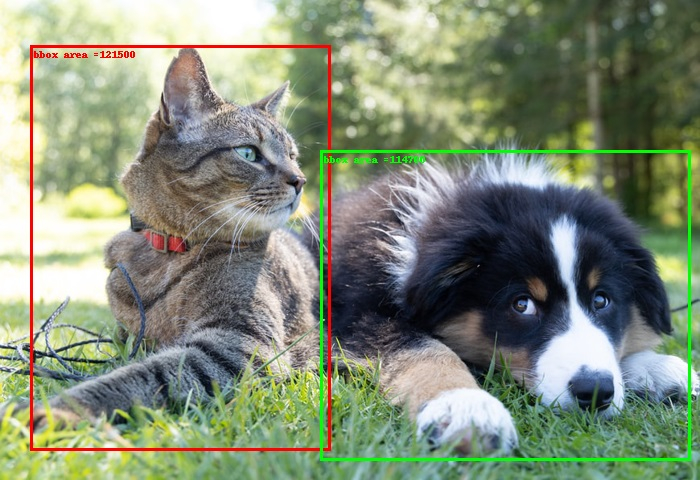
在以下 Python 程式中,我們計算一組兩個邊界框的面積,並將這些面積作為標籤放在影像上,並顯示影像。
import torch
from PIL import Image
import torchvision
from torchvision.io import read_image
from torchvision.utils import draw_bounding_boxes
from torchvision.ops import box_area

img = read_image('catndog.png')

# bounding box in (xmin, ymin, xmax, ymax) format
bbox1 = [30, 45, 330, 450]
bbox2 = [320, 150, 690, 460]
bbox = [bbox1, bbox2]
bbox = torch.tensor(bbox, dtype=torch.int)
print(bbox)
print(bbox.size())

area = box_area(bbox)
labels = [f"bbox area ={a}" for a in area]
print(labels)
img=draw_bounding_boxes(img, bbox, labels = labels, width=3,colors=[(255,0,0),(0,255,0)])
img = torchvision.transforms.ToPILImage()(img)
img.show()
輸出
tensor([[ 30, 45, 330, 450],
   [320, 150, 690, 460]], dtype=torch.int32)
torch.Size([2, 4])
['bbox area =121500', 'bbox area =114700']

1K+ 次檢視
