
 資料結構
資料結構 網路
網路 RDBMS
RDBMS 作業系統
作業系統 Java
Java MS Excel
 iOS
iOS HTML
HTML CSS
CSS Android
 Python
 C 程式設計
 C++
C++ C#
C# MongoDB
 MySQL
MySQL JavaScript
 PHP
PHP 物理學
物理學 化學
化學 生物
生物 數學
數學 英語
英語 經濟學
經濟學 心理學
心理學 社會學
社會學 時尚研究
時尚研究 法律研究
法律研究如何在 R 中使用 grid.arrange 來排列散點圖列表?
在預測建模中,我們在資料集中得到許多變數,並且我們希望一次視覺化這些變數之間的關係。這有助於我們理解一個變數如何隨另一個變數而變化,在此基礎上我們能夠使用更好的建模技術。為了建立圖列表,我們可以在 gridExtra 包中使用 grid.arrange 函式,它可以根據我們的需要排列圖。
示例
考慮以下資料幀 −
> set.seed(10)
> df<-data.frame(x1=rnorm(10),x2=rnorm(20,0.2),x3=rnorm(20,0.5),x4=rnorm(10,0.5))
> head(df,20)
       x1            x2        x3     x4
1   0.01874617  1.301779503 -1.3537405  0.09936245
2  -0.18425254  0.955781508  0.4220539  0.16544343
3  -1.37133055 -0.038233556  1.4685663  1.86795395
4  -0.59916772  1.187444703  0.6849260  2.63776710
5   0.29454513  0.941390128 -0.8799436  1.00581926
6   0.38979430  0.289347266 -0.9355144  1.28634238
7  -1.20807618 -0.754943856  0.8620872 -0.40221194
8  -0.36367602  0.004849615 -1.2590868  1.03289699
9  -1.62667268  1.125521262  0.1754560 -0.14589425
10 -0.25647839  0.682978525 -0.1515630  0.79098749
11  0.01874617 -0.396310637  1.5865514  0.09936245
12 -0.18425254 -1.985286838 -0.2625449  0.16544343
13 -1.37133055 -0.474865938 -0.3286625  1.86795395
14 -0.59916772 -1.919061192  1.3344739  2.63776710
15  0.29454513 -1.065198022 -0.4676520  1.00581926
16  0.38979430 -0.173661555  0.4711847  1.28634238
17 -1.20807618 -0.487555430  0.7325252 -0.40221194
18 -0.36367602 -0.672158827  0.1987913  1.03289699
19 -1.62667268  0.098238994 -0.1776146 -0.14589425
20 -0.25647839 -0.053780530 1.1552276 0.79098749
載入 ggplot2 包 −
> library(ggplot2)
載入 gridExtra 包 −
> library(gridExtra)
在資料幀中不同變數的一些不同組合中建立散點圖,這些變數為 (x1,x2)、(x1,x3)、(x1,x4)、(x2,x3)、(x3,x4) −
> plot1 <- ggplot(df, aes(x1,x2)) + geom_point()
> plot2 <- ggplot(df, aes(x1,x3)) + geom_point()
> plot3 <- ggplot(df, aes(x1,x4)) + geom_point()
> plot4 <- ggplot(df, aes(x2,x3)) + geom_point()
> plot5 <- ggplot(df, aes(x3,x4)) + geom_point()
建立圖列表 −
> PlotsList<- list(plot1,plot2,plot3,plot4,plot5)
在一個圖中排列圖 −
> grid.arrange(grobs = PlotsList, ncol = 2)
輸出
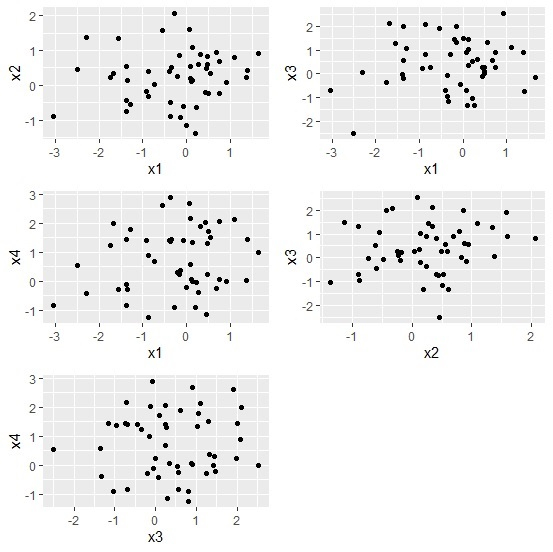

更新時間: 10-8-2020
461 次瀏覽

廣告