
 資料結構
資料結構 網路
網路 RDBMS
RDBMS 作業系統
作業系統 Java
Java MS Excel
 iOS
iOS HTML
HTML CSS
CSS Android
 Python
 C 程式設計
 C++
C++ C#
C# MongoDB
 MySQL
MySQL Javascript
 PHP
PHP 物理
物理 化學
化學 生物
生物 數學
數學 英語
英語 經濟
經濟 心理學
心理學 社會研究
社會研究 時裝研究
時裝研究 法律研究
法律研究如何在 JavaFX 中將徑向漸變(顏色)應用於節點?
可以使用 setFill() 方法為 JavaFX 中的形狀應用顏色,它為幾何形狀內部或背景新增顏色。
該方法接受 javafx.scene.paint.Paint 類的一個物件作為引數。它是用於填充形狀和背景的顏色和漸變的基類。
JavaFX 中的 javafx.scene.paint.RadialGradient 類是 Paint 的一個子類,使用它可以為形狀填充圓形顏色漸變圖案。
為幾何形狀應用徑向漸變圖案:
透過傳遞所需引數例項化 RadialGradient 類。
使用 setFill() 方法將建立的漸變設定到形狀。
示例
import javafx.application.Application;
import javafx.scene.Group;
import javafx.scene.Scene;
import javafx.scene.paint.Color;
import javafx.scene.paint.CycleMethod;
import javafx.scene.paint.RadialGradient;
import javafx.scene.paint.Stop;
import javafx.stage.Stage;
import javafx.scene.shape.Circle;
import javafx.scene.shape.Ellipse;
import javafx.scene.shape.Polygon;
import javafx.scene.shape.Rectangle;
public class RadialGradientExample extends Application {
   public void start(Stage stage) {
      //Drawing a circle
      Circle circle = new Circle(75.0f, 65.0f, 40.0f );
      //Drawing a Rectangle
      Rectangle rect = new Rectangle(150, 30, 100, 65);
      //Drawing an ellipse
      Ellipse ellipse = new Ellipse(330, 60, 60, 35);
      //Drawing Polygon
      Polygon poly = new Polygon(410, 60, 430, 30, 470, 30, 490, 60, 470, 100, 430, 100 );
      //Setting the radial gradient
      Stop[] stops = new Stop[] {
         new Stop(0.0, Color.WHITE),
         new Stop(0.3, Color.RED),
         new Stop(1.0, Color.DARKRED)
      };
      RadialGradient gradient = new RadialGradient(0, 0, 300, 178, 60, false, CycleMethod.NO_CYCLE, stops);
      //Setting the pattern
      circle.setFill(gradient);
      circle.setStrokeWidth(3);
      circle.setStroke(Color.CADETBLUE);
      rect.setFill(gradient);
      rect.setStrokeWidth(3);
      rect.setStroke(Color.CADETBLUE);
      ellipse.setFill(gradient);
      ellipse.setStrokeWidth(3);
      ellipse.setStroke(Color.CADETBLUE);
      poly.setFill(gradient);
      poly.setStrokeWidth(3);
      poly.setStroke(Color.CADETBLUE);
      //Setting the stage
      Group root = new Group(circle, ellipse, rect, poly);
      Scene scene = new Scene(root, 600, 150);
      stage.setTitle("Radial Gradient");
      stage.setScene(scene);
      stage.show();
   }
   public static void main(String args[]){
      launch(args);
   }
}
輸出
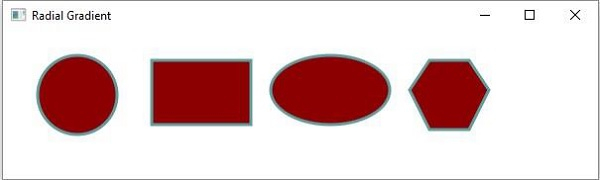

更新日期:2020 年 5 月 16 日
490 次瀏覽

廣告