
 資料結構
資料結構 網路
網路 RDBMS
RDBMS 作業系統
作業系統 Java
Java MS Excel
 iOS
iOS HTML
HTML CSS
CSS Android
 Python
 C 程式設計
 C++
C++ C#
C# MongoDB
 MySQL
MySQL Javascript
 PHP
PHP 物理學
物理學 化學
化學 生物學
生物學 數學
數學 英語
英語 經濟學
經濟學 心理學
心理學 社會學
社會學 時尚研究
時尚研究 法律研究
法律研究如何在 JavaFX 中為文字節點新增反射效果?
在 JavaFX 中,可以使用 setEffect() 方法為任何節點物件新增效果。該方法接受一個 Effect 類的物件,並將其新增到當前節點中。
反射效果在給定內容的下方渲染其倒影。javafx.scene.effect.Reflection 表示反射效果。若要向文字節點新增模糊效果,請執行以下操作:
透過傳入基本 x、y 座標(位置)和文字字串作為建構函式的引數來例項化 Text 類。
設定所需的屬性,如字型、描邊等。
透過例項化 Reflection 類來建立一個模糊效果。
使用 setEffect() 方法將建立的效果設定為文字節點。
最後,將建立的文字節點新增到 Group 物件中。
示例
import java.io.FileNotFoundException;
import javafx.application.Application;
import javafx.scene.Group;
import javafx.scene.Scene;
import javafx.scene.effect.Reflection;
import javafx.scene.paint.Color;
import javafx.stage.Stage;
import javafx.scene.text.Font;
import javafx.scene.text.FontPosture;
import javafx.scene.text.FontWeight;
import javafx.scene.text.Text;
public class ReflectionEffect extends Application {
   public void start(Stage stage) throws FileNotFoundException {
      //Creating a text object
      String str = "Welcome to Tutorialspoint";
      Text text = new Text(30.0, 80.0, str);
      //Setting the font
      Font font = Font.font("Brush Script MT", FontWeight.BOLD, FontPosture.REGULAR, 65);
      text.setFont(font);
      //Setting the color of the text
      text.setFill(Color.BROWN);
      //Setting the width and color of the stroke
      text.setStrokeWidth(2);
      text.setStroke(Color.BLUE);
      //Creating the reflection effect
      Reflection reflection = new Reflection();
      reflection.setFraction(0.8);
      //Setting the effect to the text
      text.setEffect(reflection);
      //Setting the stage
      Group root = new Group(text);
      Scene scene = new Scene(root, 595, 150, Color.BEIGE);
      stage.setTitle("Reflection Effect");
      stage.setScene(scene);
      stage.show();
   }
   public static void main(String args[]){
      launch(args);
   }
}
輸出
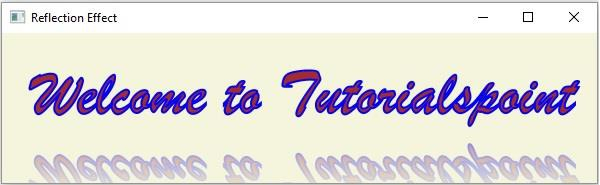

更新於: 2020 年 5 月 16 日
267 次瀏覽

廣告