
 資料結構
資料結構 網路
網路 關係資料庫管理系統 (RDBMS)
 作業系統
作業系統 Java
Java MS Excel
 iOS
iOS HTML
HTML CSS
CSS Android
 Python
 C語言程式設計
 C++
C++ C#
C# MongoDB
 MySQL
MySQL Javascript
 PHP
PHP 物理學
物理學 化學
化學 生物學
生物學 數學
數學 英語
英語 經濟學
經濟學 心理學
心理學 社會學
社會學 服裝學
服裝學 法學
法學如何將標籤與輸入框對齊?
在設計網頁表單時,將標籤與輸入欄位對齊可以顯著提高可讀性和可用性。這種對齊方式增強了表單的視覺結構,使使用者更容易填寫資訊。在本文中,我們將介紹使用 CSS 技術將標籤與各自輸入欄位的右側和左側對齊的方法。
使用 CSS 屬性對齊標籤
透過使用 CSS 屬性(如 text-align、display 和 margin),我們可以控制標籤相對於輸入欄位的位置和對齊方式。在下面的示例中,我們將演示如何在表單中將元素與輸入欄位的右側和左側對齊。
使用 CSS 將標籤右對齊
要將標籤右對齊,我們可以使用以下方法。關鍵是將 <label> 元素設定為 inline-block 顯示方式並指定固定寬度。然後,透過將 text-align 屬性設定為 right,標籤文字將右對齊,靠近輸入欄位。
示例程式碼
<!DOCTYPE html>
<html>
  <head>
    <title>Form with Right-Aligned Labels</title>
    <style>
      div {
        margin-bottom: 10px;
      }
      label {
        display: inline-block;
        width: 150px;
        text-align: right;
      }
    </style>
  </head>
  <body>
    <form action="/form/submit" method="post">
      <div>
        <label>Short Label</label>
        <input type="text" />
      </div>
      <div>
        <label>Medium Label</label>
        <input type="text" />
      </div>
      <div>
        <label>Longer Label with More Text</label>
        <input type="text" />
      </div>
    </form>
  </body>
</html>
輸出

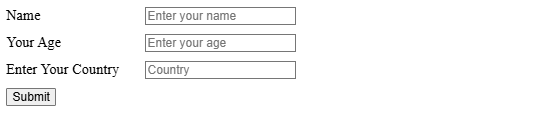
預設情況下,標籤左對齊
透過移除 text-align: right; 屬性,標籤將預設左對齊。這種方法在處理簡單的表單或不需要右對齊時很有用。此外,我們可以在 <label> 元素上新增屬性,並在 <input> 元素上新增相應的 id 屬性,以建立可點選的標籤-輸入對,從而增強可訪問性。
示例程式碼
<!DOCTYPE html>
<html>
  <head>
    <title>Form with Left-Aligned Labels</title>
    <style>
      div {
        margin-bottom: 10px;
      }
      label {
        display: inline-block;
        width: 150px;
      }
    </style>
  </head>
  <body>
    <form action="/form/submit" method="post">
      <div>
        <label for="name">Name</label>
        <input type="text" id="name"
               placeholder="Enter your name" />
      </div>
      <div>
        <label for="age">Your Age</label>
        <input type="text" id="age" name="age"
               placeholder="Enter your age" />
      </div>
      <div>
        <label for="country">Enter Your Country</label>
        <input type="text" id="country" name="country"
               placeholder="Country" />
      </div>
      <input type="submit" value="Submit" />
    </form>
  </body>
</html>
輸出
使用樣式增強功能左對齊標籤
為了進一步改善視覺外觀,我們可以自定義標籤顏色並向輸入欄位新增填充。在這個例子中,我們使用淺灰色樣式化 <label> 元素,並向 <input> 元素新增 padding 以獲得更均衡的外觀。
示例程式碼
<!DOCTYPE html>
<html>
  <head>
    <title>Styled Left-Aligned Labels</title>
    <style>
      div {
        margin-bottom: 10px;
      }
      label {
        display: inline-block;
        width: 110px;
        color: #777777;
      }
      input {
        padding: 5px 10px;
      }
    </style>
  </head>
  <body>
    <form action="/form/submit" method="post">
      <div>
        <label for="name">Your Name:</label>
        <input id="name" name="username" type="text" autofocus />
      </div>
      <div>
        <label for="lastname">Your Last Name:</label>
        <input id="lastname" name="lastname" type="text" />
      </div>
      <input type="submit" value="Submit" />
    </form>
  </body>
</html>
輸出


更新於:2024年11月8日
19 次瀏覽

廣告