
 資料結構
資料結構 網路
網路 關係資料庫管理系統 (RDBMS)
 作業系統
作業系統 Java
Java MS Excel
 iOS
iOS HTML
HTML CSS
CSS Android
 Python
 C語言程式設計
 C++
C++ C#
C# MongoDB
 MySQL
MySQL Javascript
 PHP
PHP 物理學
物理學 化學
化學 生物學
生物學 數學
數學 英語
英語 經濟學
經濟學 心理學
心理學 社會學
社會學 服裝設計
服裝設計 法律研究
法律研究如何在Selenium 2中驗證元素不存在?
我們可以驗證Selenium webdriver中元素是否存在。為此,我們將使用`getPageSource`方法獲取整個頁面原始碼。因此,我們可以獲取完整的頁面原始碼並檢查元素的文字是否存在。
我們還可以使用`findElements`方法和任何定位器(例如xpath、CSS等)來識別匹配的元素。`findElements`返回一個元素列表。
我們將藉助`size`方法計算列表返回的元素數量。如果`size`的值大於0,則元素存在;如果小於0,則元素不存在。
讓我們驗證頁面上是否存在突出顯示的文字:
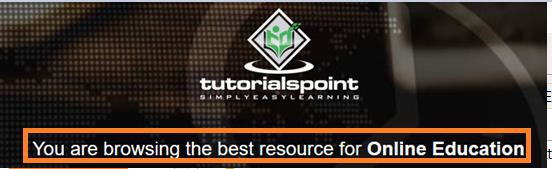
示例
使用`findElements()`的程式碼實現。
import org.openqa.selenium.By;
import org.openqa.selenium.WebDriver;
import org.openqa.selenium.WebElement;
import org.openqa.selenium.chrome.ChromeDriver;
import java.util.concurrent.TimeUnit;
import java.util.List;
public class ExistElements{
   public static void main(String[] args) {
      System.setProperty("webdriver.chrome.driver",
      "C:\Users\ghs6kor\Desktop\Java\chromedriver.exe");
      WebDriver driver = new ChromeDriver();
      driver.manage().timeouts().implicitlyWait(5, TimeUnit.SECONDS);
      driver.get("https://tutorialspoint.tw/index.htm");
      String str = "You are browsing the best resource for Online Education";
      // identify elements
      List<WebElement> m= driver.findElements(By.xpath("//*[contains(text(),'You are browsin')]"));
      // verify size
      if ( m.size() > 0){
         System.out.println("Text: " + str + " is present. ");
      }
      else{
         System.out.println("Text: " + str+ " is not present. ");
      }
      driver.quit();
   }
}
示例
使用`getPageSource`的程式碼實現。
import org.openqa.selenium.By;
import org.openqa.selenium.WebDriver;
import org.openqa.selenium.WebElement;
import org.openqa.selenium.chrome.ChromeDriver;
import java.util.concurrent.TimeUnit;
public class ElementExistPgSource{
   public static void main(String[] args) {
      System.setProperty("webdriver.chrome.driver",
      "C:\Users\ghs6kor\Desktop\Java\chromedriver.exe");
      WebDriver driver = new ChromeDriver();
      driver.manage().timeouts().implicitlyWait(5, TimeUnit.SECONDS);
      driver.get("https://tutorialspoint.tw/index.htm");
      String str = "You are browsing the best resource for Online Education";
      //get page source
      if ( driver.getPageSource().contains("You are browsin")){
         System.out.println("Text: " + str + " is present. ");
      }
      else{
         System.out.println("Text: " + str + " is not present. ");
      }
      driver.quit();
   }
}
輸出


更新於:2021年2月1日
6K+ 次瀏覽

廣告