
 資料結構
資料結構 網路
網路 RDBMS
RDBMS 作業系統
作業系統 Java
Java MS Excel
 iOS
iOS HTML
HTML CSS
CSS Android
 Python
 C 語言程式設計
 C++
C++ C#
C# MongoDB
 MySQL
MySQL Javascript
 PHP
PHP 物理
物理 化學
化學 生物
生物 數學
數學 英語
英語 經濟
經濟 心理學
心理學 社會研究
社會研究 時尚研究
時尚研究 法律研究
法律研究如何在 Tkinter 視窗中開啟一個網站?
Tkinter 提供了許多內建函式和方法,其中包含一些實用函式來幫助我們構建一個使用者友好的應用程式。在 tkinter 中,如果你想開啟一個網頁,可以使用內建 Python 庫 webview,它允許使用者在其自己的原生 GUI 視窗中檢視 HTML 內容。你可以使用以下命令來安裝webview庫:
pip install pywebview
要建立一個用於開啟請求的 HTML 內容的視窗,你必須首先使用 create_window(win_title, 'URL') 方法建立一個視窗容器並在此方法中指定 URL。這將建立一個新視窗,該視窗將開啟請求的 URL 並顯示其內容
示例
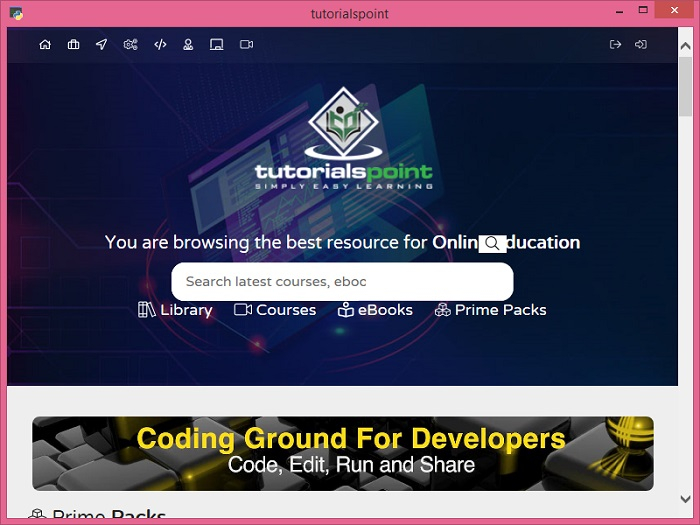
以下示例演示瞭如何在 Tkinter GUI 視窗中開啟一個網頁。
# Import the required libraries
from tkinter import *
import webview

# Create an instance of tkinter frame or window
win = Tk()

# Set the size of the window
win.geometry("700x350")

# Create a GUI window to view the HTML content
webview.create_window('tutorialspoint', 'https://tutorialspoint.tw')
webview.start()
輸出
執行上面的程式碼將在 tkinter 視窗中顯示請求的 URL 網路內容。

更新時間:2021 年 12 月 16 日
4 千次以上瀏覽

廣告