
 資料結構
資料結構 網路
網路 RDBMS
RDBMS 作業系統
作業系統 Java
Java MS Excel
 iOS
iOS HTML
HTML CSS
CSS Android
 Python
 C 程式設計
 C++
C++ C#
C# MongoDB
 MySQL
MySQL Javascript
 PHP
PHP 物理學
物理學 化學
化學 生物學
生物學 數學
數學 英語
英語 經濟學
經濟學 心理學
心理學 社會學
社會學 時尚學
時尚學 法律學
法律學如何讓 Selenium 指令碼在自動化中保持會話有效?
我們可以在自動化中讓 Selenium 指令碼的會話保持有效。在 Chrome 瀏覽器中,可以透過 ChromeOptions 和 Capabilities 類來實現這一目標。
Capabilities 類可以透過 getCapabilities 方法獲取瀏覽器的功能。這種技術通常用於在一個包含大量步驟的場景中除錯某個特定步驟。
首先,讓我們嘗試在以下頁面的突出顯示編輯框中輸入文字 −

程式碼實現
import org.openqa.selenium.WebDriver;
import org.openqa.selenium.WebElement;
import org.openqa.selenium.chrome.ChromeDriver;
import org.openqa.selenium.Capabilities;
import org.openqa.selenium.By;
import java.util.Map;
import java.util.concurrent.TimeUnit;
public class BrwSessionAlive{
   public static void main(String[] args)
   throws InterruptedException{
      System.setProperty("webdriver.chrome.driver",
      "C:\Users\ghs6kor\Desktop\Java\chromedriver.exe");
      WebDriver driver = new ChromeDriver();
      //obtain browser capabilities
      Capabilities cap = driver.getCapabilities();
      Map<String, Object> mp = cap.asMap();
      mp.forEach((key, value) -> {
         System.out.println("Key is: " + key + " Value is: " + value);
      });
      //implicit wait
      driver.manage().timeouts().implicitlyWait(10, TimeUnit.SECONDS);
      //url launch
      driver.
      get("https://tutorialspoint.tw/about/about_careers.htm");
      //identify element
      WebElement e = driver.findElement(By.id("gsc-i-id1"));
      e.sendKeys("Selenium");
   }
}
輸出
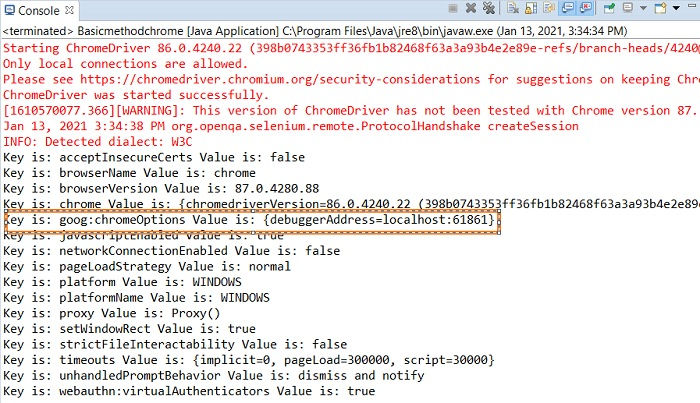
在上圖中,我們突出顯示了帶有 localhost:61861 值的 debuggerAddress 引數。我們應當將此鍵值對新增到 ChromeOptions 類的例項中。
瀏覽器

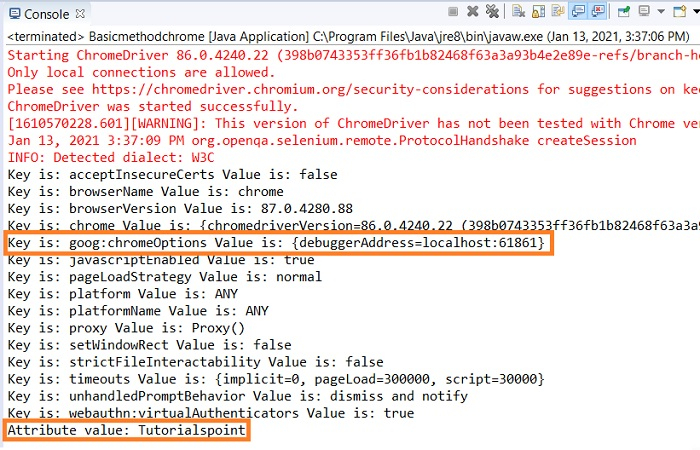
現在,我們將連線到這個現有的瀏覽器會話,並在此會話上執行其他自動化步驟。
修改程式碼以連線到舊會話。
import org.openqa.selenium.WebElement;
import org.openqa.selenium.chrome.ChromeDriver;
import org.openqa.selenium.chrome.ChromeOptions;
import org.openqa.selenium.Capabilities;
import org.openqa.selenium.By;
import java.util.Map;
import org.openqa.selenium.WebDriver;
import java.util.concurrent.TimeUnit;
public class BrwSessionAlive{
   public static void main(String[] args)
   throws InterruptedException{
      System.setProperty("webdriver.chrome.driver",
      "C:\Users\ghs6kor\Desktop\Java\chromedriver.exe");
      WebDriver driver = new ChromeDriver();
      //instance of ChromeOptions
      ChromeOptions op = new ChromeOptions();
      //configure debuggerAddress value
      op.setExperimentalOption("debuggerAddress", "localhost:61861");
      //obtain browser capabilities
      Capabilities cap = driver.getCapabilities(op);
      Map<String, Object> mp = cap.asMap();
      mp.forEach((key, value) -> {
         System.out.println("Key is: " + key + " Value is: " + value);
      });
      //implicit wait
      driver.manage().timeouts().implicitlyWait(10, TimeUnit.SECONDS);
      //identify element
      WebElement e = driver.findElement(By.id("gsc-i-id1"));
      //clear existing data
      e.clear();
      e.sendKeys("Tutorialspoint");
      String str = e.getAttribute("value");
      System.out.println("Attribute value: " + str);
   }
}
輸出
瀏覽器


更新於: 2021-06-25
4K+ 檢視次數

廣告