
 資料結構
資料結構 網路
網路 RDBMS
RDBMS 作業系統
作業系統 Java
Java MS Excel
 iOS
iOS HTML
HTML CSS
CSS Android
 Python
 C 程式設計
 C++
C++ C#
C# MongoDB
 MySQL
MySQL Javascript
 PHP
PHP 物理
物理 化學
化學 生物
生物 數學
數學 英語
英語 經濟
經濟 心理學
心理學 社會研究
社會研究 時尚研究
時尚研究 法律研究
法律研究如何在 Java 中顯示/隱藏 JPasswordField 的回顯字元?\n
JPasswordField 是 JTextField 的子類,JPasswordField 中輸入的每個字元都可以被一個回顯字元來代替。這允許對密碼進行保密輸入。預設情況下,回顯字元是星號 (*)。JPasswordField 的重要方法包括**get password**()、 getText()、getAccessibleContext() 等。預設情況下,JPasswordField 可以顯示 回顯字元。我們可以隱藏 回顯字元 並透過單擊JCheckbox 向用戶顯示原始文字。
示例
import java.awt.*;
import java.awt.event.*;
import javax.swing.*;
public final class ShowJPasswordTest extends JPanel {
   private JPasswordField pf1;
   private JCheckBox jcb;
   private JPanel panel;
   public ShowJPasswordTest() {
      pf1 = makePasswordField();
      jcb = new JCheckBox("Show Passwords");
      jcb.addActionListener(ae -> {
         JCheckBox c = (JCheckBox) ae.getSource();
         pf1.setEchoChar(c.isSelected() ? '\u0000' : (Character)          UIManager.get("PasswordField.echoChar"));
      });
      panel = new JPanel(new BorderLayout());
      panel.add(pf1);
      panel.add(jcb, BorderLayout.SOUTH);
      add(makeTitledPanel("Show/Hide Password", panel));
      setBorder(BorderFactory.createEmptyBorder(2, 5, 2, 5));
   }
   private static JPasswordField makePasswordField() {
      JPasswordField pf = new JPasswordField(20);
      pf.setText("tutorialspoint");
      pf.setAlignmentX(Component.RIGHT_ALIGNMENT);
      return pf;
   }
   private static Component makeTitledPanel(String title, Component cmp) {
      JPanel p = new JPanel(new GridBagLayout());
      p.setBorder(BorderFactory.createTitledBorder(title));
      GridBagConstraints c = new GridBagConstraints();
      c.weightx = 1d;
      c.fill = GridBagConstraints.HORIZONTAL;
      c.insets = new Insets(5, 5, 5, 5);
      p.add(cmp, c);
      return p;
   }
   public static void main(String[] args) {
      JFrame frame = new JFrame("Show/HidePasswordField Test");
      frame.getContentPane().add(new ShowJPasswordTest());
      frame.setSize(375, 250);
      frame.setDefaultCloseOperation(JFrame.EXIT_ON_CLOSE);
      frame.setLocationRelativeTo(null);
      frame.setVisible(true);
   }
}
enum PasswordField {
   SHOW, HIDE;
}
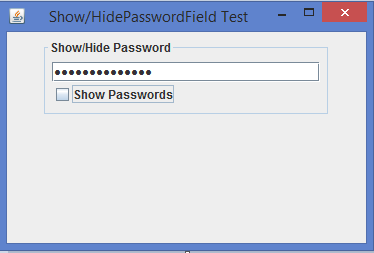
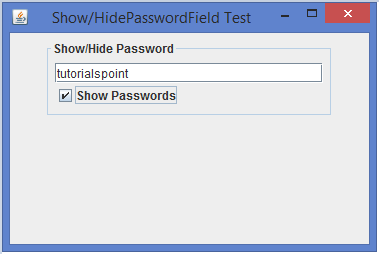
輸出
顯示回顯字元
隱藏回顯字元

更新於:10-2-2020
2K+ 瀏覽

廣告