
 資料結構
資料結構 網路
網路 關係型資料庫管理系統
 作業系統
作業系統 Java
Java MS Excel
 iOS
iOS HTML
HTML CSS
CSS Android
 Python
 C 程式設計
 C++
C++ C#
C# MongoDB
 MySQL
MySQL JavaScript
 PHP
PHP 物理
物理 化學
化學 生物
生物 數學
數學 英語
英語 經濟學
經濟學 心理學
心理學 社會學
社會學 時尚研究
時尚研究 法律研究
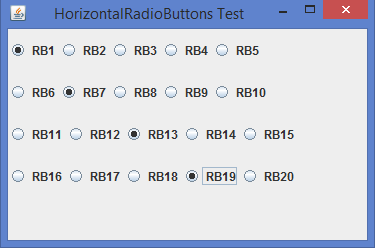
法律研究我們可以在 Java 中如何水平排列 JRadioButtons?\n
JRadioButton 是 JToggleButton 的子類,它是一個可以“選中”或“取消選中”的二態按鈕。與複選框不同的是,單選按鈕與一個組關聯,並且一個組中只能選中一個單選按鈕,可以使用ButtonGroup 類來實現這一點。選中組中的單選按鈕時,組中任何其他先前選中的單選按鈕都會取消選擇。我們可以透過使用BoxLayout. 來水平或垂直排列單選按鈕。
示例
import java.awt.*;
import javax.swing.*;
public class HorizontalRadioButtonsTest extends JPanel {
   public HorizontalRadioButtonsTest(){
      JRadioButton jrb1 = new JRadioButton(" RB1");
      JRadioButton jrb2 = new JRadioButton(" RB2");
      JRadioButton jrb3 = new JRadioButton(" RB3");
      JRadioButton jrb4 = new JRadioButton(" RB4");
      JRadioButton jrb5 = new JRadioButton(" RB5");
      Box box1 = Box.createHorizontalBox();
      box1.add(jrb1);
      box1.add(jrb2);
      box1.add(jrb3);
      box1.add(jrb4);
      box1.add(jrb5);
      JRadioButton jrb6 = new JRadioButton(" RB6");
      JRadioButton jrb7 = new JRadioButton(" RB7");
      JRadioButton jrb8 = new JRadioButton(" RB8");
      JRadioButton jrb9 = new JRadioButton(" RB9");
      JRadioButton jrb10 = new JRadioButton(" RB10");
      Box box2 = Box.createHorizontalBox();
      box2.add(jrb6);
      box2.add(jrb7);
      box2.add(jrb8);
      box2.add(jrb9);
      box2.add(jrb10);
      JRadioButton jrb11 = new JRadioButton(" RB11");
      JRadioButton jrb12 = new JRadioButton(" RB12");
      JRadioButton jrb13 = new JRadioButton(" RB13");
      JRadioButton jrb14 = new JRadioButton(" RB14");
      JRadioButton jrb15 = new JRadioButton(" RB15");
      Box box3 = Box.createHorizontalBox();
      box3.add(jrb11);
      box3.add(jrb12);
      box3.add(jrb13);
      box3.add(jrb14);
      box3.add(jrb15);
      JRadioButton jrb16 = new JRadioButton(" RB16");
      JRadioButton jrb17 = new JRadioButton(" RB17");
      JRadioButton jrb18 = new JRadioButton(" RB18");
      JRadioButton jrb19 = new JRadioButton(" RB19");
      JRadioButton jrb20 = new JRadioButton(" RB20");
      Box box4 = Box.createHorizontalBox();
      box4.add(jrb16);
      box4.add(jrb17);
      box4.add(jrb18);
      box4.add(jrb19);
      box4.add(jrb20);
      setLayout(new GridLayout(5, 1));
      add(box1);
      add(box2);
      add(box3);
      add(box4);
   }
   public static void main(String[] args) {
      JFrame frame = new JFrame("HorizontalRadioButtons Test");
      frame.add(new HorizontalRadioButtonsTest());
      frame.setDefaultCloseOperation(JFrame.EXIT_ON_CLOSE);
      frame.setLocationRelativeTo(null);
      frame.setSize(375, 250);
      frame.setVisible(true);
   }
}
輸出

更新於: 2020 年 2 月 10 日
615 次瀏覽

廣告