
 資料結構
資料結構 網路
網路 RDBMS
RDBMS 作業系統
作業系統 Java
Java MS Excel
 iOS
iOS HTML
HTML CSS
CSS Android
 Python
 C 程式設計
 C++
C++ C#
C# MongoDB
 MySQL
MySQL JavaScript
 PHP
PHP 物理
物理 化學
化學 生物
生物 數學
數學 英語
英語 經濟學
經濟學 心理學
心理學 社會學
社會學 時尚研究
時尚研究 法律研究
法律研究如何在 Java 中實現自動完成 JComboBox?\n
JComboBox 是 JComponent 類的子類,它是一個 文字欄位 和一個 下拉列表 的組合,使用者可以從中 選擇一個值。當用戶對組合框執行操作時,JComboBox 可以生成 ActionListener、ChangeListener 和 ItemListener 介面。
當用戶使用鍵盤輸入值時,可以透過擴充套件 JComboBox 類來定製組合框(AutoCompleteComboBox),實現 自動完成 JComboBox。
示例
import java.awt.*;
import java.awt.event.*;
import javax.swing.*;
import javax.swing.plaf.basic.*;
public class AutoCompleteComboBoxTest extends JFrame {
   private JComboBox comboBox;
   public AutoCompleteComboBoxTest() {
      setTitle("AutoCompleteComboBox");
      String[] countries = new String[] {"india", "australia", "newzealand", "england", "germany",
"france", "ireland", "southafrica", "bangladesh", "holland", "america"};
      comboBox = new AutoCompleteComboBox(countries);
      add(comboBox, BorderLayout.NORTH);
      setSize(400, 300);
      setDefaultCloseOperation(JFrame.EXIT_ON_CLOSE);
      setLocationRelativeTo(null);
      setVisible(true);
   }
   public static void main(String []args) {
      new AutoCompleteComboBoxTest();
   }
}
 // Implementtion of AutoCompleteComboBox
class AutoCompleteComboBox extends JComboBox {
   public int caretPos = 0;
   public JTextField tfield = null;
   public AutoCompleteComboBox(final Object countries[]) {
      super(countries);
      setEditor(new BasicComboBoxEditor());
      setEditable(true);
   }
   public void setSelectedIndex(int index) {
      super.setSelectedIndex(index);
      tfield.setText(getItemAt(index).toString());
      tfield.setSelectionEnd(caretPos + tfield.getText().length());
      tfield.moveCaretPosition(caretPos);
   }
   public void setEditor(ComboBoxEditor editor) {
      super.setEditor(editor);
      if(editor.getEditorComponent() instanceof JTextField) {
         tfield = (JTextField) editor.getEditorComponent();
         tfield.addKeyListener(new KeyAdapter() {
            public void keyReleased(KeyEvent ke) {
               char key = ke.getKeyChar();
               if (!(Character.isLetterOrDigit(key) || Character.isSpaceChar(key) )) return;
               caretPos = tfield.getCaretPosition();
               String text="";
               try {
                  text = tfield.getText(0, caretPos);
               } catch (javax.swing.text.BadLocationException e) {
                  e.printStackTrace();
               }
               for (int i=0; i < getItemCount(); i++) {
                  String element = (String) getItemAt(i);
                  if (element.startsWith(text)) {
                     setSelectedIndex(i);
                     return;
                  }
               }
            }
         });
      }
   }
}
輸出
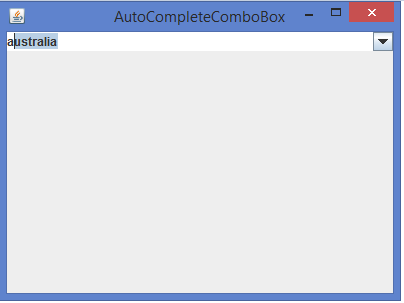

更新於: 2020 年 2 月 12 日
1000+ 瀏覽

廣告