
 資料結構
資料結構 網路
網路 關係資料庫管理系統 (RDBMS)
 作業系統
作業系統 Java
Java MS Excel
 iOS
iOS HTML
HTML CSS
CSS Android
 Python
 C 語言程式設計
 C++
C++ C#
C# MongoDB
 MySQL
MySQL Javascript
 PHP
PHP 物理學
物理學 化學
化學 生物學
生物學 數學
數學 英語
英語 經濟學
經濟學 心理學
心理學 社會學
社會學 服裝學
服裝學 法學
法學使用 apply() 方法突出顯示 Pandas DataFrame 的特定列
在使用 Pandas DataFrame 展示或解釋某些事即時,我們可能需要突出顯示給定資料中重要的行和列,以使其更具吸引力、更易於解釋和視覺效果更佳。突出顯示 Pandas DataFrame 特定列的一種方法是使用內建方法 apply()。
使用 apply() 突出顯示 Pandas DataFrame 的 Python 程式
在直接跳轉到示例程式之前,有必要討論 Pandas 和 apply() 的基礎知識。
Pandas
這是一個開源的 Python 庫,主要用於資料分析和操作。它可以透過對指定資料執行各種操作(例如清洗、過濾、分組、聚合和合並)來處理關係資料和標記資料。
apply() 方法
它用於將使用者定義的方法應用於 Pandas DataFrame 的每個元素。要突出顯示特定列,我們首先需要定義一個自定義方法,該方法定義突出顯示列所需的條件,然後我們使用 apply() 方法以及 style 模組來執行操作。
語法
style.apply(nameOfMethod)
示例 1
以下示例顯示了 apply() 方法的實際實現。
方法
第一步是用引用名稱“pd”匯入 pandas 庫。
建立一個名為“data”的字典,其中包含三個鍵:“Name”、“Age”和“Score”。每個鍵都具有與其關聯的列表作為其值。
現在,定義一個數據框來表示鍵作為列名,其值作為該列的資料。
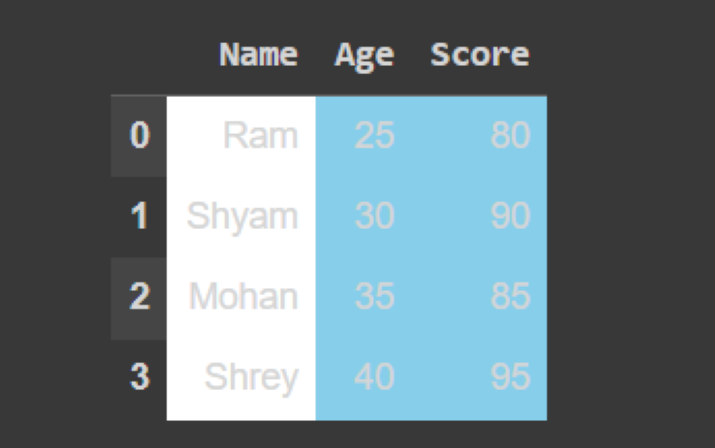
定義一個名為“highlight_columns”的使用者定義方法以及引數“col”。此方法將把“color”變數設定為“skyblue”(對於“Age”和“Score”列)和“White”(對於“Name”列),然後返回。
然後,使用 'apply()' 呼叫此方法來突出顯示指定的列,然後顯示突出顯示的列。
import pandas as pd
# defining a DataFrame
data = {
   'Name': ['Ram', 'Shyam', 'Mohan', 'Shrey'],
   'Age': [25, 30, 35, 40],
   'Score': [80, 90, 85, 95]
}
df = pd.DataFrame(data)
# a user-defined method to highlight specific columns
def highlight_columns(col):
   color = 'skyblue' if col.name in ['Age', 'Score'] else 'white'
   return ['background-color: {}'.format(color) for _ in col]
# calling method using apply()
styled_df = df.style.apply(highlight_columns)
# to show the highlighted column
styled_df
輸出
示例 2
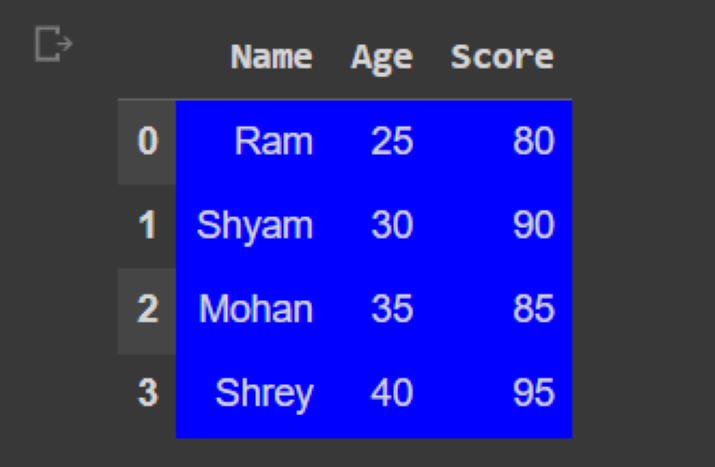
在下面的示例中,我們將使用 apply() 方法突出顯示所有三列。為此,我們只需要將“color”變數設定為“blue”,而無需像在前面的示例中那樣指定任何條件。
import pandas as pd
# defining a DataFrame
data = {
   'Name': ['Ram', 'Shyam', 'Mohan', 'Shrey'],
   'Age': [25, 30, 35, 40],
   'Score': [80, 90, 85, 95]
}
df = pd.DataFrame(data)
# a user-defined method to highlight specific columns
def highlight_columns(col):
   color = 'blue'
   return ['background-color: {}'.format(color) for _ in col]
# calling method using apply()
styled_df = df.style.apply(highlight_columns)
# to show the highlighted portion
styled_df
輸出
示例 3
在這個示例中,我們將根據定義的條件僅突出顯示給定列的特定資料。
方法
與前兩個示例一樣,我們將匯入 pandas 庫並建立一個字典。
在“highlight_columns()”方法內,使用 elif 語句定義多個條件來突出顯示列。
如果列名為“Age”,我們將遍歷列中的每個值,並檢查它是否大於 30。如果是,我們將背景色設定為藍色。
如果列名為“Score”,我們將遍歷列中的每個值,並檢查它是否大於或等於 90。如果是,我們將背景色設定為綠色。
然後,使用 'apply()' 呼叫此方法來突出顯示指定的列,然後顯示突出顯示的列。
import pandas as pd
# defining a DataFrame
data = {
   'Name': ['Ram', 'Shyam', 'Mohan', 'Shrey'],
   'Age': [25, 30, 35, 40],
   'Score': [80, 90, 85, 95]
}
df = pd.DataFrame(data)
# method for highlighting specific columns
def highlight_columns(col):
   if col.name == 'Age':
      return ['background-color: blue' if val > 30 else '' for val in col]
   elif col.name == 'Score':
      return ['background-color: green' if val >= 90 else '' for val in col]
   else:
      return ['' for _ in col]
# calling the method using apply()
styled_df = df.style.apply(highlight_columns)
# to display the highlighted DataFrame
styled_df
輸出

結論
在本文中,我們學習瞭如何在突出顯示指定列的資料時使用 apply() 方法。它與 Pandas 的 style 模組一起使用。我們還了解了如何建立 Pandas DataFrame。

2K+ 次瀏覽
