
 資料結構
資料結構 網路
網路 關係資料庫管理系統
 作業系統
作業系統 Java
Java MS Excel
 iOS
iOS HTML
HTML CSS
CSS Android
 Python
 C 程式設計
 C++
C++ C#
C# MongoDB
 MySQL
MySQL Javascript
 PHP
PHP 物理學
物理學 化學
化學 生物學
生物學 數學
數學 英語
英語 經濟學
經濟學 心理學
心理學 社會學
社會學 時尚研究
時尚研究 法律研究
法律研究Python Tkinter 應用的功能測試示例
假設我們有一個基於 GUI 的 Python tkinter 應用程式,它接收使用者的文字輸入並透過將其儲存到新的文字檔案中進行驗證。該檔案包含使用者輸入的相同文字。我們可以從檔案中檢查和驗證使用者輸入。
在功能測試中,我們主要關注後端 API、資料庫、使用者-伺服器通訊、輸入和輸出等。
要使用功能測試策略檢查應用程式,我們必須首先了解使用者需求和輸入/輸出。在測試預階段之後,我們針對不同的測試用例測試我們的應用程式。
例如,我們有一個基於 GUI 的 tkinter 應用程式,它接收使用者輸入並將其以文字檔案的形式儲存在系統中。
示例
from tkinter import *

win = Tk()

win.geometry("700x600")

# Create title label
title_label = Label(win, text="Enter the File Name")
title_label.pack(anchor='n')

# Create title entry
title_entry = Entry(win, width=35)
title_entry.pack(anchor='nw')

# Create save button and function
def save():
   # Get contents of title entry and text entry
   # Create a file to write these contents in to it
   file_title = title_entry.get()
   file_contents = text_entry.get(0.0, END)
   with open(file_title + ".txt", "w") as file:
      file.write(file_contents)
      print("File successfully created")
      file.close()
   pass
#Create a save button to save the content of the file
save_button = Button(win, text="Save The File", command=save)
save_button.pack()

# Create text entry
text_entry = Text(win, width=40, height=30, border=4, relief=RAISED)
text_entry.pack()

win.mainloop()
輸出
執行以上程式碼將建立一個如下所示的視窗,
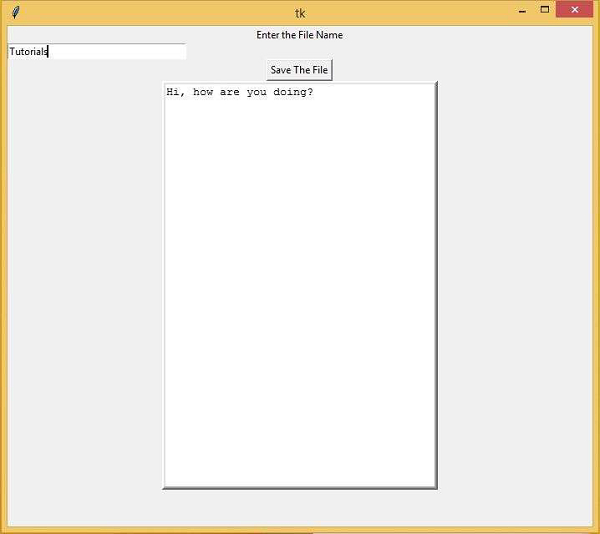
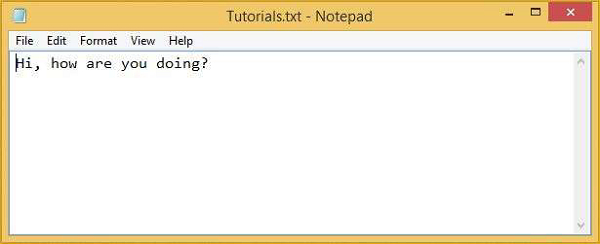
一旦我們點選“儲存檔案”按鈕,它將檔名儲存為“Tutorials.txt”。
現在,轉到檔案位置並從外部開啟文字檔案。它將包含與使用者輸入相同的文字。

更新於: 2021年3月4日
3K+ 閱讀量

廣告