
 資料結構
資料結構 網路
網路 關係型資料庫管理系統 (RDBMS)
 作業系統
作業系統 Java
Java MS Excel
 iOS
iOS HTML
HTML CSS
CSS Android
 Python
 C語言程式設計
 C++
C++ C#
C# MongoDB
 MySQL
MySQL Javascript
 PHP
PHP 物理學
物理學 化學
化學 生物學
生物學 數學
數學 英語
英語 經濟學
經濟學 心理學
心理學 社會學
社會學 服裝設計
服裝設計 法律研究
法律研究PowerShell異常處理
在本文中,我們將學習以下幾點。
什麼是PowerShell中的異常?
終止錯誤和非終止錯誤。
使用Try/Catch塊。
將非終止錯誤轉換為終止錯誤。
處理實際的異常訊息。
什麼是PowerShell中的異常?
PowerShell或其他程式語言中的異常是可以處理的錯誤或意外結果。例如,執行過程中找不到檔案,或將數字除以零。
如果未正確處理異常,則可能會停止指令碼執行。
終止錯誤和非終止錯誤
非終止錯誤不會中斷指令碼執行,即使在指令碼中檢測到錯誤,指令碼也會繼續執行。以下是非終止錯誤的示例。
示例1
if(Get-Service -Name DoesntExist) {
   Write-Output "Service Found"
}else {
   Write-Output "Service not found"
}
Write-Output "This Line will be printed"
輸出

正如您所看到的,即使找不到服務名稱,Write-Output 也會被列印。因此,指令碼執行繼續。
終止錯誤會在發現錯誤時停止指令碼執行,如果您的程式沒有設計成處理此類錯誤,則會被認為是一個嚴重的問題;有時,當我們需要在出現問題時終止指令碼時,它們會很有用。
“Throw”命令會終止指令碼。
示例2
if(Get-Service -Name DoesntExist) {
   Write-Output "Service Found"
}else {
   throw "Service not found"
}
Write-Output "This Line will be printed"
輸出
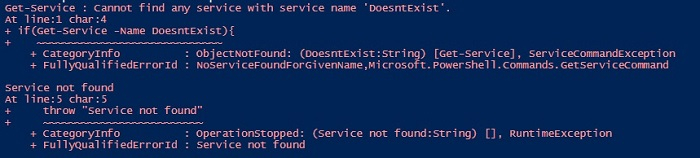
正如您所看到的,“write-output”由於“throw”命令而未被列印,它已終止。
使用Try/Catch塊處理異常
讓我們將這段程式碼寫入try/catch塊中,這是程式語言中常用的異常處理方法。
示例3
try {
   if(Get-Service -Name DoesntExist) {
      Write-Output "Service Found"
   }else {
      Write-Output "Service not found"
   }
   Write-Output "This Line will be printed"
}catch {
   Write-Output "Error Occured"
}
輸出

與示例1的輸出相同,這裡沒有使用try/catch塊。我們將在幾分鐘內對指令碼進行一些更改,以便更容易地使用try/catch塊。
讓我們將示例2轉換為try/catch塊。
示例4
try {
   if(Get-Service -Name DoesntExist) {
      Write-Output "Service Found"
   }else {
      throw "Service not found"
   }
   Write-Output "This Line will be printed"
}catch {
   Write-Output "Error Occured"
}
輸出

因此,throw命令終止指令碼並移動到catch塊,並顯示異常輸出。但是,我們仍然會收到錯誤訊息(紅色顯示),並且catch輸出稍後顯示。
將非終止錯誤轉換為終止錯誤
處理此異常的更好方法是使用ErrorAction引數或$ErrorActionPreference變數將非終止錯誤轉換為終止錯誤。預設情況下,PowerShell為此變數設定的值為Continue,因此如果發生錯誤,程式將繼續執行。如果我們將此變數或引數值設定為“Stop”,並且cmdlet發生錯誤,則它會在try塊中終止指令碼,並在catch塊中繼續執行。
示例5
try {
   if(Get-Service -Name DoesntExist -ErrorAction Stop) {
      Write-Output "Service Found"
   }else {
      Write-Output "Service not found"
   }
   Write-Output "This Line will be printed"
}catch {
   Write-Host "Error Occured" -f Red
}
輸出
Error Occured
正如您所看到的,它只顯示catch塊,因為服務不存在。讓我們使用$ErrorActionPreference變數,它作為-ErrorAction引數的替代方案,但適用於整個指令碼。
示例6
$ErrorActionPreference = "Stop"
try {
   if(Get-Service -Name DoesntExist) {
      Write-Output "Service Found"
   }
}catch {
   Write-Host "Error Occured" -f Red
}
輸出將與上面相同。
處理實際的錯誤訊息
您可以直接捕獲cmdlet生成的錯誤訊息,而不是編寫自定義錯誤訊息,如下所示。
示例7
$ErrorActionPreference = "Stop"
try {
   if(Get-Service -Name DoesntExist) {
      Write-Output "Service Found"
   }
}catch {
   $_.Exception
}
輸出


瀏覽量:10K+
