
 資料結構
資料結構 網路
網路 RDBMS
RDBMS 作業系統
作業系統 Java
Java MS Excel
 iOS
iOS HTML
HTML CSS
CSS Android
 Python
 C 程式設計
 C++
C++ C#
C# MongoDB
 MySQL
MySQL Javascript
 PHP
PHP 物理學
物理學 化學
化學 生物學
生物學 數學
數學 英語
英語 經濟學
經濟學 心理學
心理學 社會學
社會學 時裝學
時裝學 法律碩士
法律碩士利用 Android 中的 Timber 提升你的記錄體驗
Timber 庫是 Android Log 的擴充套件庫。在開發 Android 應用程式時,大多數開發者更喜歡使用 Android Log。但問題在於在部署 Android 專案時如何清洗日誌。使用 Timber 庫可以避免此過程。
本例演示如何在 Android 中整合 Timber。
步驟 1 − 在 Android Studio 中建立新專案,轉到檔案 ⇒ 新專案,然後填寫所有必填項以建立新專案。
步驟 2 − 如下所示在 build.gradle 中新增 Timber 庫
apply plugin: 'com.android.application'
android {
   compileSdkVersion 28
   defaultConfig {
      applicationId "com.example.andy.myapplication"
      minSdkVersion 15
      targetSdkVersion 28
      versionCode 1
      versionName "1.0"
      testInstrumentationRunner "android.support.test.runner.AndroidJUnitRunner"
   }
   buildTypes {
      release {
         minifyEnabled false
         proguardFiles getDefaultProguardFile('proguard-android.txt'), 'proguard-rules.pro'
      }
   }
}
dependencies {
   implementation fileTree(dir: 'libs', include: ['*.jar'])
   implementation 'com.android.support:appcompat-v7:28.0.0'
   implementation 'com.android.support.constraint:constraint-layout:1.1.3'
   testImplementation 'junit:junit:4.12'
   implementation 'com.jakewharton.timber:timber:4.7.1'
   androidTestImplementation 'com.android.support.test:runner:1.0.2'
   androidTestImplementation 'com.android.support.test.espresso:espresso-core:3.0.2'
}
步驟 3 − 如下所示必須在 MainActivity 中的 onCreate 方法中初始化 Timber。
import android.os.Bundle;
import android.support.v7.app.AppCompatActivity;
import timber.log.Timber;
public class MainActivity extends AppCompatActivity {
   @Override
   protected void onCreate(Bundle savedInstanceState) {
      super.onCreate(savedInstanceState);
      setContentView(R.layout.activity_main);
      if (BuildConfig.DEBUG) {
         Timber.plant(new Timber.DebugTree());
      }
   }
}
步驟 4 −Timber 有不同的錯誤和警告方法,如下所示。
Timber.v("Some Text");- It indicates about verbose error
Timber.d("Some Text ");- It indicates about debug error
Timber.i("Some Text ");- It indicates about information error
Timber.w("Some Text ");- It indicates about warning error
Timber.e("Some Text ");- It indicates about error
步驟 5 − Timber 的一個簡單示例如下所示。
package com.example.andy.myapplication;
import android.os.Bundle;
import android.support.v7.app.AppCompatActivity;
import timber.log.Timber;
public class MainActivity extends AppCompatActivity {
   @Override
   protected void onCreate(Bundle savedInstanceState) {
      super.onCreate(savedInstanceState);
      setContentView(R.layout.activity_main);
      if (BuildConfig.DEBUG) {
         Timber.plant(new Timber.DebugTree());
      } else {
         Timber.plant(new ReleaseTree());
      }
      Timber.v("Some Text");
      Timber.d("Some Text ");
      Timber.i("Some Text ");
      Timber.w("Some Text ");
      Timber.e("Some Text ");
   }
}
步驟 6 − 在上述示例中,我們根本不會更改任何內容以檢視和展示。
上述程式碼的示例輸出如下所示 −
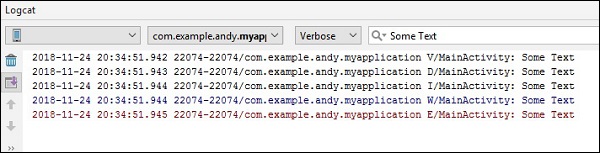
點選此處下載專案程式碼

更新日期:30-07-2019
337 瀏覽

廣告