
 資料結構
資料結構 網路
網路 關係型資料庫管理系統
 作業系統
作業系統 Java
Java MS Excel
 iOS
iOS HTML
HTML CSS
CSS Android
 Python
 C 程式設計
 C++
C++ C#
C# MongoDB
 MySQL
MySQL Javascript
 PHP
PHP 物理
物理 化學
化學 生物學
生物學 數學
數學 英語
英語 經濟學
經濟學 心理學
心理學 社會學
社會學 時尚設計
時尚設計 法律
法律使用 CSS 影像精靈建立導航選單
使用影像精靈可以減少 http 請求次數,從而加快我們的網站載入時間。
以下是使用 CSS 影像精靈建立導航選單的程式碼 −
示例
<!DOCTYPE html>
<html>
<head>
<style>
body {
   font-family: "Segoe UI", Tahoma, Geneva, Verdana, sans-serif;
   margin: 0px;
}
span {
   width: 200px;
   height: 300px;
   background-color: black;
}
nav {
   background-color: black;
   height: 50px;
   padding-top: 15px;
   padding-left: 10px;
}
nav a {
   font-size: 20px;
   color: white;
   text-decoration: none;
   margin-right: 10px;
}
.home {
   width: 32px;
   height: 32px;
   background: url("css_sprites.png") -62px -62px;
}
.search {
   width: 32px;
   height: 32px;
   background: url("css_sprites.png") -10px -62px;
}
.phone {
   width: 32px;
   height: 32px;
   background: url("css_sprites.png") -62px -10px;
}
.user {
   width: 32px;
   height: 32px;
   background: url("css_sprites.png") -10px -10px;
}
</style>
</head>
<body>
<nav>
<img class="home" />
<a href="">HOME</a>
<img class="phone" />
<a href="">Call Us</a>
<img class="user" />
<a href="">Our Team</a>
<img class="search" />
<a href="">Search</a>
</nav>
<h1>
Main content here
</h1>
<p>Lorem ipsum dolor sit amet consectetur adipisicing elit. Animi, non! Numquam
reprehenderit alias, nisi eos corrupti repudiandae deleniti illo officiis!</p>
</body>
</html>
輸出
以上程式碼將產生以下輸出 −
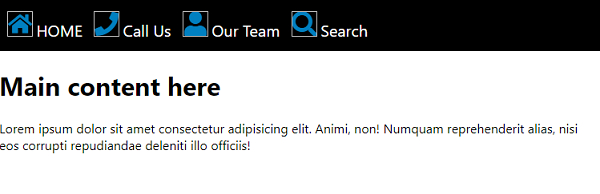

更新於: 11-May-2020
446 次瀏覽

Advertisements