
 資料結構
資料結構 網路
網路 關係資料庫管理系統 (RDBMS)
 作業系統
作業系統 Java
Java MS Excel
 iOS
iOS HTML
HTML CSS
CSS Android
 Python
 C語言程式設計
 C++
C++ C#
C# MongoDB
 MySQL
MySQL Javascript
 PHP
PHP 物理學
物理學 化學
化學 生物學
生物學 數學
數學 英語
英語 經濟學
經濟學 心理學
心理學 社會學
社會學 時尚研究
時尚研究 法律研究
法律研究如何使用 CSS 建立一個動畫的可關閉側邊導航選單?
要建立一個動畫的可關閉側邊導航選單,需要提供一種機制,以便單擊按鈕即可關閉和開啟它。選單透過按鈕開啟,透過“x”關閉。為此使用了事件監聽器,並呼叫函式來設定導航選單的寬度。
假設網頁上有一個這樣的按鈕:
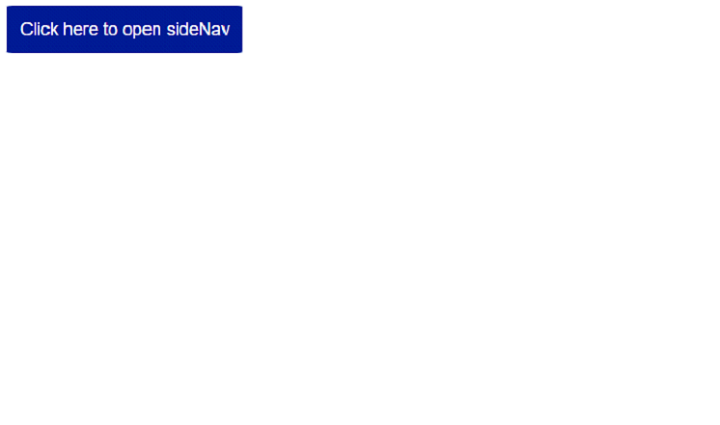
單擊上面的按鈕,側邊導航欄就會開啟:
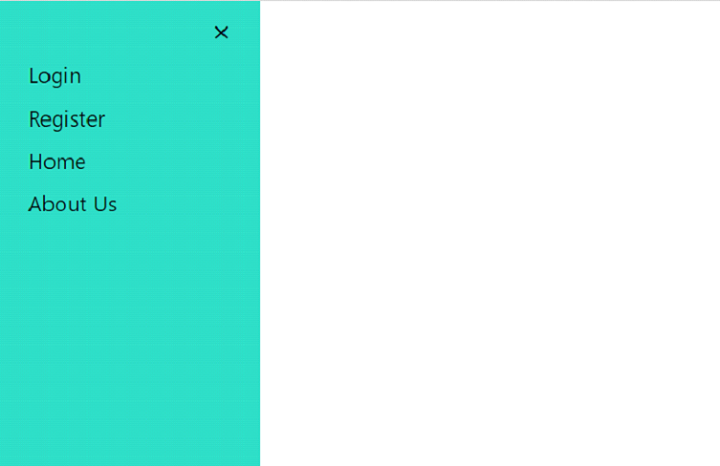
建立用於開啟選單的按鈕
首先,設定一個按鈕來開啟導航選單:
<button class="openSideNav">Click here to open sideNav</button>
單擊按鈕時,呼叫函式showNav(),使用事件監聽器開啟導航選單:
let openBtn = document.querySelector(".openSideNav");
openBtn.addEventListener("click", () => {
   showNav();
});
showNav() 函式設定寬度:
function showNav() {
   document.querySelector(".sideNav").style.width = "300px";
}
建立用於關閉選單的按鈕
要設定關閉按鈕,使用“x”來關閉它,並在單擊“x”時呼叫一個函式:
<a href="#" class="closeBtn">×</a>
單擊關閉按鈕“x”時,將呼叫hideNav() 函式:
let closeBtn = document.querySelector(".closeBtn");
closeBtn.addEventListener("click", () => {
hideNav();
});
hideNav() 函式將寬度設定為隱藏選單:
function hideNav() {
   document.querySelector(".sideNav").style.width = "0";
}
設定導航選單
既然我們知道如何開啟和關閉選單,讓我們看看如何設定導航樣式:
<nav class="sideNav">
設定導航選單樣式
sideNav 的樣式如下所示。這裡,height: 100vh; 表示此元素的高度等於視口高度的 100%。位置是固定的,因為我們需要一個固定的導航選單:
.sideNav {
   height: 100vh;
   width: 0;
   position: fixed;
   z-index: 1;
   top: 0;
   left: 0;
   background-color: rgb(46, 218, 195);
   overflow-x: hidden;
   padding-top: 60px;
   transition: 0.5s;
}
設定菜單鏈接樣式
連結樣式如下:
.sideNav a {
   padding: 8px 8px 8px 32px;
   text-decoration: none;
   font-size: 25px;
   color: #000000;
   font-family: "Segoe UI", Tahoma, Geneva, Verdana, sans-serif;
   display: block;
   transition: 0.3s;
}
示例
以下是建立動畫的可關閉側邊導航選單的程式碼:
<!DOCTYPE html>
<html lang="en" >
<head>
   <meta charset="UTF-8" />
   <meta name="viewport" content="width=device-width, initial-scale=1.0" />
   <title>Document</title>
   <style>
      .sideNav {
         height: 100vh;
         width: 0;
         position: fixed;
         z-index: 1;
         top: 0;
         left: 0;
         background-color: rgb(46, 218, 195);
         overflow-x: hidden;
         padding-top: 60px;
         transition: 0.5s;
      }
      .sideNav a {
         padding: 8px 8px 8px 32px;
         text-decoration: none;
         font-size: 25px;
         color: #000000;
         font-family: "Segoe UI", Tahoma, Geneva, Verdana, sans-serif;
         display: block;
         transition: 0.3s;
      }
      .sidenav a:hover {
         color: #f1f1f1;
      }
      .sideNav .closeBtn {
         position: absolute;
         top: 0;
         right: 25px;
         font-size: 36px;
         margin-left: 50px;
      }
      button {
         padding: 15px;
         background-color: rgb(0, 27, 145);
         color: rgb(255, 255, 255);
         font-size: 20px;
         border: none;
         border-radius: 2%;
      }
   </style>
</head>
<body>
   <nav class="sideNav">
      <a href="#" class="closeBtn">×</a>
      <a href="#">Login</a>
      <a href="#">Register</a>
      <a href="#">Home</a>
      <a href="#">About Us</a>
   </nav>
   <button class="openSideNav">Click here to open sideNav</button>
   <script>
      let openBtn = document.querySelector(".openSideNav");
      openBtn.addEventListener("click", () => {
         showNav();
      });
      let closeBtn = document.querySelector(".closeBtn");
      closeBtn.addEventListener("click", () => {
         hideNav();
      });
      function showNav() {
         document.querySelector(".sideNav").style.width = "300px";
      }
      function hideNav() {
         document.querySelector(".sideNav").style.width = "0";
      }
   </script>
</body>
</html>

更新於:2023年10月27日
347 次瀏覽

廣告