
 資料結構
資料結構 網路
網路 關係資料庫管理系統 (RDBMS)
 作業系統
作業系統 Java
Java MS Excel
 iOS
iOS HTML
HTML CSS
CSS Android
 Python
 C語言程式設計
 C++
C++ C#
C# MongoDB
 MySQL
MySQL Javascript
 PHP
PHP 物理學
物理學 化學
化學 生物學
生物學 數學
數學 英語
英語 經濟學
經濟學 心理學
心理學 社會學
社會學 服裝設計
服裝設計 法律研究
法律研究如何使用HTML和CSS建立一個mega選單(導航欄中全寬下拉選單)?
mega選單包含帶下拉選單的選單。下拉選單將具有完整的設定,用於建立行和列以及新增如下內容:
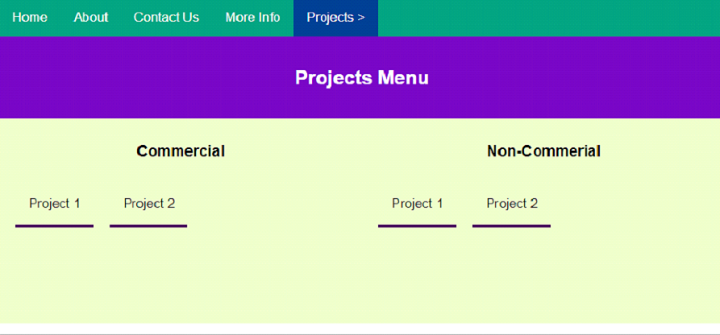
mega選單,即導航欄中的全寬下拉選單,外觀如下:

單擊“**專案**”下拉選單時,將出現下拉選單:
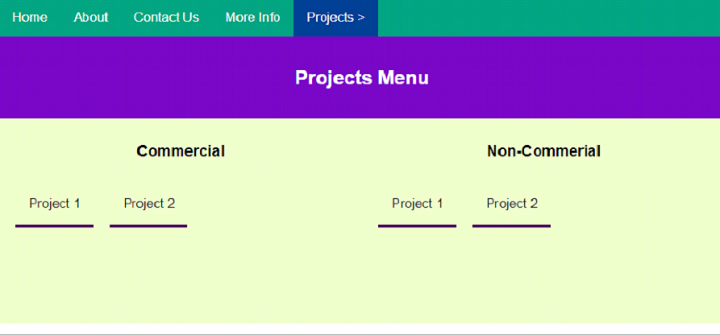
設定導航選單
我們已將菜單鏈接設定在<nav>內。
<nav>
   <a class="links" href="#">Home</a>
   <a class="links" href="#">About</a>
   <a class="links" href="#">Contact Us</a>
   <a class="links" href="#">More Info</a>
</nav>
設定選單和連結樣式
導航選單和連結的樣式如下:
nav {
   overflow: hidden;
   background-color: rgb(2, 161, 127);
   font-family: Arial, Helvetica, sans-serif;
}
nav a {
   float: left;
   font-size: 16px;
   color: white;
   text-align: center;
   padding: 14px 16px;
   text-decoration: none;
}
全寬下拉選單
這是我們的全寬下拉選單。我們為行和列設定了不同的div,使其成為一個mega下拉選單:
<div class="dropdown">
   <button class="megaButton">Projects ></button>
   <div class="megaContent">
      <div class="megaHeader">
         <h2>Projects Menu</h2>
      </div>
      <div class="megaRow">
         <div class="megaColumn">
            <h3>Commercial</h3>
            <a class="links" href="#">Project 1</a>
            <a class="links" href="#">Project 2</a>
         </div>
         <div class="megaColumn">
            <h3>Non-Commerial</h3>
            <a class="links" href="#">Project 1</a>
            <a class="links" href="#">Project 2</a>
         </div>
      </div>
   </div>
</div>
設定下拉選單的按鈕和內容樣式
讓我們設定megamenu的樣式,包括按鈕、內容等:
.dropdown {
   float: left;
   overflow: hidden;
}
.dropdown .megaButton {
   font-size: 16px;
   border: none;
   outline: none;
   color: white;
   padding: 14px 16px;
   background-color: inherit;
   font: inherit;
   margin: 0;
}
nav a:hover, .dropdown:hover .megaButton {
   background-color: rgb(0, 63, 146);
}
.megaContent {
   text-align: center;
   display: none;
   position: absolute;
   background-color: #f9f9f9;
   width: 100%;
   left: 0;
   z-index: 1;
}
.megaContent .megaHeader {
   background: rgb(119, 6, 194);
   padding: 16px;
   color: white;
}
.dropdown:hover .megaContent {
   display: block;
}
設定下拉選單的列樣式
我們已經為mega選單下拉選單設定了列樣式。方向設定為左,連結也已設定樣式:
.megaColumn {
   float: left;
   width: 50%;
   padding: 10px;
   background-color: rgb(233, 255, 198);
   height: 250px;
}
.megaColumn .links {
   color: black;
   padding: 16px;
   margin:10px;
   text-decoration: none;
   display: block;
   text-align: left;
   border-bottom: 4px solid rgb(69, 0, 90);
}
.megaColumn a:hover {
   background-color: lightblue;
}
建立Mega選單
示例
以下是使用HTML和CSS建立mega選單的程式碼:
<!DOCTYPE html>
<html>
<head>
   <style>
      body {
         margin: 0;
         padding: 0;
      }
      *,*::before,*::after{
         box-sizing: border-box;
      }
      nav {
         overflow: hidden;
         background-color: rgb(2, 161, 127);
         font-family: Arial, Helvetica, sans-serif;
      }
      nav a {
         float: left;
         font-size: 16px;
         color: white;
         text-align: center;
         padding: 14px 16px;
         text-decoration: none;
      }
      .dropdown {
         float: left;
         overflow: hidden;
      }
      .dropdown .megaButton {
         font-size: 16px;
         border: none;
         outline: none;
         color: white;
         padding: 14px 16px;
         background-color: inherit;
         font: inherit;
         margin: 0;
      }
      nav a:hover, .dropdown:hover .megaButton {
         background-color: rgb(0, 63, 146);
      }
      .megaContent {
         text-align: center;
         display: none;
         position: absolute;
         background-color: #f9f9f9;
         width: 100%;
         left: 0;
         z-index: 1;
      }
      .megaContent .megaHeader {
         background: rgb(119, 6, 194);
         padding: 16px;
         color: white;
      }
      .dropdown:hover .megaContent {
         display: block;
      }
      .megaColumn {
         float: left;
         width: 50%;
         padding: 10px;
         background-color: rgb(233, 255, 198);
         height: 250px;
      }
      .megaColumn .links {
         color: black;
         padding: 16px;
         margin:10px;
         text-decoration: none;
         display: block;
         text-align: left;
         border-bottom: 4px solid rgb(69, 0, 90);
      }
      .megaColumn a:hover {
         background-color: lightblue;
      }
      /*Float reset trick for clearing floats*/
      .megaRow:after {
         content: "";
         display: table;
         clear: both;
      }
   </style>
</head>
<body>
   <nav>
      <a class="links" href="#">Home</a>
      <a class="links" href="#">About</a>
      <a class="links" href="#">Contact Us</a>
      <a class="links" href="#">More Info</a>
      <div class="dropdown">
         <button class="megaButton">Projects ></button>
         <div class="megaContent">
            <div class="megaHeader">
               <h2>Projects Menu</h2>
            </div>
            <div class="megaRow">
               <div class="megaColumn">
                  <h3>Commercial</h3>
                  <a class="links" href="#">Project 1</a>
                  <a class="links" href="#">Project 2</a>
               </div>
               <div class="megaColumn">
                  <h3>Non-Commerial</h3>
                  <a class="links" href="#">Project 1</a>
                  <a class="links" href="#">Project 2</a>
               </div>
            </div>
         </div>
      </div>
   </nav>
</body>
</html>

更新於:2023年10月27日
2K+ 瀏覽量

廣告