
 資料結構
資料結構 網路
網路 關係型資料庫管理系統
 作業系統
作業系統 Java
Java MS Excel
 iOS
iOS HTML
HTML CSS
CSS Android
 Python
 C 程式設計
 C++
C++ C#
C# MongoDB
 MySQL
MySQL Javascript
 PHP
PHP 物理
物理 化學
化學 生物
生物 數學
數學 英語
英語 經濟
經濟 心理學
心理學 社會學
社會學 時尚研究
時尚研究 法律研究
法律研究使用 Python 中的 openpyxl 在 excel 檔案中進行算術運算
Python 可以幫助我們直接從 Python 環境使用 Excel 檔案。我們可以引用 Excel 中的每個單元格或單元格區域,並對這些單元格應用算術運算子。這些運算的結果也可以儲存在特定單元格中,這些單元格的位置可以由 Python 程式指定。
在以下示例中,我們使用 Excel 的內建函式執行各種算術運算。例如單元格內的數字總和或平均值。結果也儲存在特定位置。我們使用 openpyxl 模組,該模組開啟一個工作簿並將其標記為活動。然後,我們儲存某些值在預定義的單元格中,然後將這些單元格上的函式應用到儲存在其他單元格中的結果。
示例
import openpyxl

excel = openpyxl.Workbook()

excel_file = excel.active

excel_file['A1'] = 50
excel_file['B1'] = 100
excel_file['C1'] = 150
excel_file['D1'] = 200
excel_file['E1'] = 250

excel_file['A3'] = 20
excel_file['B3'] = 40
excel_file['C3'] = 60
excel_file['D3'] = 80
excel_file['E3'] = 100

excel_file['A5'] = 2
excel_file['B5'] = 4
excel_file['C5'] = 6
excel_file['D5'] = 9
excel_file['E5'] = 15

excel_file['A7'] = 4
excel_file['B7'] = 11
excel_file['C7'] = 27
excel_file['D7'] = 40
excel_file['E7'] = 75

excel_file['F1'] = 'Sum(A1 to E1)'
excel_file['G1'] = '= SUM(A1:E1)'
excel_file['F3'] = 'Sum(A3 to E3)'
excel_file['G3'] = '= AVERAGE(A3:E3)'
excel_file['F5'] = 'Product(A5 to E5)'
excel_file['G5'] = '= PRODUCT(A5:E5)'
excel_file['F7'] = 'Count(A7 to E7)'
excel_file['G7'] = '= COUNT(A7:E7)'

excel.save("D:\Arithmetic_operations.xlsx")
輸出
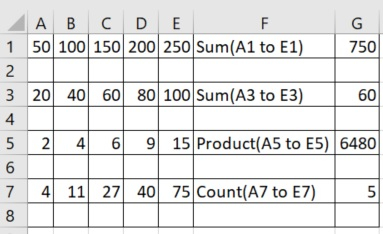
執行以上程式碼,得到以下結果 −

更新於: 2020-07-22
310 次瀏覽

廣告