
 資料結構
資料結構 網路
網路 RDBMS
RDBMS 作業系統
作業系統 Java
Java MS Excel
 iOS
iOS HTML
HTML CSS
CSS Android
 Python
 C程式設計
C程式設計 C++
C++ C#
C# MongoDB
 MySQL
MySQL Javascript
 PHP
PHP 物理學
物理學 化學
化學 生物學
生物學 數學
數學 英語
英語 經濟學
經濟學 心理學
心理學 社會學
社會學 時尚研究
時尚研究 法律研究
法律研究編寫Python程式以將資料框架匯出到html檔案
假設我們已經儲存了pandas.csv檔案並將其匯出為Html格式
解決方案
為解決此問題,我們將按照以下步驟操作:
使用read_csv方法讀取csv檔案,如下所示:
df = pd.read_csv('pandas.csv')使用檔案物件建立新的檔案pandas.html並設定為寫入模式,
f = open('pandas.html','w')宣告result變數將資料框架轉換為html檔案格式,
result = df.to_html()
使用檔案物件,從結果中寫入所有資料。最後關閉檔案物件,
f.write(result)
f.close()
示例
讓我們看看下面的實現,以獲得更好的理解:
import pandas as pd
df = pd.read_csv('pandas.csv')
print(df)
f = open('pandas.html','w')
result = df.to_html()
f.write(result)
f.close()
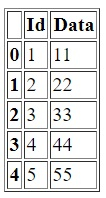
輸出
pandas.html
<table border="1" class="dataframe">
   <thead>
      <tr style="text-align: right;">
         <th></th>
         <th>Id</th>
         <th>Data</th>
      </tr>
   </thead>
   <tbody>
      <tr>
         <th>0</th>
         <td>1</td>
         <td>11</td>
      </tr>
      <tr>
         <th>1</th>
         <td>2</td>
         <td>22</td>
      </tr>
      <tr>
         <th>2</th>
         <td>3</td>
         <td>33</td>
      </tr>
      <tr>
         <th>3</th>
         <td>4</td>
         <td>44</td>
      </tr>
      <tr>
         <th>4</th>
         <td>5</td>
         <td>55</td>
      </tr>
   </tbody>
</table>

更新於:2021年2月24日
1000+次瀏覽

廣告