
 資料結構
資料結構 網路
網路 RDBMS
RDBMS 作業系統
作業系統 Java
Java MS Excel
 iOS
iOS HTML
HTML CSS
CSS Android
 Python
 C 程式設計
 C++
C++ C#
C# MongoDB
 MySQL
MySQL Javascript
 PHP
PHP 物理
物理 化學
化學 生物
生物 數學
數學 英語
英語 經濟
經濟 心理學
心理學 社會研究
社會研究 時尚研究
時尚研究 法律研究
法律研究JDialog 在 Java 中的設定模式型別為 MODELESS 時會發生什麼
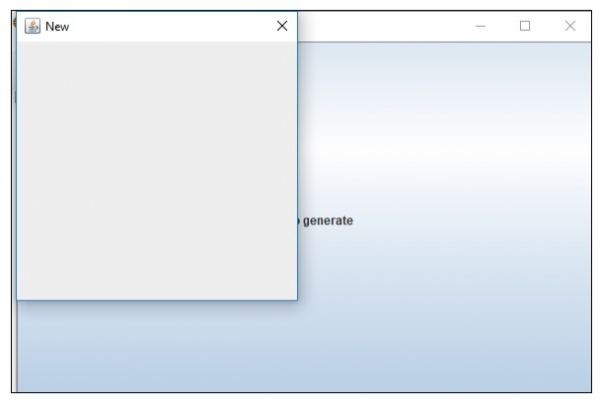
Modeless 對話方塊在螢幕上,並且可以供使用者使用。以下是使用設定模式型別 MODELESS 的 JDialog 的示例
示例
import java.awt.Cursor;
import java.awt.Dialog.ModalityType;
import java.awt.Dimension;
import java.awt.event.ActionEvent;
import javax.swing.AbstractAction;
import javax.swing.JButton;
import javax.swing.JDialog;
import javax.swing.JFrame;
public class SwingDemo {
   public static void main(String[] args) {
      JFrame frame = new JFrame();
      frame.setSize(new Dimension(600, 400));
      JDialog dialog = new JDialog(frame, "New",ModalityType.MODELESS);
      dialog.setSize(300, 300);
      frame.add(new JButton(new AbstractAction("Click to generate") {
         @Override
         public void actionPerformed(ActionEvent e) {
            frame.setCursor(Cursor.getPredefinedCursor(Cursor.WAIT_CURSOR));
            dialog.setVisible(true);
         }
      }));
      frame.setVisible(true);
   }
}
輸出
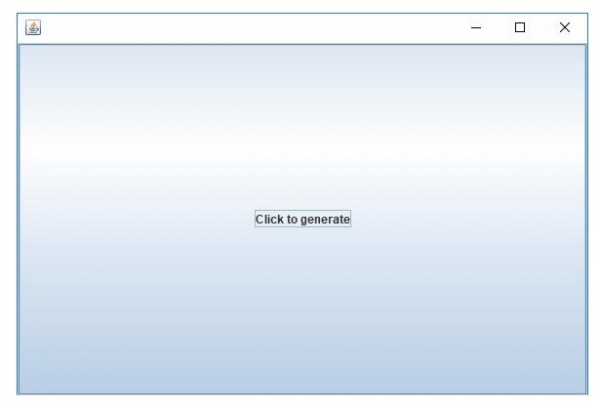
現在,單擊它以生成新的會話。你隨時可以關閉它,因為它是 Modeless

更新於: 2019 年 7 月 30 日
84 次瀏覽

廣告