
 資料結構
資料結構 網路
網路 關係資料庫管理系統
 作業系統
作業系統 Java
Java MS Excel
 iOS
iOS HTML
HTML CSS
CSS Android
 Python
 C 語言程式設計
 C++
C++ C#
C# MongoDB
 MySQL
MySQL Javascript
 PHP
PHP 物理學
物理學 化學
化學 生物學
生物學 數學
數學 英語
英語 經濟學
經濟學 心理學
心理學 社會學
社會學 時尚研究
時尚研究 法律研究
法律研究Java 中 JFrame 和 JDialog 的區別是什麼?\n
JFrame
- 新增到框架中的元件稱為其內容,這些內容由**contentPane**管理。要將元件新增到**JFrame**,我們必須使用其**contentPane**代替。
- **JFrame**包含一個帶有**標題**、**邊框**、(可選)**選單欄**和**使用者指定元件**的視窗。
- **JFrame**可以**移動**、**調整大小**、**最小化**,並且它不是**JComponent**的子類。
- 預設情況下,JFrame 顯示在螢幕的**左上角**。要將框架顯示在指定位置,我們可以在 JFrame 類中使用**setLocation(x, y)**方法。
示例
import java.awt.*;
import java.awt.event.*;
import javax.swing.*;
public class JFrameDemo {
   public static void main(String s[]) {
      JFrame frame = new JFrame("JFrame Demo");
      frame.addWindowListener(new WindowAdapter() {
         public void windowClosing(WindowEvent e) {
            System.exit(0);
         }
      });
      JLabel lbl = new JLabel("JFrame Demo");
      lbl.setPreferredSize(new Dimension(175, 100));
      frame.getContentPane().add(lbl, BorderLayout.CENTER);
      frame.setSize(375, 275);
      frame.setVisible(true);
   }
}
輸出

JDialog
- **JDialog**與**JFrame**非常相似,除了 JDialog 可以設定為**模態**。**模態**意味著在顯示相應的 JDialog 時,無法使用或啟用任何其他視窗。
- **模態對話方塊**阻止對其他頂級視窗的輸入,而**非模態對話方塊**允許對其他視窗進行輸入。
- 與**JFrame**不同,JDialog 在視窗右上角不包含最小化和最大化按鈕。
示例
import javax.swing.JDialog;
import javax.swing.JLabel;
public class JDialogDemo extends JDialog {
   public static void main(String[] args) {
      try {
         JDialogDemo dialog = new JDialogDemo();
         dialog.setVisible(true);
      } catch (Exception e) {
         e.printStackTrace();
      }
   }
   public JDialogDemo() {
      setDefaultCloseOperation(JDialog.DISPOSE_ON_CLOSE);
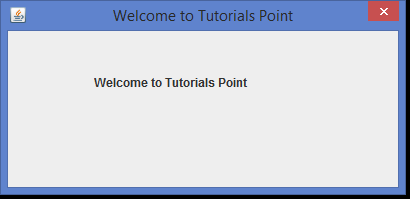
      setTitle("Welcome to Tutorials Point");
      setBounds(100, 100, 359, 174);
      getContentPane().setLayout(null);
      JLabel label = new JLabel("Welcome to Tutorials Point");
      label.setBounds(86, 37, 175, 29);
      getContentPane().add(label);
   }
}
輸出

更新於: 2020年2月7日
2K+ 次檢視

廣告