
 資料結構
資料結構 網路
網路 RDBMS
RDBMS 作業系統
作業系統 Java
Java MS Excel
 iOS
iOS HTML
HTML CSS
CSS Android
 Python
 C 程式設計
 C++
C++ C#
C# MongoDB
 MySQL
MySQL Javascript
 PHP
PHP 物理學
物理學 化學
化學 生物學
生物學 數學
數學 英語
英語 經濟學
經濟學 心理學
心理學 社會研究
社會研究 時尚研究
時尚研究 法律研究
法律研究Tkinter – 如何根據長度建立彩色線段?
Tkinter 畫布元件是一款多功能元件,通常用於繪製形狀、弧線、物件、顯示影像或任何內容。畫布元件內的物件可用 configure() 方法或透過向屬性提供值而在構造方法內進行修改和配置。
要在畫布元件上建立線段,可以採用 create_lines(x0,x1,x2,x3, fill="color", width, **options) 構造方法。在構造方法中,可以指定 x0(上),x1(右),x2(下) 和 x3(左) 的值,此值決定繪製在畫布元件內的線段長度。
示例
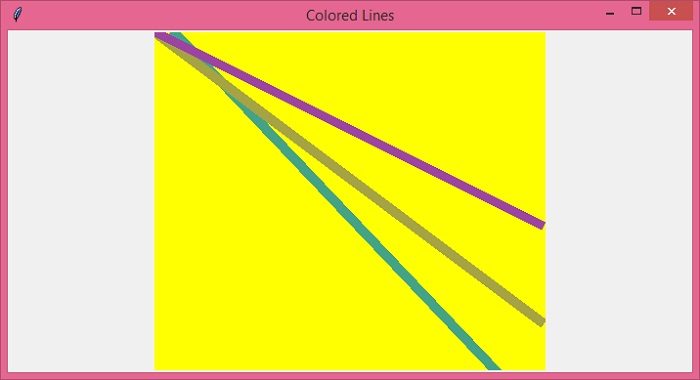
我們舉個例子來了解其工作原理。本例中,將在畫布元件中建立三條不同顏色的線段。
# Import the tkinter library
from tkinter import *

# Create an instance of tkinter canvas by executing it
win = Tk()
win.geometry("700x350")
win.title("Colored Lines")

# Create a canvas widget
my_canvas = Canvas(win, width=400, height=400, background="yellow")
my_canvas.pack()

# Create colored lines by providing length and width
my_canvas.create_line(20, 0, 400, 400, fill="#44a387", width=10)
my_canvas.create_line(0, 0, 400, 300, fill="#a5a344", width=10)
my_canvas.create_line(0, 0, 400, 200, fill="#9d44a3", width=10)

# Run the mainloop
win.mainloop()
輸出
執行上述程式碼將在畫布元件中顯示一些彩色線段。

更新於: 2021 年 12 月 22 日
1K+ 瀏覽

廣告