
 資料結構
資料結構 網路
網路 關係資料庫管理系統 (RDBMS)
 作業系統
作業系統 Java
Java MS Excel
 iOS
iOS HTML
HTML CSS
CSS Android
 Python
 C語言程式設計
 C++
C++ C#
C# MongoDB
 MySQL
MySQL Javascript
 PHP
PHP 物理學
物理學 化學
化學 生物學
生物學 數學
數學 英語
英語 經濟學
經濟學 心理學
心理學 社會學
社會學 服裝設計
服裝設計 法學
法學使用Python傳送Gmail郵件
本文將介紹如何使用Python傳送帶附件的電子郵件。傳送郵件不需要任何外部庫。Python自帶一個名為SMTPlib的模組。它使用SMTP(簡單郵件傳輸協議)傳送郵件,並建立用於郵件傳送的SMTP客戶端會話物件。
SMTP需要有效的發件人和收件人郵箱ID以及埠號。不同網站的埠號各不相同。例如,谷歌的埠號為587。
首先,我們需要匯入用於傳送郵件的模組。
import smtplib
這裡我們還使用了MIME(多用途網際網路郵件擴充套件)模組以提高靈活性。使用MIME標頭,我們可以儲存發件人和收件人資訊以及其他一些詳細資訊。
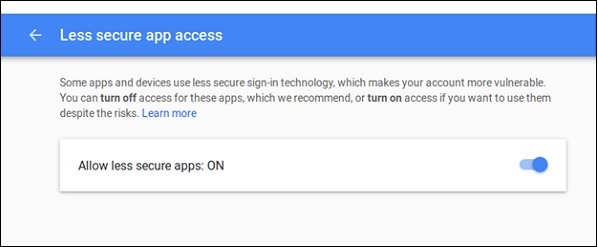
我們使用谷歌的Gmail服務傳送郵件。因此,出於谷歌的安全考慮,我們需要一些設定(如果需要)。如果這些設定沒有配置,那麼如果谷歌不支援來自第三方應用程式的訪問,則以下程式碼可能無法工作。
要允許訪問,我們需要在谷歌帳戶中設定“安全性較低的應用訪問”設定。如果啟用了兩步驗證,則無法使用安全性較低的訪問。
要完成此設定,請訪問谷歌的管理員控制檯,並搜尋“安全性較低的應用”設定。
使用SMTP (smtplib)傳送帶附件郵件的步驟
- 建立MIME
- 在MIME中添加發件人、收件人地址
- 在MIME中新增郵件標題
- 將正文附加到MIME
- 使用有效的埠號和適當的安全功能啟動SMTP會話。
- 登入系統。
- 傳送郵件並退出
示例程式碼
import smtplib
from email.mime.multipart import MIMEMultipart
from email.mime.text import MIMEText
mail_content = '''Hello,
This is a simple mail. There is only text, no attachments are there The mail is sent using Python SMTP library.
Thank You
' ' '
#The mail addresses and password
sender_address = 'sender123@gmail.com'
sender_pass = 'xxxxxxxx'
receiver_address = 'receiver567@gmail.com'
#Setup the MIME
message = MIMEMultipart()
message['From'] = sender_address
message['To'] = receiver_address
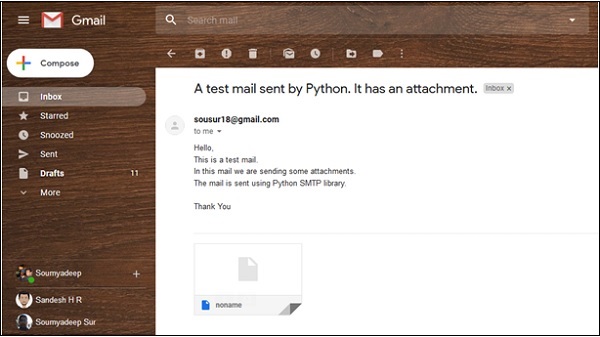
message['Subject'] = 'A test mail sent by Python. It has an attachment.'   #The subject line
#The body and the attachments for the mail
message.attach(MIMEText(mail_content, 'plain'))
#Create SMTP session for sending the mail
session = smtplib.SMTP('smtp.gmail.com', 587) #use gmail with port
session.starttls() #enable security
session.login(sender_address, sender_pass) #login with mail_id and password
text = message.as_string()
session.sendmail(sender_address, receiver_address, text)
session.quit()
print('Mail Sent')
輸出
D:\Python TP\Python 450\linux>python 327.Send_Mail.py
Mail Sent

更新於:2019年7月30日
16K+ 瀏覽量

廣告