
 資料結構
資料結構 網路
網路 RDBMS
RDBMS 作業系統
作業系統 Java
Java MS Excel
 iOS
iOS HTML
HTML CSS
CSS Android
 Python
 C 程式設計
 C++
C++ C#
C# MongoDB
 MySQL
MySQL Javascript
 PHP
PHP 物理
物理 化學
化學 生物
生物 數學
數學 英語
英語 經濟學
經濟學 心理學
心理學 社會學
社會學 時尚研究
時尚研究 法學研究
法學研究Selenium Webdriver 使用類名進行定位策略
透過類名可以用作 Selenium webdriver 中的定位策略。我們可利用帶有定位符的類屬性(如類名、css 和 xpath)識別元素。要使用 css 定位 web 元素,語法為 tagname[class='value'],要使用的方法為 By.cssSelector。
要使用 xpath 定位 web 元素,語法為 //tagname[@class='value']。然後,我們必須使用 By.xpath 方法來定位它。要使用定位符類名定位元素,我們必須使用 By.className 方法。
我們來看一下具有類屬性的 web 元素的 html 程式碼 −

語法
WebElement elm = driver. findElement(By.className("input__input"));
WebElement p = driver.findElement(By.xpath("//input[@class = ' input__input']"));
WebElement t = driver. findElement(By.cssSelector("input[class=' input__input']"));
示例
import org.openqa.selenium.By;
import org.openqa.selenium.WebDriver;
import org.openqa.selenium.WebElement;
import org.openqa.selenium.firefox.FirefoxDriver;
import java.util.concurrent.TimeUnit;
public class ClsNameStrategy{
   public static void main(String[] args) {
      System.setProperty("webdriver.gecko.driver",
      "C:\Users\ghs6kor\Desktop\Java\geckodriver.exe");
      WebDriver driver = new FirefoxDriver();
      //implicit wait
      driver.manage().timeouts().implicitlyWait(5, TimeUnit.SECONDS);
      //URL launch
      driver.get("https://www.linkedin.com/");
      // identify element class name
      WebElement elm = driver.findElement(By.className("input__input"));
      elm.sendKeys("abc@gmail.com");
      //identify with cssSelector
      WebElement c= driver.findElement(By.cssSelector("input[class='input__input']"));
      String str = c.getAttribute("value");
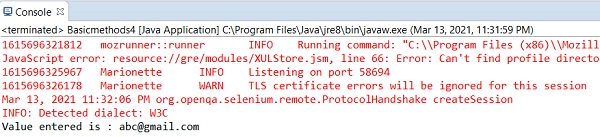
      System.out.println("Value entered is : " + str);
      //identify with xpath
      WebElement x = driver.
      findElement(By.xpath("//input[@class='input__input']"));

      x.clear();
      driver.close();
   }
}
輸出

更新日期: 06-Apr-2021
654 次瀏覽

廣告