
 資料結構
資料結構 網路
網路 關係型資料庫管理系統
 作業系統
作業系統 Java
Java MS Excel
 iOS
iOS HTML
HTML CSS
CSS Android
 Python
 C 程式設計
 C++
C++ C#
C# MongoDB
 MySQL
MySQL Javascript
 PHP
PHP 物理學
物理學 化學
化學 生物學
生物學 數學
數學 英語
英語 經濟學
經濟學 心理學
心理學 社會學
社會學 時尚研究
時尚研究 法律研究
法律研究Selenium WebDriver 和下拉框。
我們可以使用 Selenium webdriver 處理下拉選單。Selenium 中的靜態下拉選單透過 **Select** 類處理,並且下拉選單應在 html 程式碼中使用 **<select>** 標籤識別。
讓我們看看靜態下拉選單的 html 程式碼。
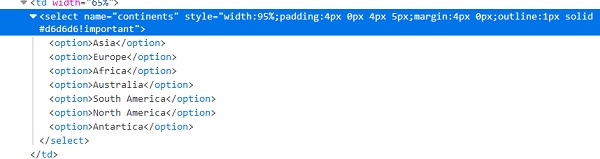
我們必須在程式碼中新增 **import org.openqa.selenium.support.ui.Select** 語句才能使用 Select 類中可用的方法。從下拉選單中選擇選項的方法如下所示:
selectByValue(val) – 選擇其 value 屬性與傳遞給方法的引數匹配的選項。僅當下拉選項的 html 程式碼中包含 value 屬性時,才能使用此方法。
語法:Select sl = new Select (driver.findElement(By.name("name"))); sl.selectByValue ('value');
selectByVisibleText(txt) – 選擇其可見文字與傳遞給方法的引數匹配的選項。
語法:Select sl = new Select (driver.findElement(By.name("name"))); sl.selectByVisibleText ('Selenium');
selectByIndex(n) – 選擇其索引與傳遞給方法的引數匹配的選項。索引從零開始。
語法:Select sl = new Select (driver.findElement(By.name("name"))); sl.selectByIndex(3);
示例
程式碼實現。
import org.openqa.selenium.By;
import org.openqa.selenium.WebDriver;
import org.openqa.selenium.WebElement;
import org.openqa.selenium.chrome.ChromeDriver;
import java.util.concurrent.TimeUnit;
import org.openqa.selenium.support.ui.Select
public class SelectDropDown{
   public static void main(String[] args) {
      System.setProperty("webdriver.chrome.driver", "C:\Users\ghs6kor\Desktop\Java\chromedriver.exe");
      WebDriver driver = new ChromeDriver();
      String u = "https://tutorialspoint.tw/selenium/selenium_automation_practice.htm" driver.get(u);
      driver.manage().timeouts().implicitlyWait(8, TimeUnit.SECONDS);
      // identify dropdown
      WebElement d=driver.findElement(By.xpath("//*[@name='continents']"));
      //dropdown handle with Select class
      Select sl = new Select(d);
      // select option with text visible
      sl.selectByVisibleText("Africa");
      // select option with index
      sl.selectByIndex(4);
      driver.quit();
   }
}

更新於: 2020-10-26
478 次瀏覽

廣告