
 Data Structure
 Networking
 RDBMS
RDBMS Operating System
 Java
Java MS Excel
 iOS
iOS HTML
HTML CSS
CSS Android
 Python
 C Programming
 C++
C++ C#
C# MongoDB
 MySQL
MySQL Javascript
 PHP
PHP Physics
 Chemistry
 Biology
 Mathematics
 English
 Economics
 Psychology
 Social Studies
 Fashion Studies
 Legal Studies
將 PDF 嵌入到 HTML 的推薦方式?
將 PDF 嵌入到 HTML 中是一項簡單的任務,並且有多種方法。讓我們一個一個地來看一下。
- 使用 iframe 將 PDF 嵌入到 HTML 中。
- 使用 embed 標籤將 PDF 嵌入到 HTML 中。
- 使用 object 標籤將 PDF 嵌入到 HTML 中。
使用 iframe 將 PDF 嵌入到 HTML 中
設定 iframe 標籤的 src 屬性,並新增要嵌入的 PDF 連結 −
<iframe src="https://tutorialspoint.tw/python3/python3_tutorial.pdf" width="700" height="500">
</iframe>
示例
現在讓我們看一個使用 <iframe>− 的 ember PDF 的示例
<!DOCTYPE html>
<html>
<head>
   <title>Embed PDF</title>
</head>
<body>
   <center>
      <h1>Python by Tutorialspoint</h1>
      <p>Below is a preview of the Python Tutorial:</p>
      <iframe src="https://tutorialspoint.tw/python3/python3_tutorial.pdf" width="700" height="500">
      </iframe>
   </center>
</body>
</html>
輸出
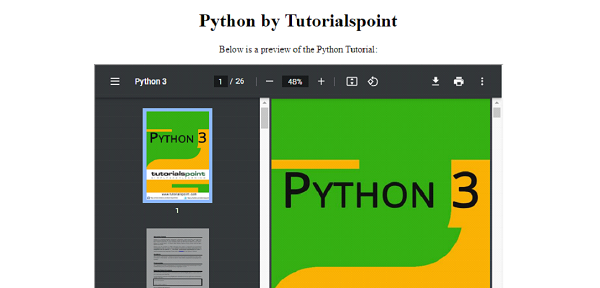
使用 embed 標籤將 PDF 嵌入到 HTML 中
我們也可以使用 <embed> 標籤嵌入 PDF −
<embed src="https://tutorialspoint.tw/java/java_tutorial.pdf" width="700" height="500">
示例
現在讓我們看一個使用 embed 標籤嵌入 PDF 的示例 −
<!DOCTYPE html>
<html>
<head>
   <title>Embed PDF</title>
</head>
<body>
   <center>
      <h1>Java by Tutorialspoint</h1>
      <p>Below is a preview of the Java Tutorial:</p>
      <embed src="https://tutorialspoint.tw/java/java_tutorial.pdf" width="700" height="500">
   </center>
</body>
</html>
輸出

使用 object 標籤將 PDF 嵌入到 HTML 中
我們可以使用 <object> 標籤嵌入 PDF。object data 的 data 屬性是你需要將要嵌入的 PDF 檔案的連結放置的地方 −
<object data="https://tutorialspoint.tw/android/android_tutorial.pdf" width="700" height="500">
示例
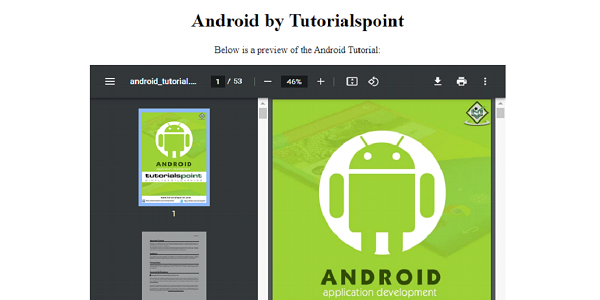
現在讓我們看一個使用 object 標籤嵌入 PDF 的示例 −
<!DOCTYPE html>
<html>
<head>
   <title>Embed PDF</title>
</head>
<body>
   <center>
      <h1>Android by Tutorialspoint</h1>
      <p>Below is a preview of the Android Tutorial:</p>
      <object data="https://tutorialspoint.tw/android/android_tutorial.pdf" width="700" height="500">
   </center>
</body>
</html>
輸出

更新於: 2022 年 12 月 6 日
2K+ 瀏覽

廣告