
 資料結構
資料結構 網路
網路 關係型資料庫管理系統 (RDBMS)
 作業系統
作業系統 Java
Java MS Excel
 iOS
iOS HTML
HTML CSS
CSS Android
 Python
 C語言程式設計
 C++
C++ C#
C# MongoDB
 MySQL
MySQL Javascript
 PHP
PHP 物理學
物理學 化學
化學 生物學
生物學 數學
數學 英語
英語 經濟學
經濟學 心理學
心理學 社會學
社會學 時尚研究
時尚研究 法學研究
法學研究如何從HTML網頁生成PDF?
在這篇文章中,我們將探討將所需的HTML內容轉換為PDF檔案的方法。很多時候我們需要閱讀並接受條款和條件,更好的方法是下載PDF檔案,在空閒時間閱讀,然後再接受。因此,為了實現這一點,我們可以利用將內容轉換為PDF檔案的方法。
我們還需要將一些內容儲存在PDF檔案中,以便以後用於各種目的。最常見的用途包括下載章節、文字、論文等。
上述轉換可以透過兩種方式實現:
列印特定網頁並將其另存為PDF
使用**jsPDF**庫
我們將在下面的示例中探討這兩種方法
示例1:列印特定網頁並將其另存為PDF。
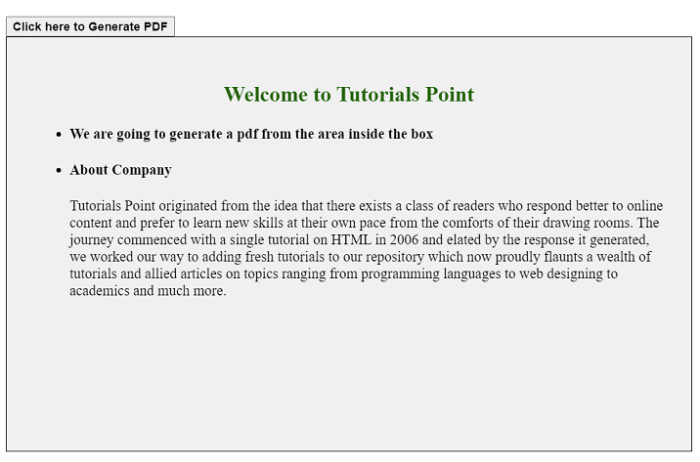
在下面的示例中,我們將探討第一種方法,並將特定網頁列印成PDF。這類似於預設列印並將檔案儲存為PDF。
實現此目標的步驟如下:
使用**window.open()**方法開啟一個新視窗
將div標籤的**innerHTML**寫入視窗中
列印並關閉視窗
示例
#檔名:index.html
<!DOCTYPE html>
<html lang="en">
<head>
   <title>Generate PDF</title>
   <style>
      .container {
         position: fixed;
         top: 20%;
         left: 28%;
         border-radius: 7px;
      }
      .card {
         box-sizing: content-box;
         width: 300px;
         height: 400px;
         padding: 30px;
         border: 1px solid black;
         font-style: sans-serif;
         background-color: #f0f0f0;
      }
      h2 {
         text-align: center;
         color: #24650b;
      }
   </style>
</head>
<body>
   <div class="container">
      <button id="pdfButton"><b>Click here to Generate PDF</b></button>
      <div class="card" id="generatePDF">
         <h2>Welcome to Tutorials Point</h2>
         <ul>
            <li>
               <h4> We are going to generate a pdf from the area inside the box</h4>
            </li>
            <li>
               <h4> About Company </h4>
               <p>Tutorials Point originated from the idea that there exists a class of readers who respond better to online content and prefer to learn new skills at their own pace from the
comforts of their drawing rooms. The journey commenced with a single tutorial on HTML in 2006 and elated by the response it generated, we worked our way to adding fresh tutorials to our repository which now proudly flaunts a wealth of tutorials and allied articles on topics ranging from programming languages to web designing to academics and much more.</p>
            </li>
         </ul>
      </div>
   </div>
   <script>
      var button = document.getElementById("pdfButton");
      var makepdf = document.getElementById("generatePDF");
      button.addEventListener("click", function () {
         var mywindow = window.open("", "PRINT", "height=600,width=600");
         mywindow.document.write(makepdf.innerHTML);
         mywindow.document.close();
         mywindow.focus();
         mywindow.print();
         return true;
      });
   </script>
</body>
</html>
輸出
示例2:使用jsPDF庫
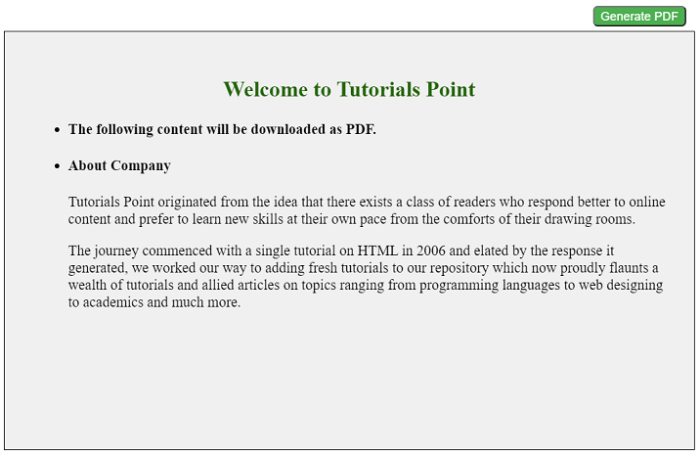
另一種方法是使用JS提供的PDF庫,即jsPDF庫。使用此庫的步驟如下:
在HTML的<head>標籤中包含指向**jsPDF**的CDN連結以匯入庫。
現在我們可以使用上述庫來使用其函式。我們將使用**fromHTML**方法從HTML建立PDF。
檔案生成後,使用save()函式儲存檔案。
示例2
#檔名:index.html
<!DOCTYPE html>
<html>
<head>
   <title>Generate PDF using jsPDF Library</title>
      <!--JSPDF CDN-->
      <script src= "https://cdnjs.cloudflare.com/ajax/libs/jspdf/1.3.2/jspdf.min.js">
      </script>
   <style>
      .container {
         position: fixed;
         top: 20%;
         left: 28%;
         border-radius: 7px;
      }
      #generatePdf {
         box-sizing: content-box;
         width: 300px;
         height: 100px;
         padding: 30px;
         border: 1px solid black;
         font-style: sans-serif;
         background-color: #f0f0f0;
      }
      #pdfButton {
         background-color: #4caf50;
         border-radius: 5px;
         margin-left: 300px;
         margin-bottom: 5px;
         color: white;
      }
      h2 {
         text-align: center;
         color: #24650b;
      }
   </style>
</head>
<body>
   <div class="container">
      <button id="pdfButton">Generate PDF</button>
      <div id="generatePdf">
         <h2>Welcome to Tutorials Point</h2>
         <ul>
            <li>
               <h4> The following content will be downloaded as PDF.</h4>
            </li>
            <li>
               <h4>About Company</h4>
               <p>Tutorials Point originated from the idea that there exists a class of readers who respond better to online content and prefer to learn new skills at their own pace from the comforts of their drawing rooms.</p>
               <p>The journey commenced with a single tutorial on HTML in 2006 and elated by the response it generated, we worked our way to adding fresh tutorials to our repository which now proudly flaunts a wealth of tutorials and allied articles on topics ranging from programming languages to web designing to academics and much more.</p>
            </li>
         </ul>
      </div>
   </div>
   <script>
      var button = document.getElementById("pdfButton");
      button.addEventListener("click", function () {
         var doc = new jsPDF("p", "mm", [300, 300]);
         var makePDF = document.querySelector("#generatePdf");
         // fromHTML Method
         doc.fromHTML(makePDF);
         doc.save("output.pdf");
      });
   </script>
</body>
</html>
輸出

更新於:2022年4月26日
18K+ 次瀏覽

廣告