
 資料結構
資料結構 網路
網路 RDBMS
RDBMS 作業系統
作業系統 Java
Java MS Excel
 iOS
iOS HTML
HTML CSS
CSS Android
 Python
 C 程式設計
 C++
C++ C#
C# MongoDB
 MySQL
MySQL Javascript
 PHP
PHP 物理
物理 化學
化學 生物
生物 數學
數學 英語
英語 經濟學
經濟學 心理學
心理學 社會科學
社會科學 時尚研究
時尚研究 法律研究
法律研究使用 Selenium WebDriver 讀取 JavaScript 變數。
我們可以用 Selenium webdriver 讀取 Javascript 變數。Selenium 可以藉助 executeScript 方法執行 Javascript 命令。作為引數傳遞要執行的 Javascript 命令到該方法。此外我們必須新增語句 import org.openqa.selenium.JavascriptExecutor 以使用 Javascript。
語法
JavascriptExecutor j = (JavascriptExecutor) driver;
j.executeScript("return document.title")
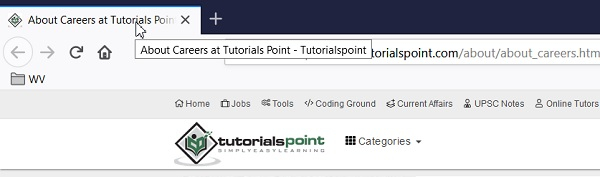
讓我們透過讀取來自 Javascript 變數的值以下頁面的瀏覽器標題。輸出應該是 關於tutorialspoint.com的職業 - Tutorialspoint.
例
程式碼實現
import org.openqa.selenium.By;
import org.openqa.selenium.WebDriver;
import org.openqa.selenium.WebElement;
import org.openqa.selenium.chrome.ChromeDriver;
import java.util.concurrent.TimeUnit;
import org.openqa.selenium.JavascriptExecutor;
public class JavascriptReadValue{
   public static void main(String[] args) {
      System.setProperty("webdriver.chrome.driver", "C:\Users\ghs6kor\Desktop\Java\chromedriver.exe");
      WebDriver driver = new ChromeDriver();
      driver.get("https://tutorialspoint.tw/about/about_careers.htm")
      driver.manage().timeouts().implicitlyWait(12, TimeUnit.SECONDS);
      // Javascript executor to read value
      JavascriptExecutor j = (JavascriptExecutor) driver;
      // get the browser title with document.title
      String t = (String)j.executeScript("return document.title");
      System.out.print("Current page title: " +t);
      driver.close();
   }
}
輸出


更新於:26-Oct-2020
2K+ 瀏覽

廣告