
 資料結構
資料結構 網路
網路 關係型資料庫管理系統
 作業系統
作業系統 Java
Java MS Excel
 iOS
iOS HTML
HTML CSS
CSS Android
 Python
 C 程式設計
 C++
C++ C#
C# MongoDB
 MySQL
MySQL Javascript
 PHP
PHP 物理
物理 化學
化學 生物
生物 數學
數學 英語
英語 經濟學
經濟學 心理學
心理學 社會學
社會學 時尚研究
時尚研究 法律研究
法律研究ReactJS – useRef Hook
在本文中,我們將瞭解如何在函式式元件中建立任何 DOM 元素的引用。
此 Hook 用於訪問元件中的任何 DOM 元素,並且將返回一個可變的 ref 物件,只要該元件被放置在 DOM 中,它就會一直存在。
如果我們向任何 DOM 元素傳遞一個 ref 物件,那麼每當節點更改時,將向相應的 DOM 節點元素新增 .current 屬性。
語法
const refContainer = useRef(initialValue);
示例
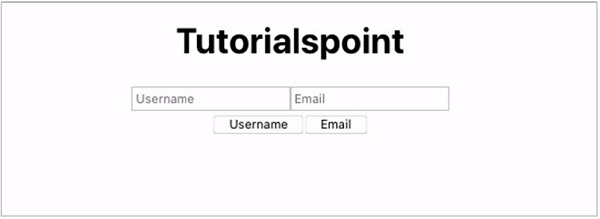
在此示例中,我們將構建一個 React 應用程式,將 ref 物件傳遞給兩個輸入欄位。
當單擊某個按鈕時,它將自動獲取這些輸入欄位的資料。
App.jsx
import React, { useRef } from 'react';

function App() {

   const email = useRef(null);
   const username = useRef(null);

   const fetchEmail = () => {
      email.current.value = 'rahul@gmail.com';
      email.current.focus();
   };
   const fetchUsername = () => {
      username.current.value = 'RahulBansal123';
      username.current.focus();
   };
   return (
      <>
         <div>
            <h1>Tutorialspoint</h1>
         </div>
         <div>
            <input placeholder="Username" ref={username} />
            <input placeholder="Email" ref={email} />
         </div>
         <button onClick={fetchUsername}>Username</button>
         <button onClick={fetchEmail}>Email</button>
      </>
   );
}
export default App;
在上面的示例中,當單擊使用者名稱或電子郵件按鈕時,將分別呼叫 fetchUsername 和 fetchEmail 函式,它們將 ref 物件傳遞給輸入欄位,並將其值從 NULL 更改為某些文字。
輸出
這將產生以下結果。

更新日期:2021 年 3 月 19 日
533 次瀏覽

廣告