
 資料結構
資料結構 網路
網路 RDBMS
RDBMS 作業系統
作業系統 Java
Java MS Excel
 iOS
iOS HTML
HTML CSS
CSS Android
 Python
 C 程式設計
 C++
C++ C#
C# MongoDB
 MySQL
MySQL Javascript
 PHP
PHP 物理學
物理學 化學
化學 生物學
生物學 數學
數學 英語
英語 經濟學
經濟學 心理學
心理學 社會學
社會學 時尚研究
時尚研究 法律研究
法律研究Python – 使用 OCR(光學字元識別)讀取 PDF 內容
PDF 代表行動式文件格式,是可以在裝置之間交換的流行檔案格式之一。由於 PDF 格式的檔案包含無法更改的文字,因此它使使用者能夠更輕鬆地閱讀並保持檔案的格式穩定。儘管閱讀 PDF 格式的文字很容易,但從中複製內容可能很耗時。為了使閱讀過程更容易,使用了 OCR(光學字元識別)工具。
使用 OCR 讀取 PDF 內容
在本文中,我們將討論光學字元識別或 OCR,這是一種電子工具,可幫助將掃描的影像或手寫文字轉換為可編輯的計算機檔案。Python 支援多個第三方庫,這些庫利用 OCR 技術從 PDF 中讀取內容。
其中一個庫是 Pytesseract。它是一個用於 Python 的光學字元識別 (OCR) 引擎,它在後臺使用 Google 的 Tesseract-OCR。Pytesseract 可以識別超過 100 種語言(包括英語、印地語、阿拉伯語和中文等)的 PDF 檔案中的文字。
光學字元識別
OCR 技術消除了手動閱讀文件的過程並節省了時間。其應用不僅限於文件提取,還擴充套件到手寫識別、身份證識別和身份驗證。總之,考慮到 OCR 在處理影像或 PDF 文件時的各種用例,它是每個開發人員都應該熟悉的工具之一。
Python 提供了與許多市售 OCR 庫(如 pytesseract)高效互動所需的靈活性,使我們的專案能夠透過在大型資料集上擴充套件它們來實現簡化執行,而無需人工干預。當我們將這種能力與自然語言處理 (NLP) 和物件檢測等不同的機器學習概念相結合時,我們能夠將計算機的程式化渲染能力推向何種程度就沒有限制了。
使用 try 和 except 方法的 Python 程式,用於使用 OCR 讀取 PDF 內容
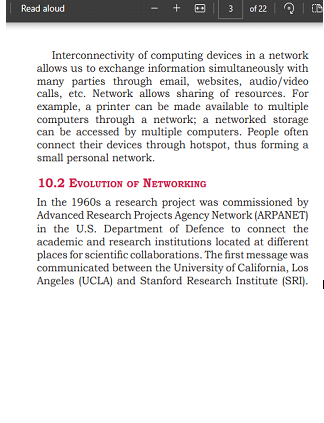
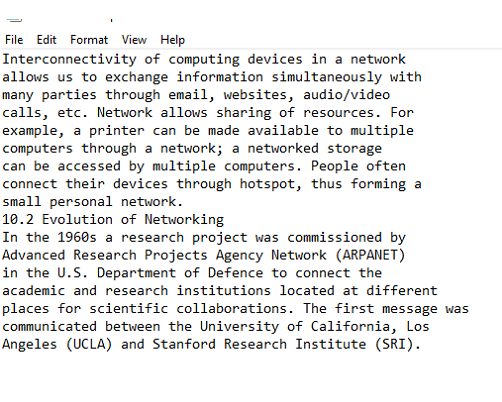
輸入以 PDF 格式給出,並命名為 sample.pdf,然後使用光學字元識別工具識別 PDF 檔案中的文字,最後返回示例文字。為此,使用了 try 和 except 方法。
演算法
步驟 1 - 匯入所需的模組,如 os 和 pytesseract。
步驟 2 - 從 PIL 包中匯入 image 模組
步驟 3 - 使用名為“convert_from_path”的函式將給定的 pdf 檔案轉換為影像
步驟 4 - 該函式定義了一個引數作為輸入檔名。
步驟 5 - 初始化空列表
步驟 6 - try 方法將把 PDF 檔案中的每個文字轉換為文字。
步驟 7 - 對於 images 列表中的每個影像,為每個影像生成檔名並以 JPEG 格式儲存。
步驟 8 - 使用 pytesseract 模組提取文字,然後將其新增到初始化的空列表中。
步驟 9 - 如果在執行上述步驟時出現任何異常,則列印該異常。
步驟 10 - 透過從輸入檔名中刪除副檔名並附加 .txt 副檔名來生成輸出檔名。
步驟 11 - 將提取的文字寫入輸出檔案並返回輸出檔名。
步驟 12 - 使用輸入檔名定義 pdf_file 變數。
步驟 13 - 使用 pdf_file 變數作為輸入呼叫 read_pdf 函式並列印其輸出。
示例
# Importing the os module to perform file operations
import os
# Importing the pytesseract module to extract text from images
import pytesseract as tess
# Importing the Image module from the PIL package to work with images
from PIL import Image
# Importing the convert_from_path function from the pdf2image module to convert PDF files to images
from pdf2image import convert_from_path

#This function takes a PDF file name as input and returns the name of the text file that contains the extracted text.
def read_pdf(file_name):
    # Store all pages of one file here:
    pages = []

    try:
        # Convert the PDF file to a list of PIL images:
        images = convert_from_path(file_name)

        # Extract text from each image:
        for i, image in enumerate(images):
          # Generating filename for each image
            filename = "page_" + str(i) + "_" + os.path.basename(file_name) + ".jpeg"
            image.save(filename, "JPEG")
          # Saving each image as JPEG
            text = tess.image_to_string(Image.open(filename))  # Extracting text from each image using pytesseract
            pages.append(text)
          # Appending extracted text to pages list

    except Exception as e:
        print(str(e))

    # Write the extracted text to a file:
    output_file_name = os.path.splitext(file_name)[0] + ".txt"  # Generating output file name
    with open(output_file_name, "w") as f:
        f.write("\n".join(pages))
      # Writing extracted text to output file

    return output_file_name

#print function returns the final converted text
pdf_file = "sample.pdf"
print(read_pdf(pdf_file))
輸入
輸出
結論
在 21 世紀,對於擁有大量資料的組織來說,資料處理是最具挑戰性的任務,隨著資料科學和機器學習的發展,訪問資料變得更加容易。最適合傳輸且無需任何更改的檔案是 pdf,因此這種方法可以幫助人們將其轉換為文字檔案。

4K+ 閱讀量
