
 資料結構
資料結構 網路
網路 關係資料庫管理系統 (RDBMS)
 作業系統
作業系統 Java
Java MS Excel
 iOS
iOS HTML
HTML CSS
CSS Android
 Python
 C語言程式設計
 C++
C++ C#
C# MongoDB
 MySQL
MySQL Javascript
 PHP
PHP 物理學
物理學 化學
化學 生物學
生物學 數學
數學 英語
英語 經濟學
經濟學 心理學
心理學 社會學
社會學 服裝設計
服裝設計 法學
法學Java(GUI)中的訊息對話方塊
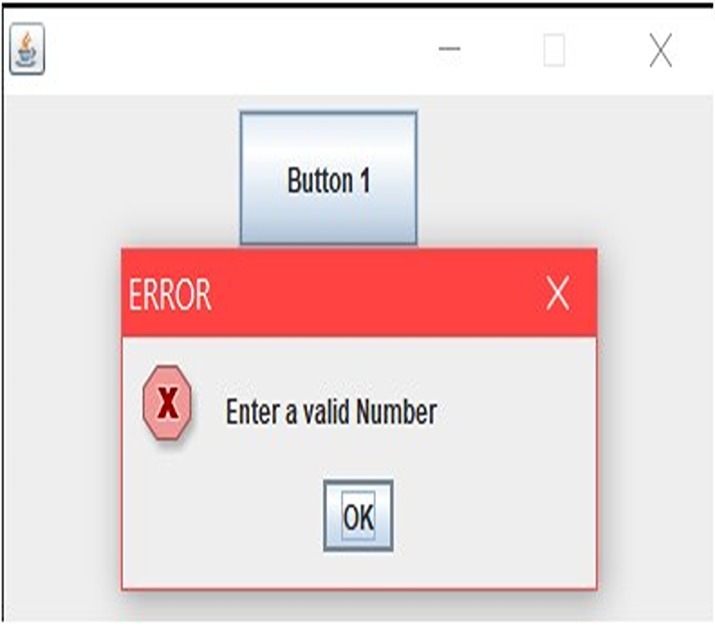
訊息對話方塊向用戶顯示資訊。訊息對話方塊使用 `JOptionPane.showMessageDialog()` 方法建立。
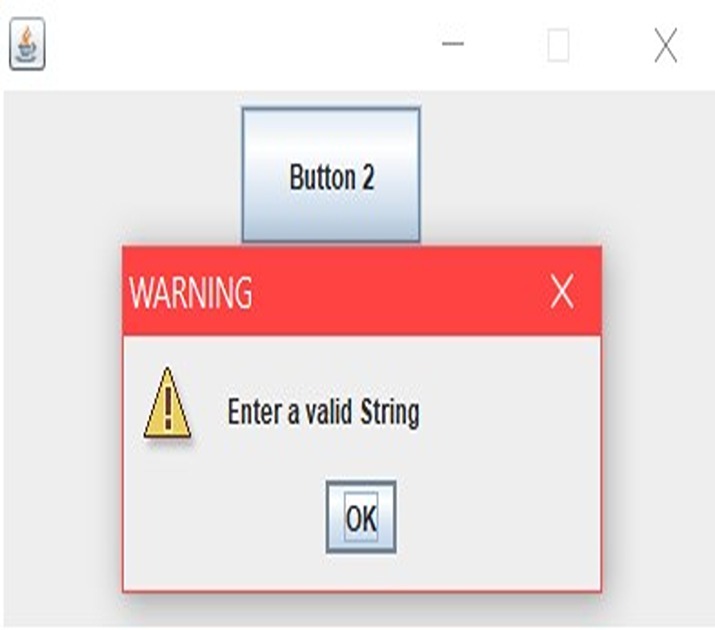
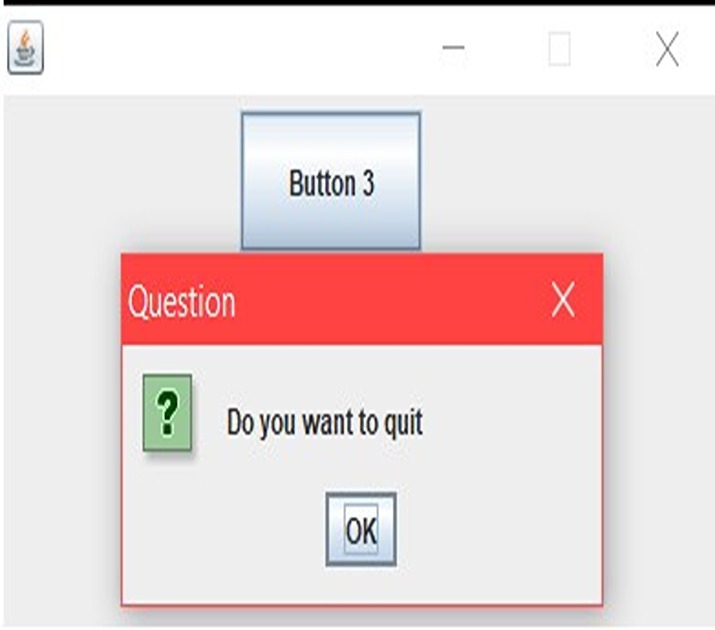
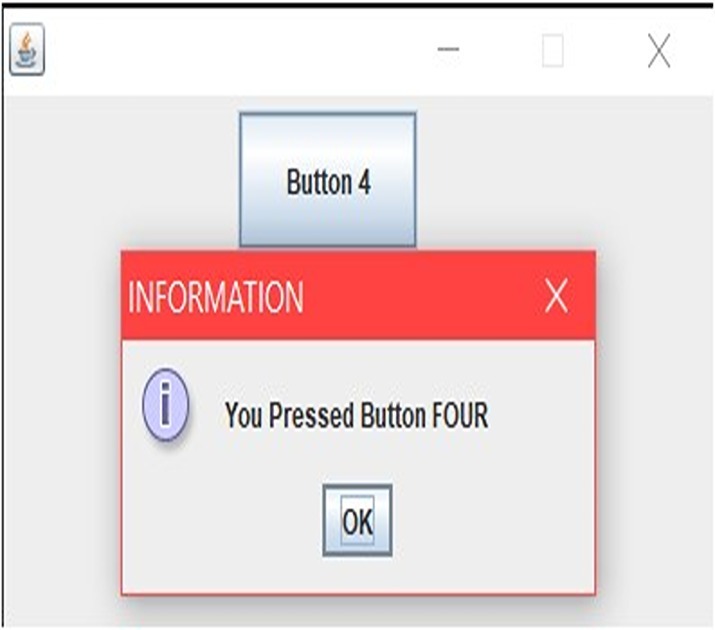
要在應用程式中建立訊息對話方塊,請使用 `JOptionPane` 類的 `showMessageDialog()` 函式。此方法需要一些資訊,例如父元件引用、所需的訊息內容和對話方塊標題。此外,您可以為指定的訊息型別選擇四個常量之一(ERROR_MESSAGE、WARNING_MESSAGE 等)。
使用方法
`setLayout(...)` − 此方法使我們能夠將容器(通常是 JPanel)的佈局設定為我們希望新增的任何佈局,例如 FlowLayout、BorderLayout、GridLayout 或 null。
`setBounds(...)` − 此方法僅在 JFrame 使用 null 佈局時才有用,用於設定元件(如 JButton)的大小和位置。
`setVisible(...)` − 此方法用於設定 JFrame 的可見性。
setVisible(true)  // used to set JFrame visible to the users.
setVisible(false) // used to set JFrame not visible to the users.
`getSource(...)` − 對導致事件發生的元素的引用包含在事件物件中。我們使用 `getSource()` 方法從事件物件中獲取引用。
`add(...)` − 此方法用於將元件(如 JButton 等)新增到 JFrame 中。
訊息對話方塊示例
顯示 ERROR_MESSAGE 的程式
// Java program to show ERROR_MESSAGE dialog
import java.awt.*;
import java.awt.event.*;
import javax.swing.*;

public class example extends JFrame implements ActionListener {
   JButton b1;

   example() {
      this.setLayout(null);
      b1 = new JButton("Button 1");
      b1.setBounds(130, 05, 100, 50);
      this.add(b1);

      b1.addActionListener(this);
   }

   public void actionPerformed(ActionEvent evt) {
      if (evt.getSource() == b1) {

         JOptionPane.showMessageDialog(this, "Enter a valid Number","ERROR", JOptionPane.ERROR_MESSAGE);
      }
   }
}

class MessageDialogs1 {
   public static void main(String args[]) {
      example f = new example();
      f.setBounds(200, 200, 400, 300);
      f.setResizable(false);
      f.setVisible(true);
   }
}
輸出
示例 2:顯示 WARNING_MESSAGE 的程式
// Java program to show WARNING_MESSAGE dialog
import java.awt.*;
import java.awt.event.*;
import javax.swing.*;

class example extends JFrame implements ActionListener {
   JButton b1;
   example() {
      this.setLayout(null);
      b1 = new JButton("Button 2");
      b1.setBounds(130, 05, 100, 50);

      this.add(b1);

      b1.addActionListener(this);
   }

   public void actionPerformed(ActionEvent evt) {
      if (evt.getSource() == b1) {
         JOptionPane.showMessageDialog(this, "Enter a valid String","WARNING", JOptionPane.WARNING_MESSAGE);
      }
   }
}

class MessageDialogs2 {

   public static void main(String args[]) {
      example f = new example();
      f.setBounds(200, 200, 400, 300);
      f.setResizable(false);
      f.setVisible(true);
   }
}
輸出
示例 3:顯示 QUESTION_MESSAGE 的程式
// Java program to show QUESTION_MESSAGE
import java.awt.*;
import java.awt.event.*;
import javax.swing.*;

class example extends JFrame implements ActionListener {
   JButton b1;
   example() {
      this.setLayout(null);
      b1 = new JButton("Button 3");
      b1.setBounds(130, 05, 100, 50);

      this.add(b1);

      b1.addActionListener(this);
   }

   public void actionPerformed(ActionEvent evt) {
      if (evt.getSource() == b1) {
         JOptionPane.showMessageDialog(this, "Do you want to quit", "Question", JOptionPane.QUESTION_MESSAGE);
      }
   }
}

class MessageDialogs3 {

   public static void main(String args[]) {
      example f = new example();
      f.setBounds(200, 200, 400, 300);
      f.setResizable(false);
      f.setVisible(true);
   }
}
輸出
示例 4:顯示 INFORMATION_MESSAGE 的程式
// Java program to show INFORMATION_MESSAGE
import java.awt.*;
import java.awt.event.*;
import javax.swing.*;

class example extends JFrame implements ActionListener {
   JButton b1;

   example() {
      this.setLayout(null);
      b1 = new JButton("Button 4");
      b1.setBounds(130, 05, 100, 50);

      this.add(b1);

      b1.addActionListener(this);
   }

   public void actionPerformed(ActionEvent evt) {
      if (evt.getSource() == b1) {
         JOptionPane.showMessageDialog(this, "You Pressed Button FOUR","INFORMATION",
         JOptionPane.INFORMATION_MESSAGE);
      }
   }
}

class MessageDialogs4 {

   public static void main(String args[]) {
      example f = new example();
      f.setBounds(200, 200, 400, 300);
      f.setResizable(false);
      f.setVisible(true);
   }
}
輸出
結論
為了有效地告知使用者,通常需要向他們呈現清晰的 UI 元素,例如訊息對話方塊。呼叫 JOptionPane 的 showMessageDialog() 功能使此過程易於快速可靠地完成,每次都需要使用者輸入。可用的標準訊息設定選項包括四個不同的重寫,用於獨特的環境:ERROR_MESSSAGE、WARNING_MESSSAGE、QUESTION_MESSSAGE 和 INFORMATION_MESSSAGE。當然,由於我們還有另外五個補充方法可用,即 -setLayout()、setBounds()、setVisible()、getSource() 和 add(),因此可以在 UI 中對任何訊息型別進行細粒度的調整。

605 次瀏覽
