
 資料結構
資料結構 網路
網路 關係資料庫管理系統
 作業系統
作業系統 Java
Java MS Excel
 iOS
iOS HTML
HTML CSS
CSS Android
 Python
 C 程式設計
 C++
C++ C#
C# MongoDB
 MySQL
MySQL Javascript
 PHP
PHP 物理學
物理學 化學
化學 生物學
生物學 數學
數學 英語
英語 經濟學
經濟學 心理學
心理學 社會學
社會學 時尚研究
時尚研究 法律研究
法律研究學習如何在 Linux 中使用 Postfix 設定郵件服務
您可能希望設定自己的 Linux 郵件伺服器的原因有很多。如今,越來越多的人被迫修復他們的電子郵件 – 如果它曾經出現故障的話。Postfix 是一個 MTA(郵件交換代理),一種用於傳送和接收郵件的軟體。它是 Wietse Venema 的郵件伺服器,最初誕生於 IBM 研究,作為廣泛使用的 Sendmail 應用程式的替代方案。現在在 Google 工作的 Wietse 繼續支援 Postfix。本文介紹了 – 如何在 Linux 中使用 postfix 設定郵件服務。
要安裝 Postfix 並測試郵件實用程式,請使用以下命令 –
$ sudo apt-get install mailutils
示例輸出應如下所示 –
Reading package lists... Done
Building dependency tree
Reading state information... Done
The following packages were automatically installed and are no longer required:
   linux-headers-4.4.0-53 linux-headers-4.4.0-53-generic
   linux-image-4.4.0-53-generic linux-image-extra-4.4.0-53-generic
   linux-signed-image-4.4.0-53-generic
Use 'sudo apt autoremove' to remove them.
The following additional packages will be installed:
   libgsasl7 libkyotocabinet16v5 libmailutils4 libntlm0 mailutils-common
   postfix
Suggested packages:
   mailutils-mh mailutils-doc procmail postfix-mysql postfix-pgsql postfix-ldap
   postfix-pcre sasl2-bin dovecot-common postfix-cdb postfix-doc
The following NEW packages will be installed:
   libgsasl7 libkyotocabinet16v5 libmailutils4 libntlm0 mailutils
   mailutils-common postfix
在安裝過程中,它將提示以下螢幕以配置 postfix –

單擊“確定”按鈕繼續。現在,它將提示以下螢幕以配置郵件配置的一般型別,如下所示 –

選擇網際網路站點並單擊“確定”按鈕。預設情況下,它將系統名稱作為系統郵件名稱,如下面的螢幕所示 –
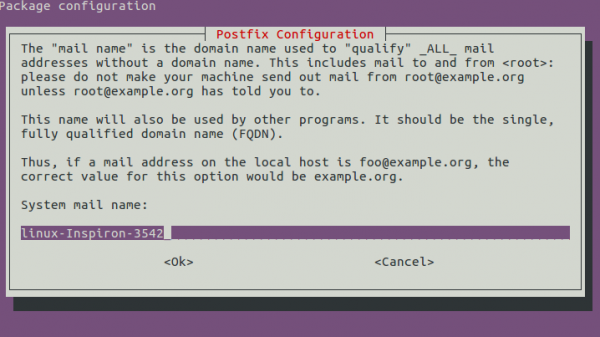
根據需要更改系統郵件名稱。例如,我們已將 tutorialspoint.com 作為系統郵件名稱。現在單擊“確定”按鈕。完成安裝過程後,您需要配置 postfix。為此,請使用以下命令開啟配置檔案。
$sudo nano /etc/postfix/main.cf
示例輸出應如下所示 –
# See /usr/share/postfix/main.cf.dist for a commented, more complete version


# Debian specific: Specifying a file name will cause the first
# line of that file to be used as the name. The Debian default
# is /etc/mailname.
#myorigin = /etc/mailname

smtpd_banner = $myhostname ESMTP $mail_name (Ubuntu)
biff = no

# appending .domain is the MUA's job.
append_dot_mydomain = no

# Uncomment the next line to generate "delayed mail" warnings
#delay_warning_time = 4h

readme_directory = no
現在查詢inet_interfaces = all 並將其重新更改為inet_interfaces = loopback-only。示例輸出應如下所示 –
mailbox_size_limit = 0
recipient_delimiter = +
inet_interfaces = loopback-only
inet_protocols = all
透過點選 Ctrl+O 儲存檔案,並透過點選 Ctrl+X 關閉檔案。現在使用以下命令重新啟動 Postfix –
$ sudo service postfix restart
要獲取有關 postfix 的更多資訊,請使用以下命令 –
$ man postfix
示例輸出應如下所示 –
POSTFIX(1)                   General Commands Manual                      POSTFIX(1)

NAME
      postfix - Postfix control program
SYNOPSIS
      postfix [-Dv] [-c config_dir] command
DESCRIPTION
   This command is reserved for the superuser. To submit mail, use the
   Postfix sendmail(1) command.

   The postfix(1) command controls the operation of the Postfix mail sys‐
   tem: start or stop the master(8) daemon, do a health check, and other
   maintenance.

   By default, the postfix(1) command sets up a standardized environment
   and runs the postfix-script shell script to do the actual work.

   However, when support for multiple Postfix instances is configured,
   postfix(1) executes the command specified with the multi_instance_wrap‐
   per configuration parameter. This command will execute the command for
   each applicable Postfix instance.
使用以下命令透過 Postfix 傳送郵件,如下所示 –
echo "Tutorials Point originated from the idea that there exists a class of readers who respond better
to online content and prefer to learn new skills at their own pace from the comforts of their drawing
rooms." | mail -s "About us" sairamkrishna@tutorialspoint.com
現在檢查您的收件箱或垃圾郵件資料夾以驗證郵件。上述郵件的示例輸出應如下所示 –
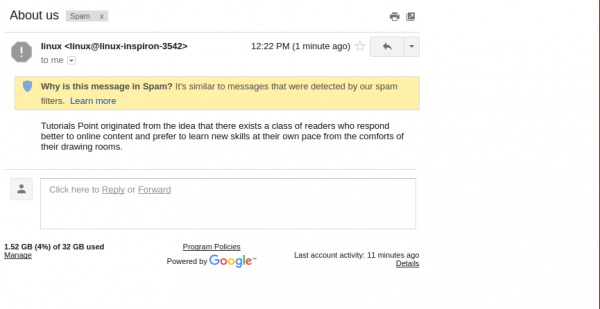
在以上文章中,我們學習了 – 學習如何在 Linux 中使用 postfix 設定郵件服務。在我們的下一篇文章中,我們將提供更多基於 Linux 的技巧和提示。繼續關注!

581 次瀏覽
